Gas Payment
In most blockchain systems, every transaction requires a fee, commonly known as "gas," to be paid by the initiator. This can be a significant hurdle for new users who may not have the native currency to pay these fees. The OCAP Client introduces a Gas Payment feature that allows application developers to sponsor these fees, creating a seamless, "gasless" experience for their users.
This powerful feature enables dApps to abstract away the complexity of gas, improving user onboarding and overall application usability.
How It Works#
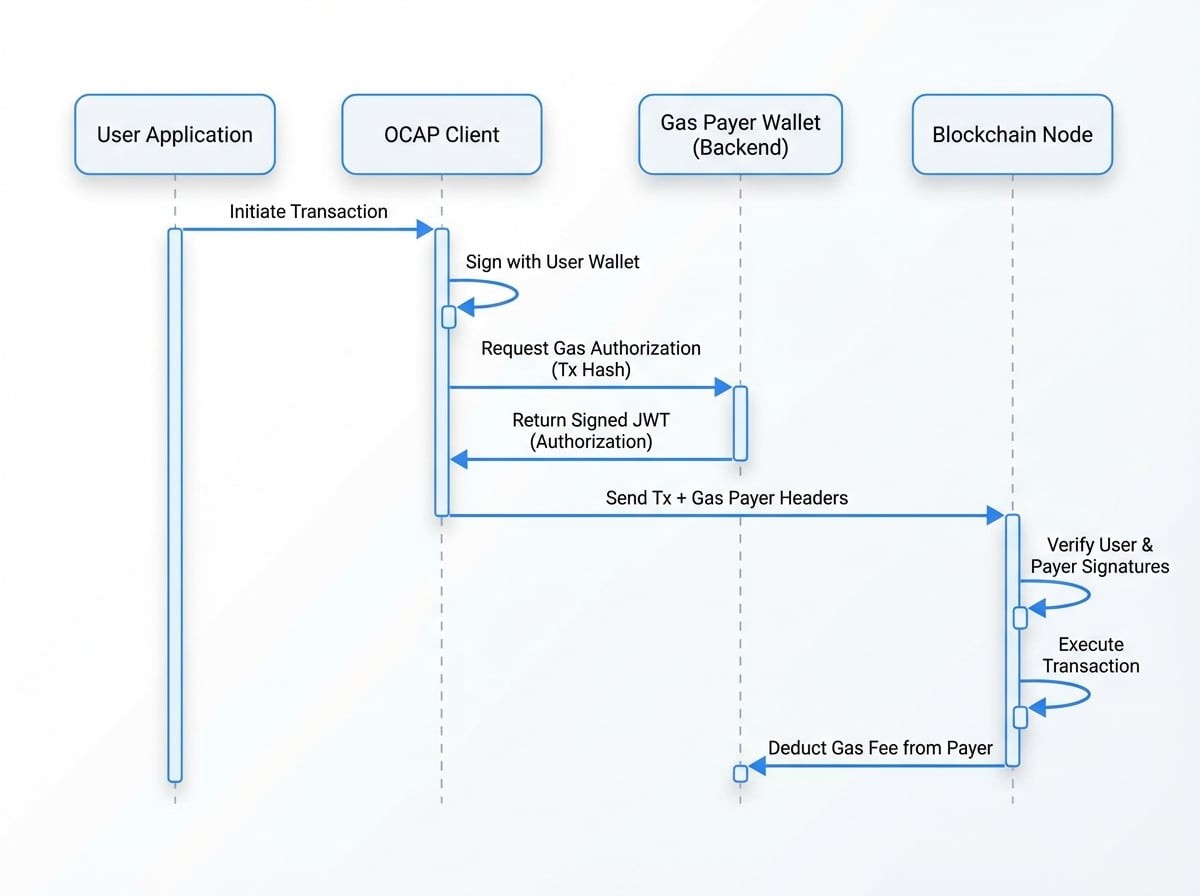
The gas payment mechanism is implemented through standard HTTP headers. When you configure a gas payer wallet on your client instance, the client automatically attaches two special headers to every sendTx mutation it sends to the blockchain node:
x-gas-payer-pk: The public key of the wallet that will pay the gas fee.x-gas-payer-sig: A JSON Web Token (JWT) signed by the gas payer's secret key. This token contains the hash of the transaction, acting as a verifiable authorization from the sponsor to pay the fee for that specific transaction.
When the blockchain node receives the transaction, it performs two critical validations:
- It verifies the user's signature on the transaction itself.
- It verifies the gas payer's signature in the header against the transaction hash.
If both signatures are valid, the transaction is executed under the user's authority, but the corresponding gas fee is deducted from the gas payer's account balance.
Workflow Diagram#
The following diagram illustrates the entire gas payment flow from transaction initiation to execution:
Usage Example#
To enable gasless transactions, you simply need to create a wallet instance for the sponsoring account and set it on the client using the setGasPayer method.
Gas Payer Setup and Usage
import Client from '@ocap/client';
import Wallet, { fromRandom } from '@ocap/wallet';

// 1. Initialize the client to connect to the Beta chain
const client = new Client('https://beta.abtnetwork.io/api');

// 2. Create a wallet for the gas payer (your application's wallet)
// This wallet must have enough native tokens (TBA) to cover transaction fees.
// You can get test tokens from the faucet: https://faucet.abtnetwork.io/
const gasPayerWallet = Wallet.fromJSON({
  sk: '...your_sponsor_secret_key...',
  pk: '...your_sponsor_public_key...',
  address: '...your_sponsor_address...',
});

// 3. Set the gas payer on the client instance
client.setGasPayer(gasPayerWallet);

// 4. Create a wallet for the end-user.
const userWallet = fromRandom();

// 5. Send a transaction using the user's wallet.
// The transaction is signed by the user, but the gas fee is paid by gasPayerWallet.
async function performGaslessTransaction() {
  try {
See all 19 lines
In this example, userWallet can successfully send a transaction even with a zero balance of the native token, because gasPayerWallet covers the cost. This creates a frictionless experience, especially for new users joining your application.
To understand the full journey of a transaction, from creation to finalization, see the Transaction Lifecycle documentation.