OverdueInvoicePayment 组件是一个专用工具,旨在处理特定客户或订阅的逾期发票支付。它通过自动获取逾期发票并为用户提供一个清晰的界面来结算其未付账款,从而简化了流程。
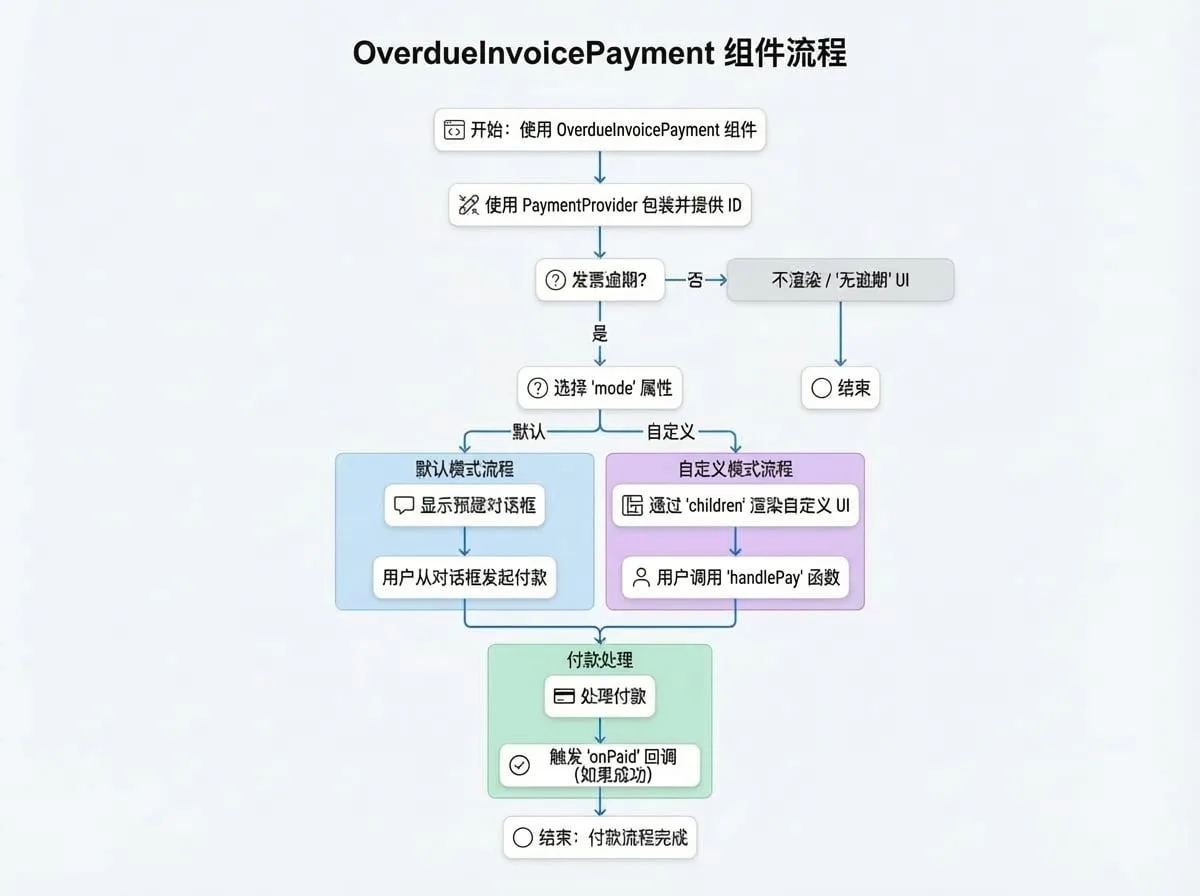
该组件可以在两种模式下运行:一种是默认模式,显示一个预构建的对话框以便快速集成;另一种是自定义模式,提供使用渲染属性(render prop)构建独特用户界面的灵活性。
工作原理
该组件协调整个逾期支付过程,从获取数据到处理最终的交易确认。
属性
OverdueInvoicePayment 组件接受以下属性来自定义其行为:
| 属性 | 类型 | 描述 |
|---|---|---|
subscriptionId | string | 要检查逾期发票的订阅 ID。必须提供 subscriptionId 或 customerId。 |
customerId | string | 客户的 ID 或 DID。使用此属性可处理一个客户的所有逾期发票。 |
mode | 'default' | 'custom' | 渲染模式。'default' 显示预构建的对话框。'custom' 使用 children 渲染属性构建自定义 UI。默认为 'default'。 |
onPaid | (id, currencyId, type) => void | 支付成功后触发的可选回调函数。id 将是 subscriptionId 或 customerId,type 将是 'subscription' 或 'customer'。 |
dialogProps | object | 在 default 模式下,传递给底层 Material-UI Dialog 组件的可选属性。例如:{ open: true, title: '自定义标题', onClose: handleClose }。 |
detailLinkOptions | object | “查看详情”链接的可选设置。可用于禁用链接、更改其文本或提供自定义的 onClick 处理程序。格式:{ enabled?: boolean, onClick?: function, title?: string }。 |
successToast | boolean | 如果为 true,支付成功后会显示一个成功的 toast 通知。默认为 true。 |
alertMessage | string | 在客户模式下,附加到默认标题文本的可选消息。 |
children | (handlePay, data) => React.ReactNode | 仅在 mode 为 'custom' 时使用的渲染属性函数。它接收一个 handlePay 函数和一个 data 对象。 |
authToken | string | 用于 API 请求的可选身份验证令牌,适用于服务器到服务器或跨域场景。 |
children 渲染属性
当使用 mode="custom" 时,children 函数接收两个参数:
handlePay(item: SummaryItem):一个为特定货币组启动支付流程的函数。item对象来自data.summary对象。data:一个包含获取到的支付信息的对象:
subscription?: Subscription:订阅详情,如果提供了subscriptionId。summary: { [key: string]: SummaryItem }:一个对象,其中每个键是货币 ID,值包含总金额、货币详情和支付方式。invoices: Invoice[]:包含所有逾期发票对象的数组。subscriptionCount?: number:有逾期发票的订阅数量(用于客户模式)。detailUrl: string:用于查看详细发票信息的 URL。
使用示例
所有示例都假定你已在应用程序中设置了 PaymentProvider。
1. 订阅的默认模式
这是处理特定订阅逾期付款的最简单方法。如果发现任何逾期发票,该组件将自动渲染一个对话框。
SubscriptionOverdue.tsx
import { OverdueInvoicePayment, PaymentProvider } from '@blocklet/payment-react';
import { useSessionContext } from './hooks/session'; // 你的自定义 session hook

function SubscriptionPage({ subscriptionId }) {
  const { session, connect } = useSessionContext();

  const handlePaymentSuccess = (id, currencyId, type) => {
    console.log(`类型为 ${type} 的 ${id} 使用货币 ${currencyId} 支付成功`);
    // 你可以在此处重新获取订阅数据以更新其状态
  };

  return (
    <PaymentProvider session={session} connect={connect}>
      {/* 如果没有逾期发票,此组件将为 null */}
      <OverdueInvoicePayment
        subscriptionId={subscriptionId}
        onPaid={handlePaymentSuccess}
      />
      {/* 其他订阅详情可在此处渲染 */}
    </PaymentProvider>
  );
}
2. 客户的默认模式
使用此模式可以创建一个集中的地方,让客户支付其所有订阅的逾期发票。
CustomerDashboard.tsx
import { OverdueInvoicePayment, PaymentProvider } from '@blocklet/payment-react';
import { useSessionContext } from './hooks/session'; // 你的自定义 session hook

function CustomerDashboard() {
  const { session, connect } = useSessionContext();

  return (
    <PaymentProvider session={session} connect={connect}>
      <h2>支付中心</h2>
      <p>请结清所有未付账款,以确保服务不被中断。</p>
      <OverdueInvoicePayment
        customerId={session.user.did}
        onPaid={() => {
          console.log('客户某种货币的所有逾期发票已支付!');
          // 刷新客户账户状态
        }}
      />
      {/* 客户仪表盘的其余部分 */}
    </PaymentProvider>
  );
}
3. 自定义 UI 模式
要完全控制用户体验,请使用 mode="custom"。这允许您将支付功能直接集成到现有 UI 中,而不是使用对话框。
CustomOverdueUI.tsx
import { OverdueInvoicePayment, PaymentProvider, Amount } from '@blocklet/payment-react';
import { useSessionContext } from './hooks/session'; // 你的自定义 session hook
import { Card, CardContent, Typography, Button, Stack } from '@mui/material';

function CustomOverdueUI({ subscriptionId }) {
  const { session, connect } = useSessionContext();

  return (
    <PaymentProvider session={session} connect={connect}>
      <OverdueInvoicePayment
        subscriptionId={subscriptionId}
        mode="custom"
        onPaid={() => console.log('自定义 UI 支付成功!')}
      >
        {(handlePay, { summary, invoices }) => {
          const summaryList = Object.values(summary);
          if (invoices.length === 0) {
            return <Typography>没有逾期付款。一切正常!</Typography>;
          }

          return (
            <Card variant="outlined">
              <CardContent>
                <Typography variant="h6" color="error" gutterBottom>
                  您有 {invoices.length} 张逾期发票。
                </Typography>
                <Stack spacing={2} mt={2}>
                  {summaryList.map((item) => (
                    <Stack key={item.currency.id} direction="row" justifyContent="space-between" alignItems="center">
                      <Typography>
                        应付总额: <Amount amount={item.amount} decimal={item.currency.decimal} symbol={item.currency.symbol} />
                      </Typography>
                      <Button
                        variant="contained"
                        color="primary"
                        onClick={() => handlePay(item)}
                      >
                        使用 {item.currency.symbol} 支付
                      </Button>
                    </Stack>
                  ))}
                </Stack>
              </CardContent>
            </Card>
          );
        }}
      </OverdueInvoicePayment>
    </PaymentProvider>
  );
}