The OAuth Service enables developers to integrate third-party authentication providers and to expose a standard OAuth 2.0 interface for their own applications. This service facilitates federated login, allowing users to sign in with accounts from providers like Google, GitHub, Apple, and Twitter, and also allows your Blocklet Service to function as a centralized authentication authority for other applications.
This guide is intended for developers and covers the technical details of configuring and using the OAuth Service APIs. For administrative configuration through the UI, please refer to the OAuth Apps section in the User Guide.
Overview
The OAuth Service has a dual role:
OAuth Client
It acts as a client to external OAuth providers. When a user chooses to log in with a third-party service, the Blocklet Service handles the redirects, token exchanges, and profile retrieval required to authenticate the user.
OAuth Server
It functions as a fully-featured OAuth 2.0 and OpenID Connect (OIDC) provider. This allows external or third-party applications to delegate authentication to your service, providing a secure method for them to access user data with proper consent.
Authentication Flow (Authorization Code Grant)
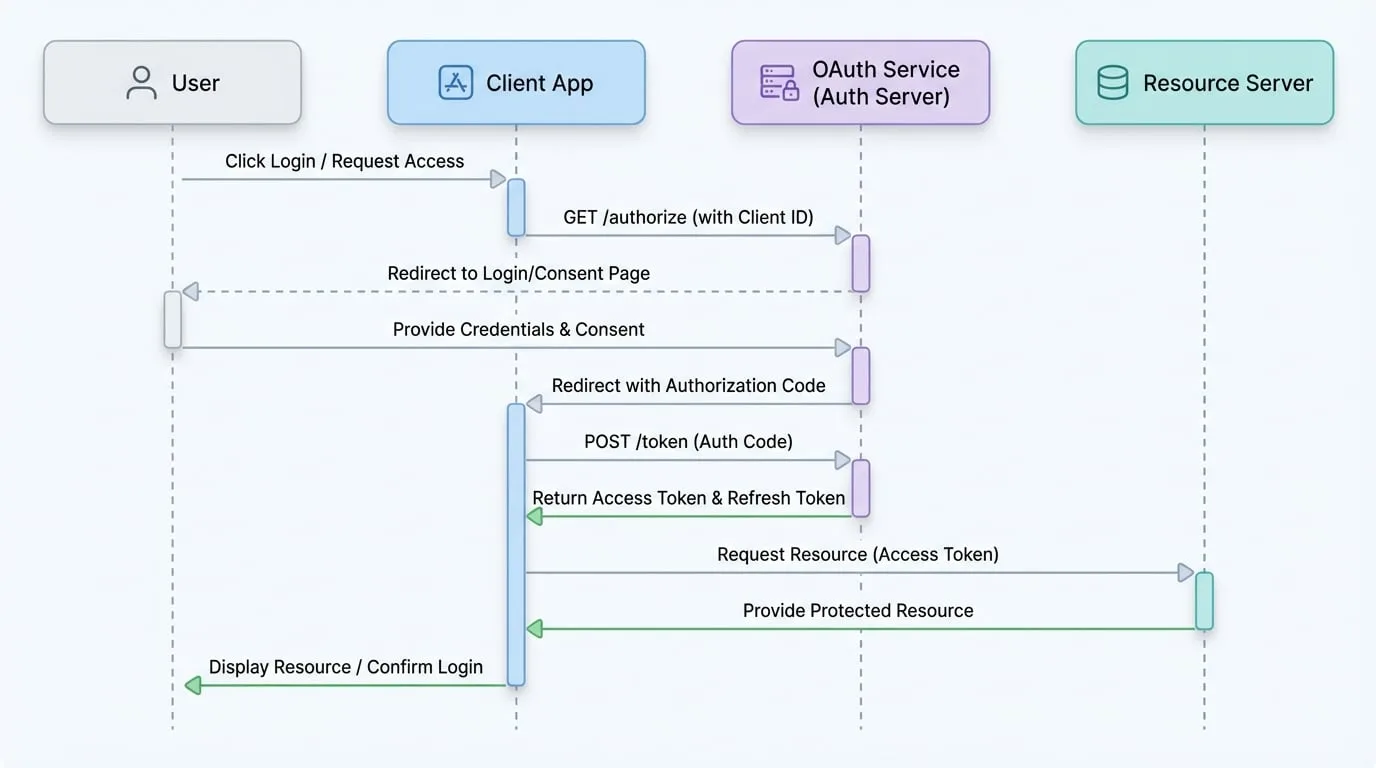
The service primarily uses the OAuth 2.0 Authorization Code Grant flow, which is a secure and widely adopted standard for web applications. The process involves the user, the client application (your blocklet or a third-party app), the authorization server (this OAuth Service), and the resource server.
The following diagram illustrates the sequence of interactions in this flow:
Integrating Third-Party Providers (Client)
You can enable users to log in to your application using their existing accounts from various providers.
Configuration
Configuration for each provider is managed within the blocklet's settings. You will need to obtain credentials (e.g., Client ID and Client Secret) from the developer console of each provider you wish to integrate.
The following providers are supported:
Uses OpenID Connect for authentication. Requires a Client ID and Client Secret from the Google Cloud Console.
GitHub
Uses OAuth 2.0. Requires a Client ID and Client Secret from your GitHub Developer settings.
Apple
Uses Sign in with Apple. Requires a Service ID, Team ID, Key ID, and private key.
Twitter (X)
Uses OAuth 2.0. Requires a Client ID and Client Secret from the X Developer Portal.
Client-Side API Flow
The client-side flow for initiating a third-party login and handling the callback is as follows:
Initiate Login
Redirect the user to the login endpoint for the desired provider.
Handle Callback
After the user authenticates with the third-party provider, they are redirected back to your application. The callback URL will contain an authorization
code.Finalize Login
Your application sends this
codeto the backend API to exchange it for a session token.
GET /.well-known/service/oauth/login/
Redirects the user to the selected provider's authentication page. The referrer header is required and must match a trusted domain configured in the service.
Parameters
- provider
string(required) — The name of the OAuth provider (e.g.,google,github).
POST /.well-known/service/api/oauth/login
After the user is redirected back from the provider, use this endpoint to exchange the authorization code for a session token.
Parameters
- provider
string(required) — The name of the OAuth provider. - code
string(required) — The authorization code received from the provider's callback.
Returns
- sessionToken
string— A JWT session token for the authenticated user. - refreshToken
string— A token that can be used to obtain a new session token. - visitorId
string— A unique identifier for the user's device/browser.
User Profile Data
When a user authenticates, the service retrieves their profile from the provider. The structure of this profile is normalized but may contain provider-specific data in an extraData field.
Standard Profile Structure
- sub
string(required) — A unique subject identifier for the user, prefixed with the provider name (e.g., `google-oauth2|... - name
string(required) — The user's full name. - email
string(required) — The user's primary email address. - picture
string— URL of the user's profile picture. - emailVerified
boolean— Indicates if the user's email has been verified by the provider. - extraData
object— Contains additional, provider-specific user data.
Acting as an OAuth 2.0 Provider (Server)
The Blocklet Service can also function as a standard OAuth 2.0 and OIDC provider, allowing third-party applications to authenticate your users and access protected resources on their behalf.
Standard Endpoints
The service exposes the following standard endpoints, all prefixed with /.well-known/service/oauth.
| Endpoint | Path | Description |
|---|---|---|
| Authorization | /authorize | Starts the authorization process by redirecting the user for login and consent. |
| Token | /token | Exchanges authorization codes or refresh tokens for access tokens. |
| Client Registration | /register | Allows dynamic registration of new client applications. |
| User Info | /userinfo | Retrieves profile information for the authenticated user using an access token. |
| Token Revocation | /revoke | Invalidates an access or refresh token. |
| JSON Web Key Set | /jwks.json | Provides the public keys used to verify JWT signatures. |
API Details
Authorization Endpoint
GET /.well-known/service/oauth/authorize
This endpoint initiates the login and consent flow.
Query Parameters
- response_type
string(required) — Must becode. - client_id
string(required) — The client ID of the application. - redirect_uri
string(required) — The URL to redirect to after authorization. - scope
string(required) — A space-separated list of requested permissions (e.g.,profile:read). - state
string— An opaque value used to maintain state between the request and callback. - code_challenge
string— The PKCE code challenge. - code_challenge_method
string— The PKCE challenge method, typicallyS256.
Token Endpoint
POST /.well-known/service/oauth/token
This endpoint is used to exchange an authorization code or refresh token for an access token.
Request Body (Authorization Code Grant)
- grant_type
string(required) — Must beauthorization_code. - code
string(required) — The authorization code received from the authorization endpoint. - redirect_uri
string(required) — The same redirect URI used in the authorization request. - client_id
string(required) — The client ID of the application. - code_verifier
string— The PKCE code verifier.
Request Body (Refresh Token Grant)
- grant_type
string(required) — Must berefresh_token. - refresh_token
string(required) — The refresh token. - client_id
string(required) — The client ID of the application.
Successful Response
Token Response
{
  "access_token": "...",
  "refresh_token": "...",
  "token_type": "Bearer",
  "scope": "profile:read",
  "expires_in": 3600
}
UserInfo Endpoint
GET /.well-known/service/oauth/userinfo
Retrieves the authenticated user's profile information. Requires a valid access_token in the Authorization header.
Successful Response
UserInfo Response
{
  "sub": "z2...",
  "name": "John Doe",
  "email": "john.doe@example.com",
  "picture": "https://example.com/avatar.png",
  "preferred_username": "John Doe",
  "email_verified": true
}
Summary
The OAuth Service is a powerful component for managing user authentication. By supporting both client integrations with major identity providers and acting as a standard OAuth 2.0 server, it provides a flexible and secure foundation for identity management in your applications.
For more information on the underlying protocols, please refer to the official documentation: