通知服务是 Blocklet SDK 的核心组件,使您的应用程序能够向用户发送各种类型的通知并订阅实时事件。该服务充当底层 ABT Node 通知功能的接口,处理从简单的用户消息到发送至 DID 钱包、电子邮件和其他渠道的丰富交互式通知的所有事务。
无论您需要提醒用户重要事件、发送交易性电子邮件,还是向所有连接的客户端广播消息,通知服务都提供了一个统一且简单的 API。
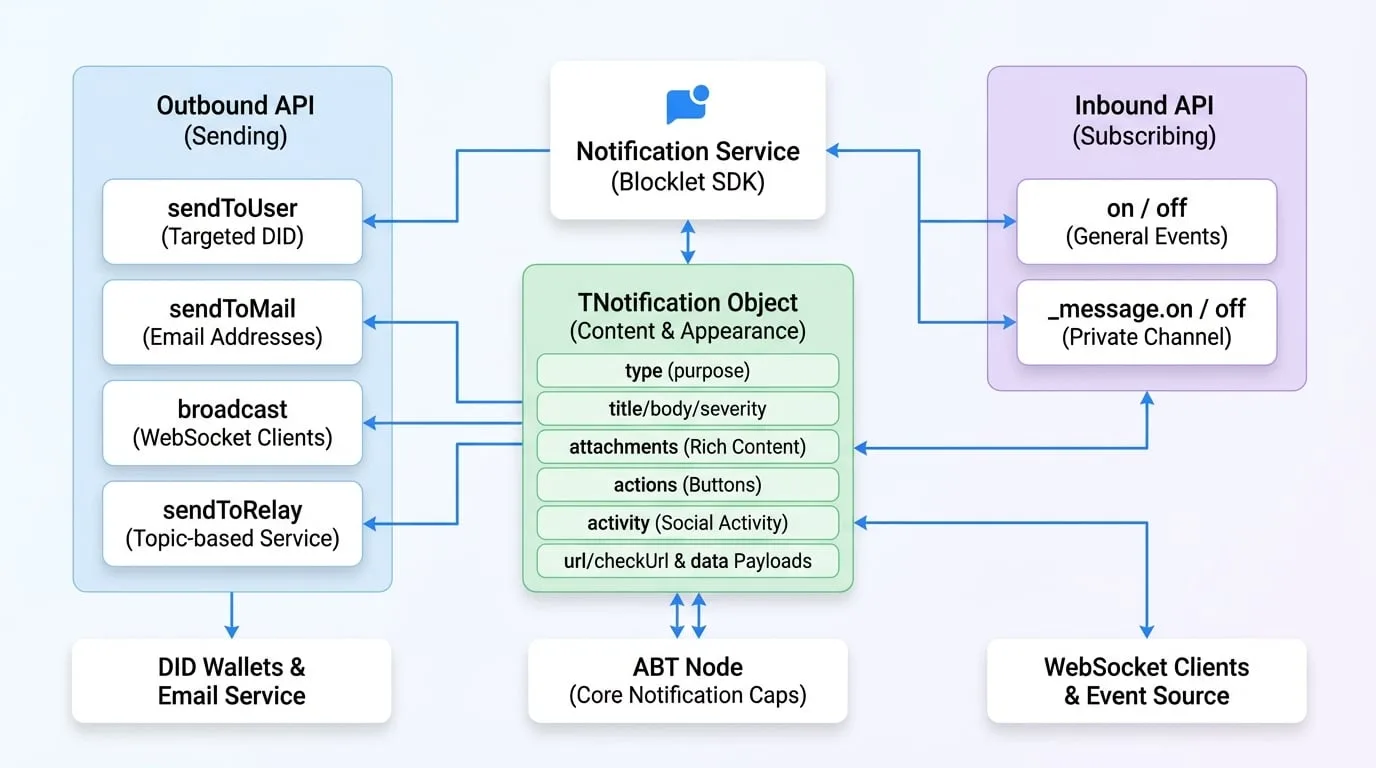
API 参考
sendToUser
通过 DID 直接向一个或多个用户发送通知。这是用于定向用户通信的主要方法。
参数
- receiver
string | string[](required) — 接收者的 DID。可以是一个 DID 字符串、一个 DID 数组,或使用 * 发送给该 blocklet 的所有用户。 - notification
TNotification | TNotification[](required) — 要发送的通知对象或通知对象数组。详细结构请参见 通知对象 (TNotification) 部分。 - options
TSendOptions— 发送通知的附加选项。- keepForOfflineUser
boolean— 如果为 true,通知将被存储并在用户上线时投递。 - locale
string— 通知的区域设置(例如 'en', 'zh')。 - channels
('app' | 'email' | 'push' | 'webhook')[]— 指定通过哪些渠道投递通知。 - ttl
number— 消息的存活时间,单位为分钟(0-7200)。超过此时间后,消息将过期。 - allowUnsubscribe
boolean— 如果为 true,允许用户退订此类通知。
- keepForOfflineUser
返回值
- Promise
Promise— 一个 promise,在成功发送后会解析为服务器的响应对象。
示例
Send a simple notification
import notification from '@blocklet/sdk/service/notification';

async function notifyUser(userDid) {
  try {
    const result = await notification.sendToUser(userDid, {
      type: 'notification',
      title: 'Hello from SDK!',
      body: 'This is a test notification sent to a specific user.',
      severity: 'info',
    });
    console.log('Notification sent successfully:', result);
  } catch (error) {
    console.error('Failed to send notification:', error);
  }
}
示例响应
{
  "status": "ok",
  "message": "通知已发送给 1 个用户。"
}
sendToMail
通过电子邮件向一个或多个收件人发送通知。通知对象的结构与 sendToUser 相同。
参数
- receiver
string | string[](required) — 单个电子邮件地址或电子邮件地址数组。 - notification
TNotification(required) — 通知对象。title用作电子邮件主题,body或attachments构成电子邮件内容。 - options
TSendOptions— 与sendToUser相同的发送选项。
返回值
- Promise
Promise— 一个 promise,会解析为服务器的响应对象。
示例
Send an email notification
import notification from '@blocklet/sdk/service/notification';

async function emailUser(userEmail) {
  try {
    const result = await notification.sendToMail(userEmail, {
      type: 'notification',
      title: 'Your Weekly Report is Ready',
      body: 'Please log in to your dashboard to view the report.',
    });
    console.log('Email sent successfully:', result);
  } catch (error) {
    console.error('Failed to send email:', error);
  }
}
示例响应
{
  "status": "ok",
  "message": "电子邮件发送成功。"
}
broadcast
向连接到特定 WebSocket 频道的客户端广播消息。默认情况下,它会发送到 blocklet 的公共频道。
参数
- notification
TNotificationInput(required) — 要广播的通知对象。 - options
object— 控制广播的选项。- channel
string— 要广播到的频道。默认为 blocklet 的公共频道,可通过 getAppPublicChannel(did) 获取。 - event
string(default:message) — 在客户端触发的事件名称。 - socketId
string— 如果提供,则仅将消息发送到此特定的套接字连接。 - userDid
string— 如果提供,则仅将消息发送到使用此 DID 身份验证的套接字。
- channel
返回值
- Promise
Promise— 一个 promise,会解析为服务器的响应。
示例
Broadcast a message
import notification from '@blocklet/sdk/service/notification';

function broadcastUpdate() {
  notification.broadcast(
    {
      type: 'passthrough',
      passthroughType: 'system_update',
      data: { message: 'A new version is available. Please refresh.' },
    },
    { event: 'system-update' }
  );
}
示例响应
{
  "status": "ok",
  "message": "广播已发送。"
}
sendToRelay
通过中继服务将消息发送到特定主题,从而实现不同组件甚至不同 blocklet 之间的实时、基于主题的通信。
参数
- topic
string(required) — 要发布事件的主题。 - event
string(required) — 正在发送的事件的名称。 - data
any(required) — 事件的负载数据。
返回值
- Promise
Promise— 一个 promise,会解析为服务器的响应。
示例
Send a relay message
import notification from '@blocklet/sdk/service/notification';

async function publishNewArticle(article) {
  try {
    await notification.sendToRelay('articles', 'new-published', {
      id: article.id,
      title: article.title,
    });
    console.log('Relay message sent.');
  } catch (error) {
    console.error('Failed to send relay message:', error);
  }
}
示例响应
{
  "status": "ok",
  "message": "中继消息已发送。"
}
on
订阅从 ABT Node 推送的通用事件,例如内部 blocklet 事件或与团队相关的事件。通知服务为此功能使用 EventEmitter 接口。
参数
- event
string(required) — 要监听的事件名称。 - callback
Function(required) — 事件触发时执行的函数。
示例
Listen for team member removal
import notification from '@blocklet/sdk/service/notification';
import { TeamEvents } from '@blocklet/constant';

function onMemberRemoved(data) {
  console.log('Team member removed:', data.user.did);
  // Add logic to update application state
}

// Subscribe to the event
notification.on(TeamEvents.MEMBER_REMOVED, onMemberRemoved);
off
移除先前用 on 添加的事件监听器。
参数
- event
string(required) — 要停止监听的事件名称。 - callback
Function(required) — 要移除的特定监听器函数。
示例
// To unsubscribe from the previous example
// notification.off(TeamEvents.MEMBER_REMOVED, onMemberRemoved);
_message.on
这是一个专门用于监听直接发送到你的 blocklet 私有消息频道的消息的特殊用途监听器。它对于处理旨在用于 blocklet 本身的直接响应或命令非常有用。
参数
- event
string(required) — 要监听的传入消息的type。 - callback
Function(required) — 接收到指定类型的消息时执行的函数。
示例
Listen for direct messages
import notification from '@blocklet/sdk/service/notification';

function handleDirectMessage(response) {
  console.log('Received direct message:', response);
}

// The 'message' event from the messageChannel is emitted with the response.type as the event name
// e.g., if response.type is 'payment_confirmation', the event here is 'payment_confirmation'
notification._message.on('payment_confirmation', handleDirectMessage);
_message.off
移除用 _message.on 添加的直接消息监听器。
参数
- event
string(required) — 要停止监听的消息类型。 - callback
Function(required) — 要移除的特定监听器函数。
通知对象 (TNotification)
通知对象是一个灵活的数据结构,用于定义通知的内容和外观。其结构可以针对不同的用例进行定制。
- type
'notification' | 'connect' | 'feed' | 'hi' | 'passthrough'(required) — 通知的主要类型,它决定了其总体目的和结构。 - title
string— 通知的标题。用于notification类型。 - body
string— 通知的主要内容/正文。用于notification类型。 - severity
'normal' | 'success' | 'error' | 'warning'— 严重性级别,可能会影响通知在钱包中的外观。用于notification类型。 - attachments
TNotificationAttachment[]— 一个富内容附件数组。这些附件在 DID 钱包中呈现为块。- type
string(required) — 附件的类型。可以是 asset、vc、token、text、image、divider、transaction、dapp、link 或 section。 - data
object— 附件的数据负载,其内容因类型而异(例如,text 类型的附件在这里会有一个 text 属性)。
- type
- actions
TNotificationAction[]— 一个与通知一同显示的操作按钮数组。- name
string(required) — 操作的标识符。 - title
string— 按钮上显示的文本。 - link
string— 点击按钮时打开的 URL。
- name
- activity
TNotificationActivity— 一个描述社交活动的对象,例如评论或关注。这是一种表示社交互动的结构化方式。- type
'comment' | 'like' | 'follow' | 'tips' | 'mention' | 'assign' | 'un_assign'(required) — 活动类型。 - actor
string(required) — 执行操作的用户的 DID。 - target
TActivityTarget(required) — 操作所作用的对象(例如,一篇博客文章)。
- type
- url
string—connect类型必需。DID Connect 会话的 URL。 - checkUrl
string—connect类型可选。用于检查会话状态的 URL。 - feedType
string—feed类型必需。一个标识 feed 类型的字符串。 - passthroughType
string—passthrough类型必需。一个标识 passthrough 数据类型的字符串。 - data
object—feed和passthrough类型必需。这些类型的数据负载。