使用 AIGNE 打造專屬的學習計畫代理 (Agent)
在這個專案中,我們將打造一個 AI 代理 (Agent),用於建立個人化的學習體驗,並根據使用者的輸入,靈活調整以符合個人需求與偏好。透過這個代理,我們可以看到使用者互動和建立結構化輸出的重要性,以及多代理 (multi-agent) 配置如何快速接收請求、處理資訊並分享給最終使用者。以下是一些關鍵考量:
- 用於評估的使用者互動: 此代理場景需要使用者針對技能評估進行互動式輸入。
- 學習風格的考量: 學習計畫產生器會將使用者偏好的學習風格納入考量。
- 專注於結構化輸出: 學習計畫具有特定的結構(主題、資源、活動、時間表)。
讓我們開始吧。
1. 專案建立:
- 名稱:"Learning Plan Generator"
- 描述:"Generates personalized learning plans based on user input."
2. 知識庫(選填):
- 名稱:"Learning Resources"
- 內容:一份依主題和技能等級分類的精選學習資源清單(課程、書籍、文章、網站)。內容可以手動填寫,也可以從網路擷取相關資料。
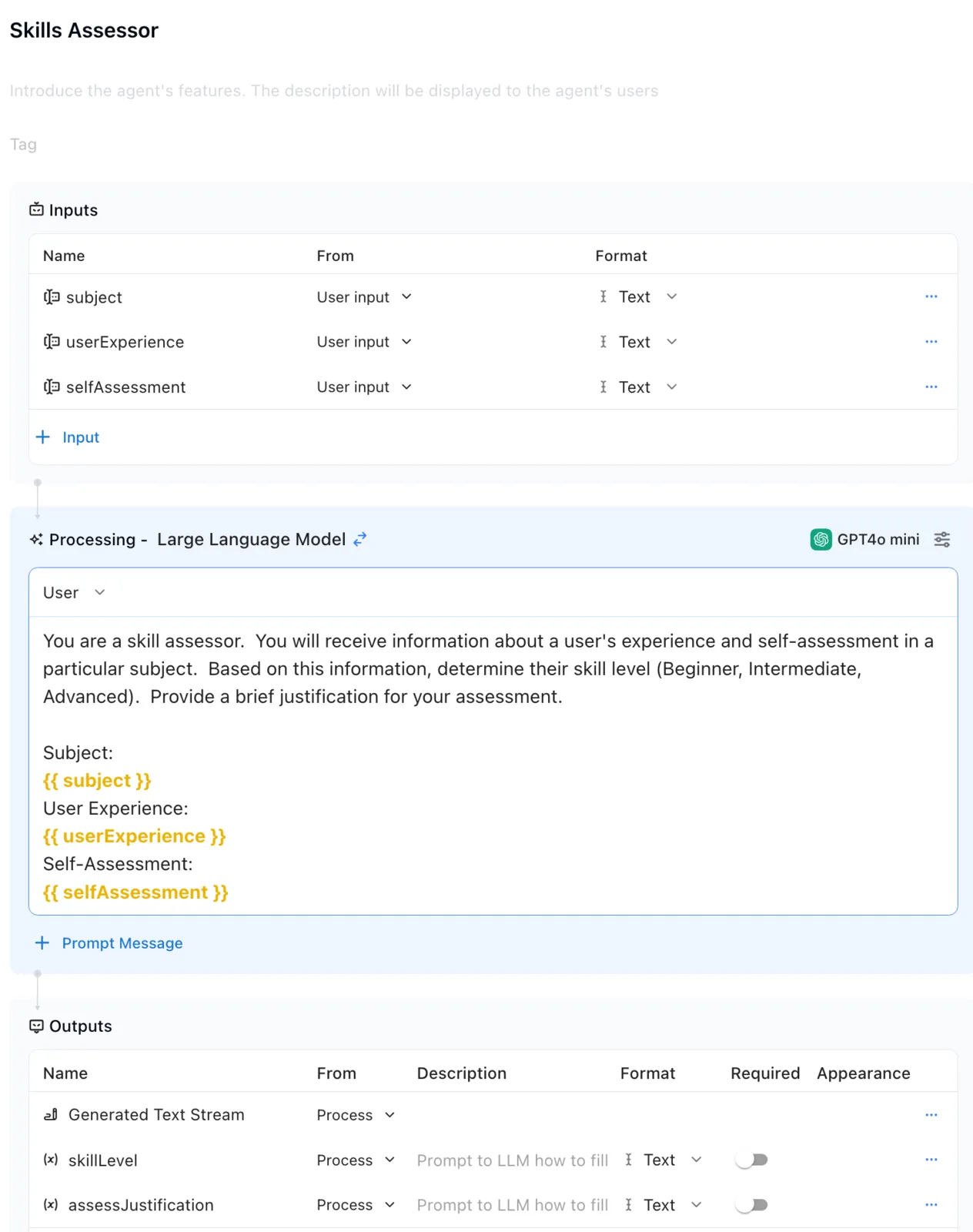
3. 代理 1:"Skill Assessor"(技能評估員)
- 目的: 評估使用者在特定主題上的目前技能等級。這可以透過多選題、自我評估,甚至分析使用者過去的經驗(如果有)來完成。在你的 AI 應用程式中,包含某種形式的使用者資訊請求是非常重要的。
- 提示詞:
You are a skill assessor. You will receive information about a user's experience and self-assessment in a particular subject. Based on this information, determine their skill level (Beginner, Intermediate, Advanced). Provide a brief justification for your assessment.

Subject:
{{ subject }}
User Experience:
{{ userExperience }}
Self-Assessment:
{{ selfAssessment }}
- 輸入:
subject(使用者輸入)userExperience(使用者輸入)selfAssessment(使用者輸入)
- 輸出:
Generated Text Stream | ProcessskillLevel(文字 - 例如:"Intermediate")assessmentJustification(文字)
- 範例
4. 代理 2:"Learning Plan Generator"(學習計畫產生器)
現在,讓我們設定第 2 個代理。
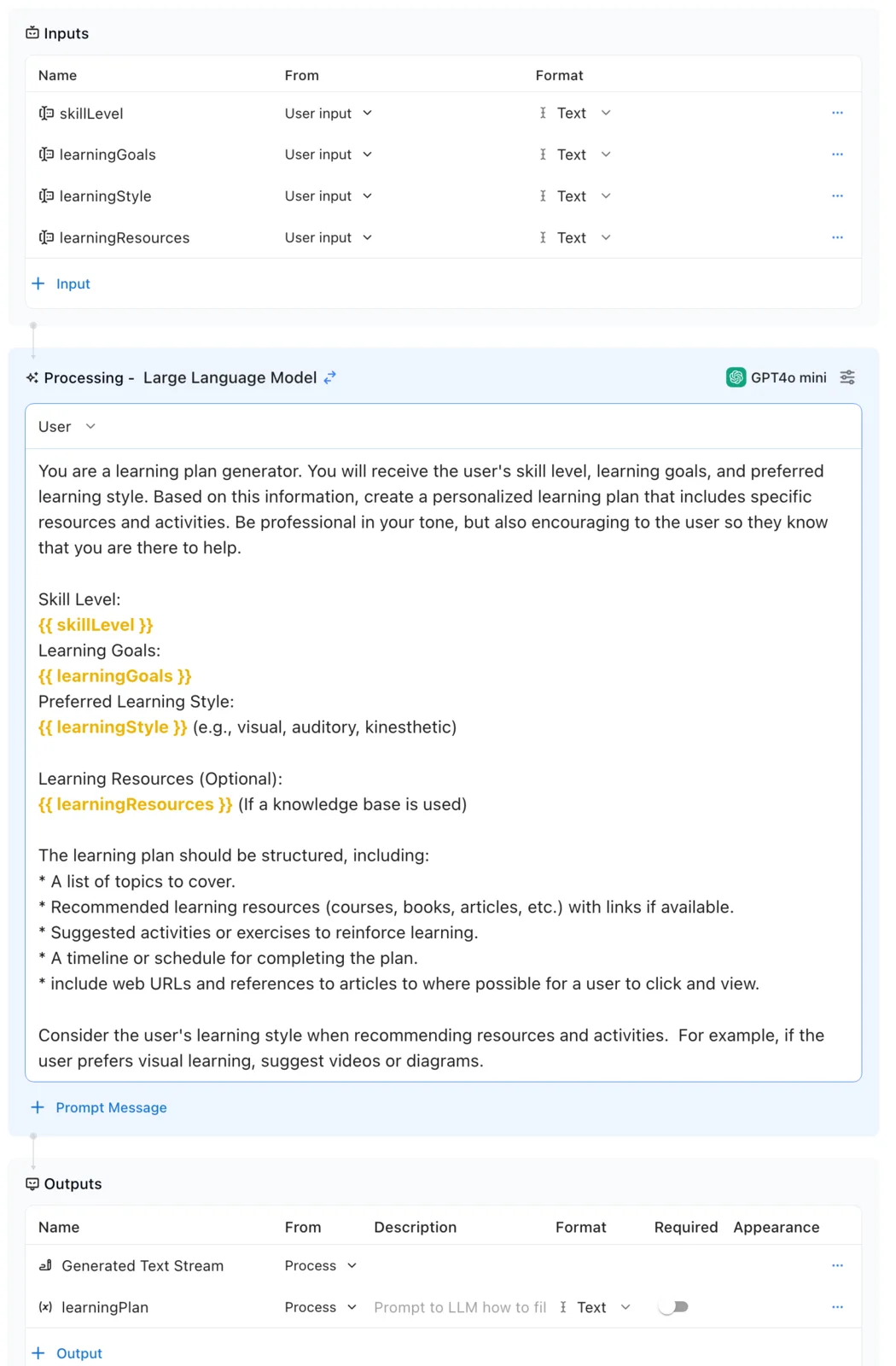
- 目的: 根據使用者的輸入(包括其技能等級和學習目標)產生個人化的學習計畫。
- 提示詞:
You are a learning plan generator. You will receive the user's skill level, learning goals, and preferred learning style.  Based on this information, create a personalized learning plan that includes specific resources and activities.

Skill Level:
{{ skillLevel }}
Learning Goals:
{{ learningGoals }}
Preferred Learning Style:
{{ learningStyle }} (e.g., visual, auditory, kinesthetic)

Learning Resources (Optional):
{{ learningResources }} (If a knowledge base is used)

The learning plan should be structured, including:
* A list of topics to cover.
* Recommended learning resources (courses, books, articles, etc.) with links if available.
* Suggested activities or exercises to reinforce learning.
* A timeline or schedule for completing the plan.

Consider the user's learning style when recommending resources and activities.  For example, if the user prefers visual learning, suggest videos or diagrams.
- 輸入:
skillLevel(來自代理 1)learningGoals(使用者輸入)learningStyle(使用者輸入)learningResources(來自知識庫 "Learning Resources" - 選填)
- 輸出:
Generated Text Stream | ProcesslearningPlan | Process | Text
- 範例:
5. 入口代理:"Learning Plan Interface"(學習計畫介面)
現在,讓我們設定入口代理來處理 UI 以及學習計畫產生器的流程。
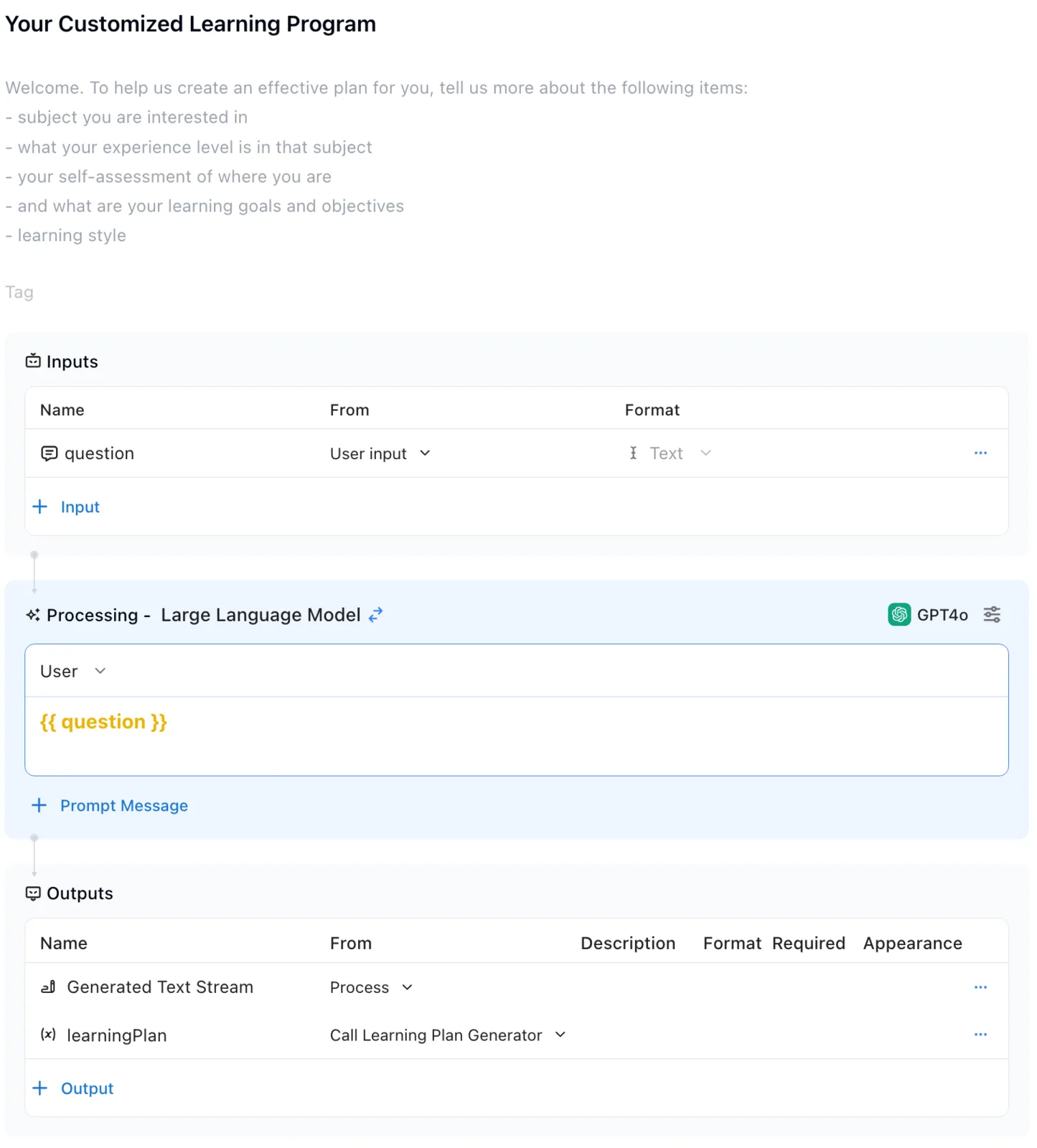
- 目的: 提供使用者介面。此代理負責從使用者端蒐集必要資訊(主題、經驗、自我評估、學習目標、學習風格),並顯示產生的學習計畫。
- 提示詞:(無提示詞)
- 輸入:
Question | User input | Text
- 輸出:
Generated Text Stream | ProcesslearningPlan | Call Learning Plan Generator
- 範例:
5. 測試並除錯你的代理
現在,讓我們測試我們的代理。選擇「Debug」並輸入一個學習場景範例。
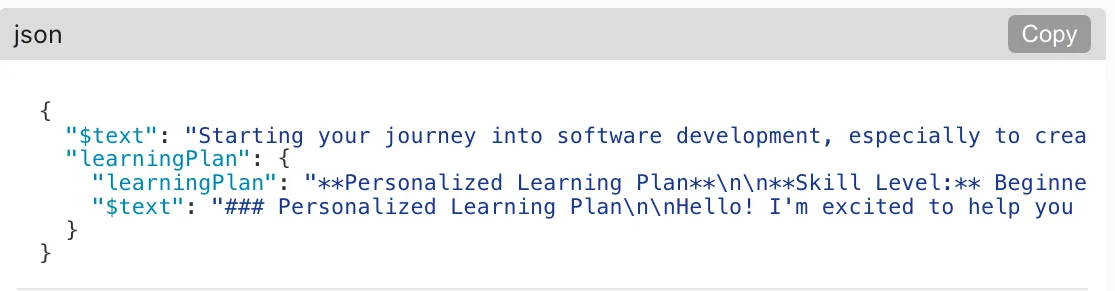
- 範例文字:"I am a wanna be developer who has not technical background. I want to learn how to do some basic coding to build a food ingredients phone app that returns health information to end users. I like to learn through reading and am a professional swimmer when I need to be."(我是一個沒有技術背景的準開發者。我想學習如何進行基礎程式設計,來開發一個能向終端使用者回傳健康資訊的食材手機 App。我喜歡透過閱讀來學習,而在需要時我是一名職業游泳運動員。)
根據輸入內容,您會看到一份文字計畫,其中列出一系列學習步驟,並以 JSON 輸出確認計畫細節。
- 部署你的 AI 應用程式,開始體驗樂趣。
如果你準備好嘗試另一個專案,請查看我們的指南,了解如何構建一個「會議摘要代理 (Meeting Summarizer Agent)」,它可以接收會議逐字稿並進行摘要,同時分享行動項目。