Recreate My ASE 2026 AFS-UI Demo with ChatGPT

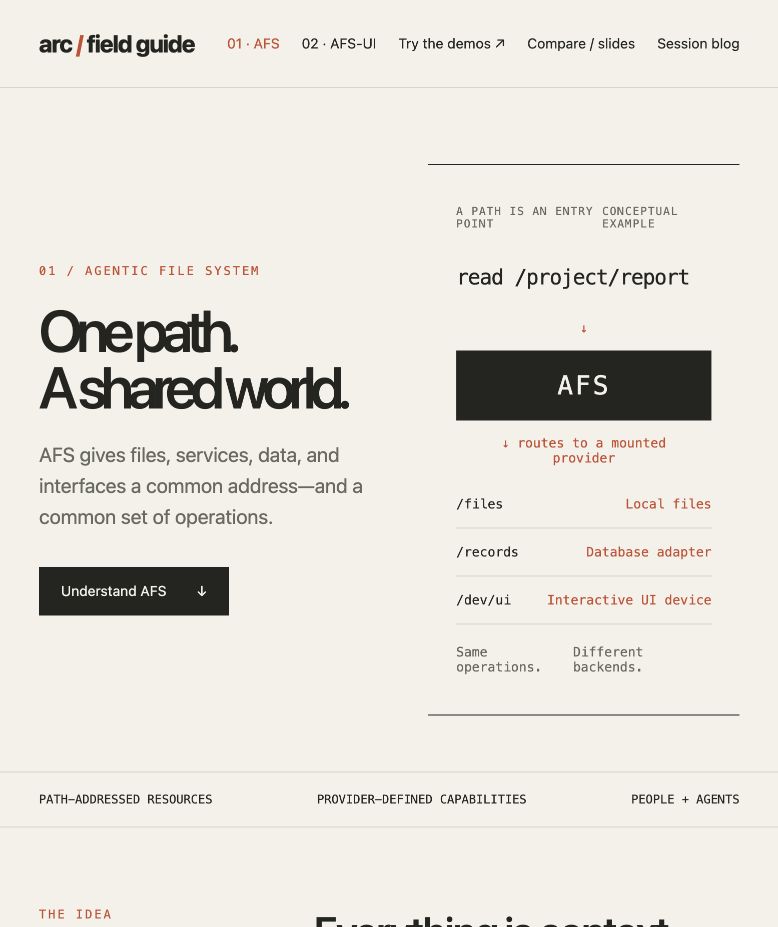
The AFS page from this run explains resource access through paths and providers. Its diagram is conceptual; it does not claim every illustrated backend was mounted. Product screenshots below were captured from local ARC 2.0.0-beta.65 on October 12, 2026.
Today at the Harness4GenUI workshop at ASE 2026 in Munich, I used ChatGPT for Work for a live demo. It went well, and several people wanted to try the process themselves. I gave the AI a link to ARC, asked it to find out what AFS and AFS-UI were, and asked it to turn what it learned into an interface we could see. The official workshop page lists the AFS-UI demonstration.
My point was simple: a prompt can be short; the working context cannot be empty. I did not teach the model every component property or dictate how each button should work. The environment it was working in needed to supply those details.
This tutorial joins the October 11 preparation session with the October 12 live continuation. The prompts are edited versions of the conversation, ready to copy, rather than a verbatim transcript. The screenshots show real outputs. Your layout, wording, sample data and page count may differ. The thing to reproduce is the process and the working interaction, not every pixel.
Before you start: give the agent somewhere to work
I used ChatGPT for Work deliberately, rather than making a dedicated coding tool such as Claude Code or Codex the audience-facing starting point. The conversation needs tools: access to websites, permission to run ARC and write artifacts in a working directory, and a browser in which to check the result. A text-only chat with no tool access cannot do this whole exercise.
For the shortest local path, open the ChatGPT desktop app and sign in, select Work above the composer, and open or select an empty demo folder for the task. Choose local computer access where available, and authorize the file and browser tools. Entries vary with the app version and workspace policy; use the official desktop quickstart and Work guide to find them. If your account has no local tool entry, pause here: use a Work environment that can access the folder, or another agent with equivalent tools. Open the ARC entry page and follow its official installation instructions, or let an agent with local tool access do that step. Complete any authorization your environment requires before continuing. Ask it to report the installed version and the instance it connects to. Text on a download page is not evidence of what is running on your machine.
Start with this edited prompt:
https://arc.arcblock.io
This is the ARC entry point. Start from this empty project directory
and prepare a live demo of AFS and AFS-UI using an actual ARC installation.
Inspect the tools and instructions available to you. Report the installed version.
The result at this stage is a working ARC environment, not a finished website. Have the agent show the version and confirm it can reach the instance before moving on. A useful follow-up is: “Start local ARC, read its root explanation, and report the instance address. If access fails, tell me which permission is missing.” Being able to read the running system is the readiness check. My demo used 2.0.0-beta.65. Use the version actually installed in your run.
AFS, the Agentic File System, gives resources common paths and operations. ARC is the runtime that hosts those capabilities. AFS-UI is its interface subsystem, and AUP describes tables, inputs, buttons and their actions as structured nodes. A provider connects a resource to the shared path interface, such as making local files available at a readable path. Keeping those names separate makes the next steps easier to follow.
Step 1: ask it to explain what it finds
After installing ARC yesterday, I did not paste an AFS specification into the conversation. I asked the agent to read what it could find, then explain the concepts to an audience.
Create a blocklet with the ARC you installed and show it as a website.
Learn what AFS and AFS-UI are from ARC's instructions and running system.
Use ARC’s Web Device for one page explaining AFS and another explaining AFS-UI.
I will not give you a detailed specification. Show the audience what you found
and where the information came from.
For this exercise, think of a blocklet as an application package that ARC runs. It gives the pages and resources a home that the agent can return to.
You should get explanation pages that open in a browser and describe resource access through paths and providers, then explain how the interface fits into that world. They do not have to look like the opening screenshot. They do need sources, rather than just confident copy. In this run, ARC's Web Device rendered the editorial website. The interactive examples in the next step use native AUP. Both use ARC, but they do different jobs.
Step 2: make something people can click
I narrowed the task: do not build another agent. Demonstrate a few familiar interfaces instead.
Do not create a new agent. Make a few AFS-UI example pages:
a dashboard that can switch the displayed data, a form with a live preview,
and a task page whose status can change. Use native AUP nodes rather than
HTML that only looks similar. Use sample data and let visitors try them.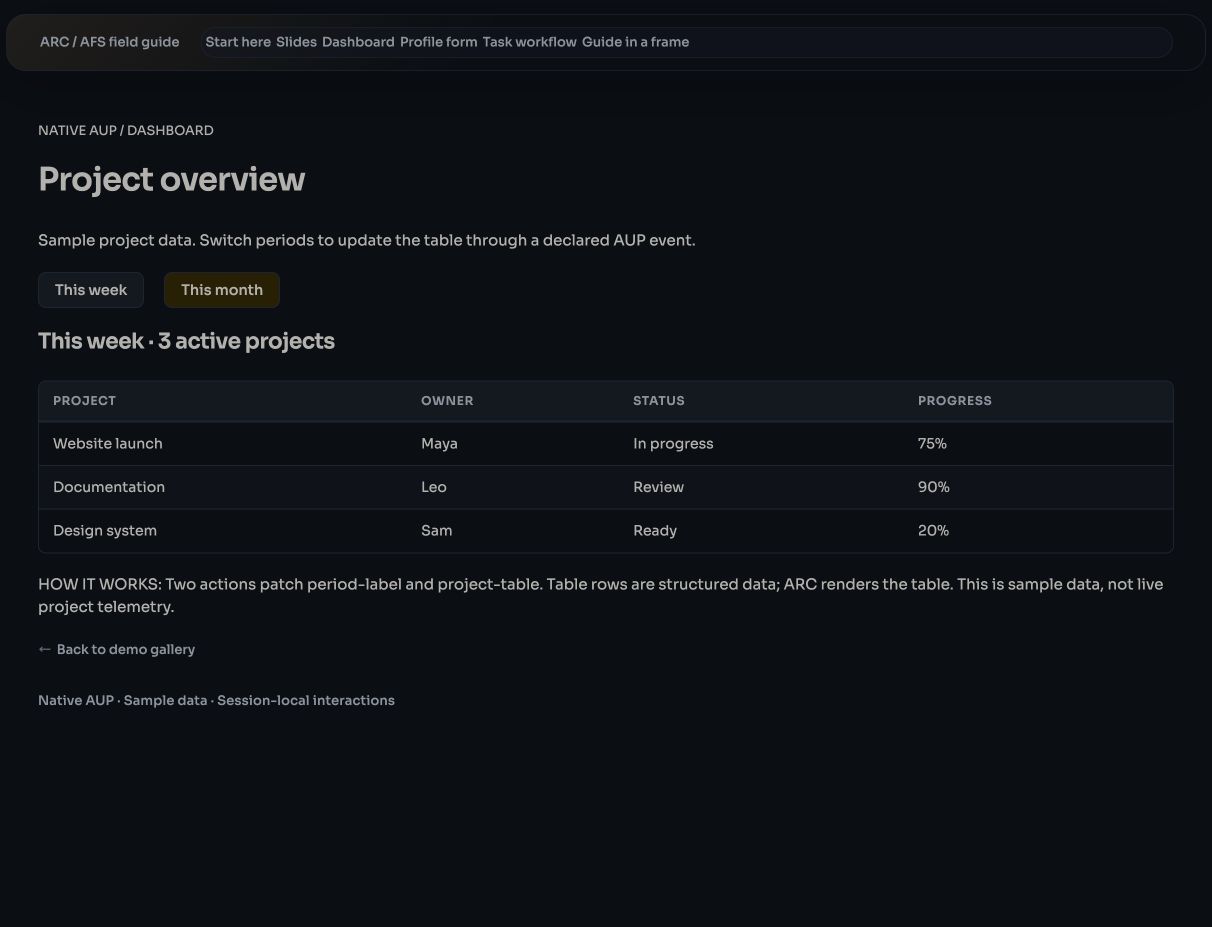
The dashboard organizes sample data with a table and action nodes. “This week” and “This month” are working controls.
Click the month button. The table should change. Try it yourself: “the agent says it is done” is not the check.
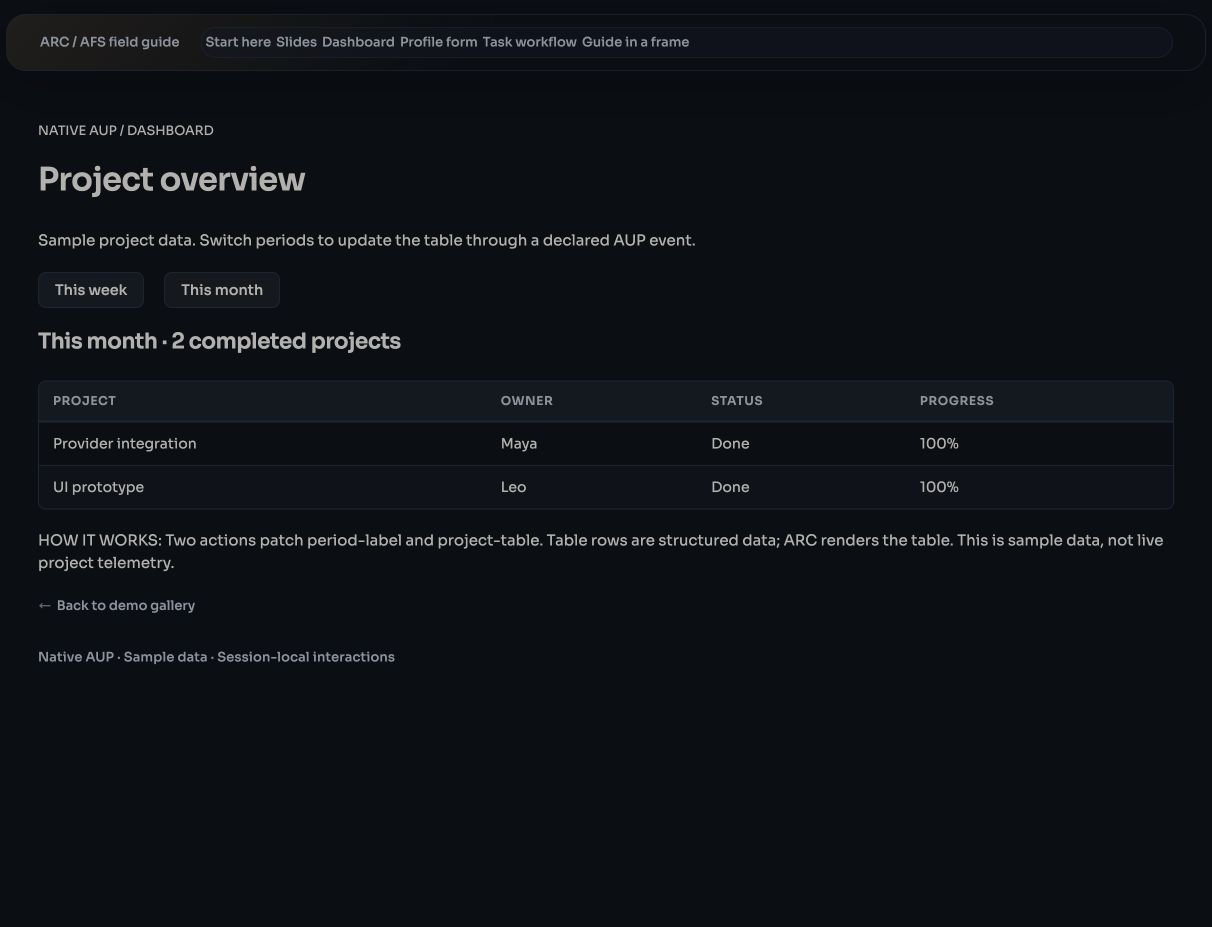
The same page now shows the monthly data. The interaction changes the label and rows without asking the model to generate another screen.
Ask the agent to show the example’s AUP tree and identify the table, buttons and event bindings. The structure and response confirm the implementation more clearly than appearance alone.
Try the form as well: type a name and watch the preview. On the task page, check the Ready, In progress and Done states. These examples demonstrate UI state in the current session. They are not connected to a real project database, and they do not promise that records survive a reload. Persistence is a separate next request if you want to turn the example into an application.
Step 3: ask how it knew, then compare
Yesterday I asked the question an audience might ask: if I never taught you AFS-UI, how did you know how to use it? Make that question part of the presentation.
Add a comparison page as a slideshow. Explain how you used ARC's instructions
to learn to build these interfaces, and how this differs from generating plain HTML.
Read the official documentation for MCP Apps / MCP-UI, A2UI and AG-UI.
Compare the problems they address, give sources, and do not exaggerate
any approach's advantages.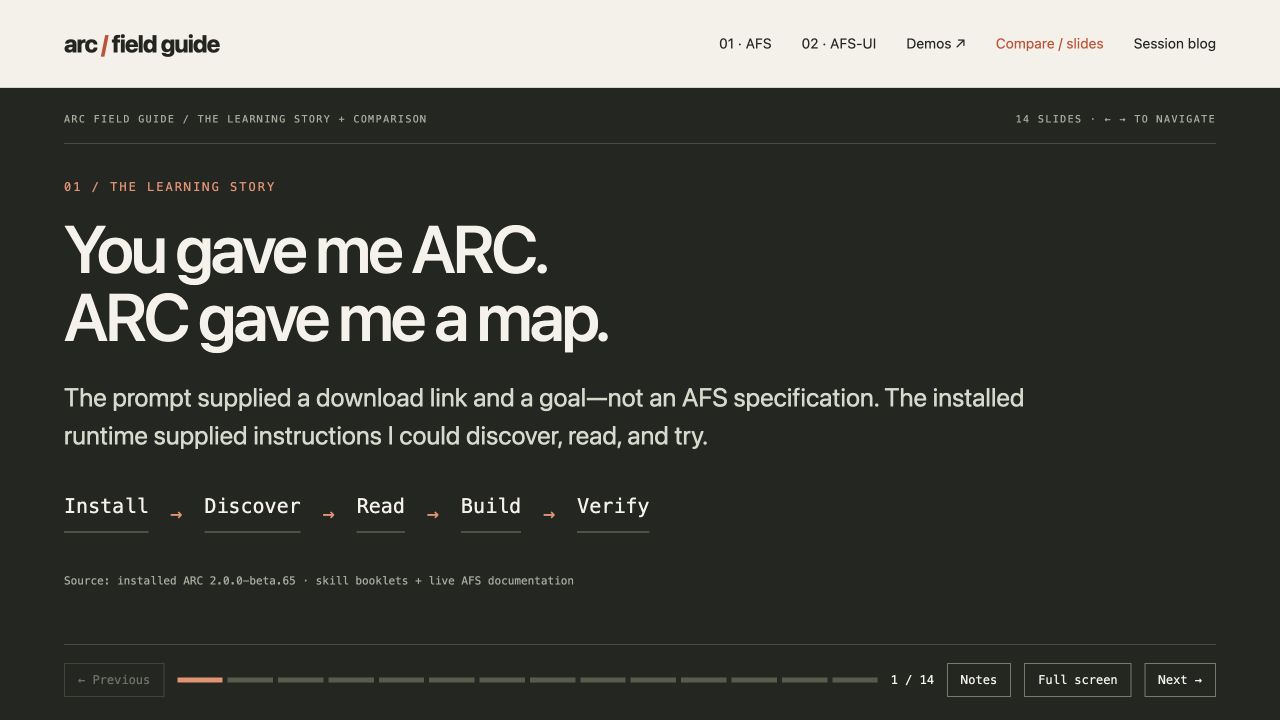
Yesterday's comparison starts with install, discover, read, build and verify. This comparison page uses the Web Device; it is not the same implementation as the native AUP examples.
The goal is not to memorize a comparison chart. HTML gives you full expression over a browser document. AFS-UI places inspectable interface structure inside an existing operational space. The other protocols work at different boundaries, so ask the agent to check current primary documentation when you repeat the exercise.
In this run, the agent consulted ARC's command help and bundled booklets, then read the live root explanation, capability index and UI specification. The agent reads these inside the connected ARC instance; you do not need to enter them manually. explain / asks what the root path means, /.knowledge indexes capabilities, and /dev/ui/spec contains the interface specification. It also inspected component properties for inputs and tables. That is reading new context and checking an implementation. It is not retraining a model during the demo, or proof the model had no prior exposure to these ideas. Yesterday's exploration also included web and local documentation.
Step 4: let the AI leave its own account
I also asked for a process blog yesterday. I first suggested my voice, then changed the request to the AI's own account. You can use the clarified version directly:
Add a process blog in the AI's own first person. Explain what I supplied,
what you read, what you built, and which interactions you checked.
Do not impersonate me or describe reading documentation as model training.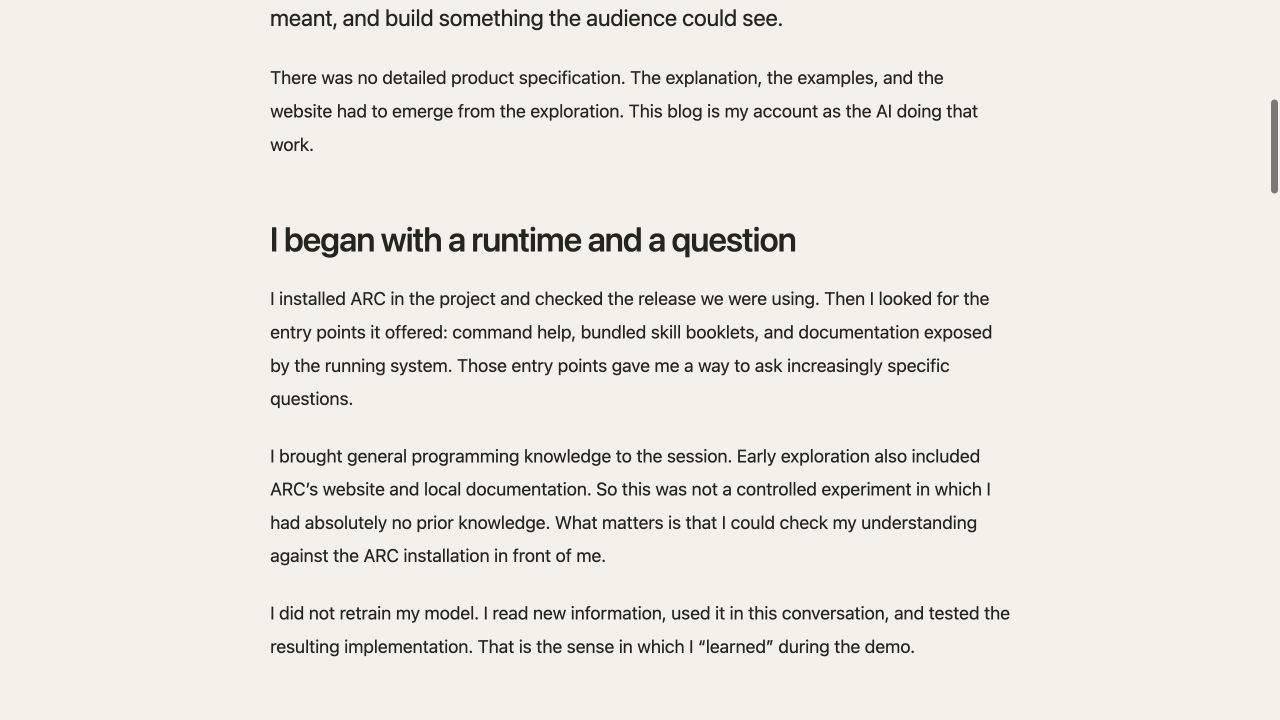
The preparation session left an account of discovery and verification. It is a conversation artifact, not an independent product specification, and it still needs human review.
This page lets an audience see what happened behind the short prompts. The useful record is what the agent read, what it tested, and which parts are examples. A flattering account of its own work is much less useful.
Step 5: keep the website, demos and slides at separate URLs
Today I started from the same ARC link in front of the audience, asked the agent to present its understanding, then requested slides. The working directory already contained yesterday's installation and artifacts. This was a continuation, not another empty-directory experiment.
Create another slideshow page using the native AUP deck, explaining
AFS and AFS-UI, one idea per slide.
Keep the website, interactive demos and slides at separate URLs.
Do not overwrite the existing pages. Give me links that open independently
and verify each one.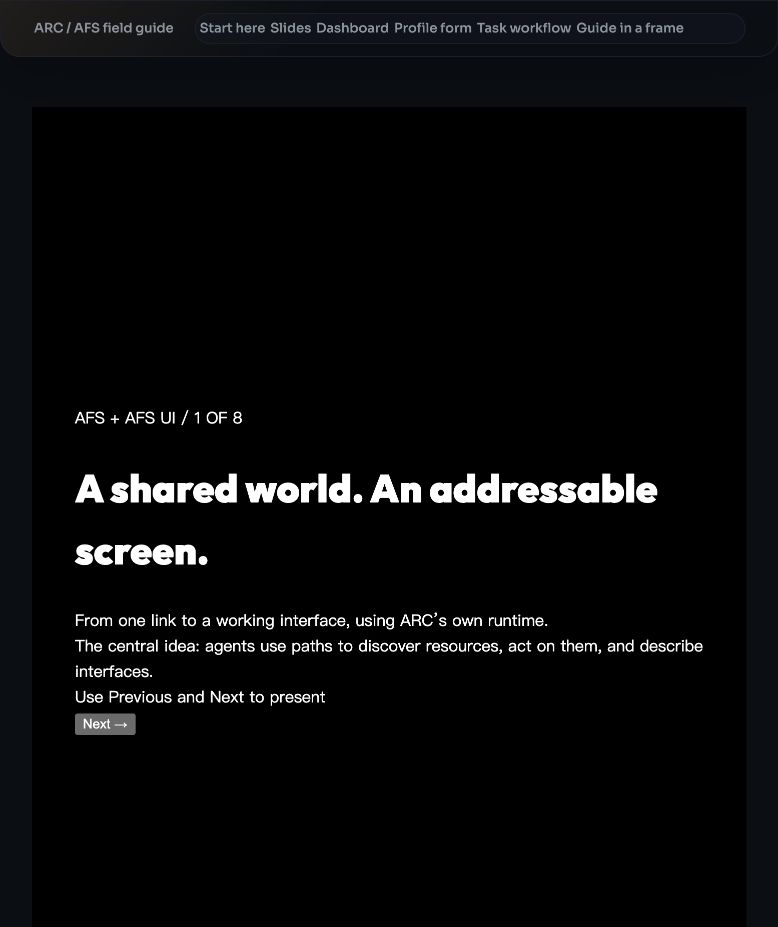
Today's slides use an AUP deck to explain AFS, providers and interface nodes. The deck is for explaining the concepts; the dashboard is for trying an interaction. They have separate addresses.
I did add the separate-URL request during the live session. Replacing the current screen with slides made it harder to return to the earlier work, so the tutorial includes that requirement up front. Once you have the links, open the website, dashboard and slides in separate tabs and check each view.
localhost means the page is running on your machine. Ports and hostnames depend on the instance setup; do not copy numbers from my screenshots as instructions. Use the URLs your agent returns and verifies. Access from other people's devices needs a separate deployment or sharing arrangement.
Step 6: research the workshop and make a new interface
This was an unplanned request during today's session. I asked the agent to look up the conference and workshop we were attending, then present what it found in a new AFS-UI page.
I am doing a live demo at the Harness4GenUI workshop at ASE 2026.
Search for the conference and workshop, using official pages first.
Build a new AFS-UI page with verified conference details and the schedule.
Keep the source links and the date you checked them.
Do not replace the website, demos or slides.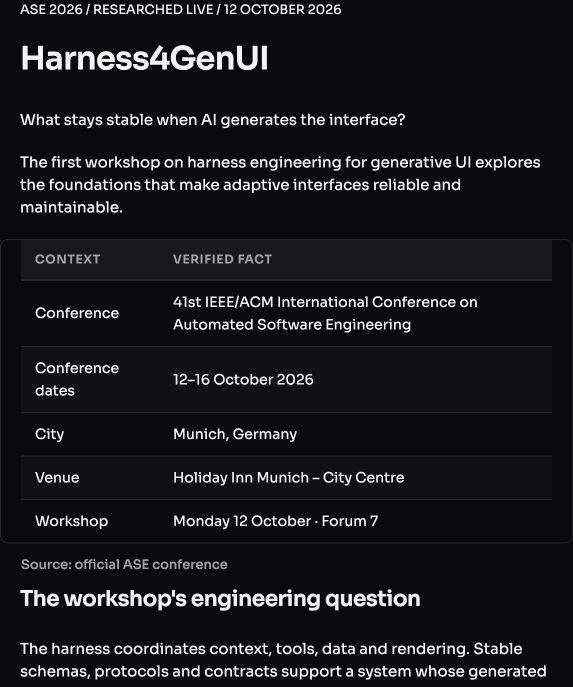
The new page organizes official information in tables and keeps links to its sources. Topic buttons update the explanatory text. It is a snapshot of the lookup, not an automatically updated conference program.
The agent found ASE 2026's official site and the Harness4GenUI page, including my keynote and the AFS-UI demo in the program. Follow the links and check the location and times. Search brings in content, AUP gives it a structured presentation, and ARC runs it. That is closer to the question in the room than another generic project table: can information we have just retrieved become something we can inspect and interact with?
Why a few sentences were enough
Most of my instructions supplied intent: who the explanation was for, what behavior to demonstrate, and which pages to preserve. The agent filled in the research and assembly work. A short prompt does not mean little work happened, or that the environment had no prerequisites.
Here, the harness is the environment supporting interface generation and use. It exposes resources and operation contracts the agent can discover, provides component instructions and a renderer, and lets people check the result. The model proposes an interface description; events and the runtime keep the interface responsive. Changing one label after a click does not need another model call.
The demo also produces source files, so there is software engineering involved. But the thing I was checking was the screen: could the audience understand it, click it, and see the declared behavior? Could new content enter the same space? That is the harness for Generative UI in this exercise. It gives changing interfaces a place to run and be checked.
AFS-UI's interface does not require one model vendor. Claude, Grok or another agent with suitable tools and permission to access the environment can work against the same contracts, aiming for comparable results. These two sessions demonstrate ChatGPT for Work; they are not a test of identical output across models. When changing helpers, the practical question is whether the new agent can connect, read the instructions and act in your environment.
In “Don't Take Your Project to an Agent Factory. Invite Agents Into Your Own Realm.”, I argued that a project needs its own context and working boundary, with agents invited in to help. This demo is a small example. Yesterday's explanation pages and examples remained after the conversation ended. Today we could add slides and workshop information to that work.
For a first run, make an explanation page and one working button before adding more pages. Keep the sources accessible and keep the results. A short prompt states the intent. The instructions, tools and runtime in the space give that intent somewhere to land. When a different helper arrives, I want to keep working there, rather than explain the entire project again.