通知サービスはBlocklet SDKのコアコンポーネントであり、アプリケーションがさまざまな種類の通知をユーザーに送信したり、リアルタイムイベントを購読したりできるようにします。このサービスは、基盤となるABT Nodeの通知機能へのインターフェースとして機能し、単純なユーザーメッセージから、DID Wallet、メール、その他のチャネルに配信されるリッチでインタラクティブな通知まで、すべてを処理します。
重要なイベントについてユーザーに警告する必要がある場合でも、トランザクションメールを送信する必要がある場合でも、接続されているすべてのクライアントにメッセージをブロードキャストする必要がある場合でも、通知サービスは統一された簡単なAPIを提供します。
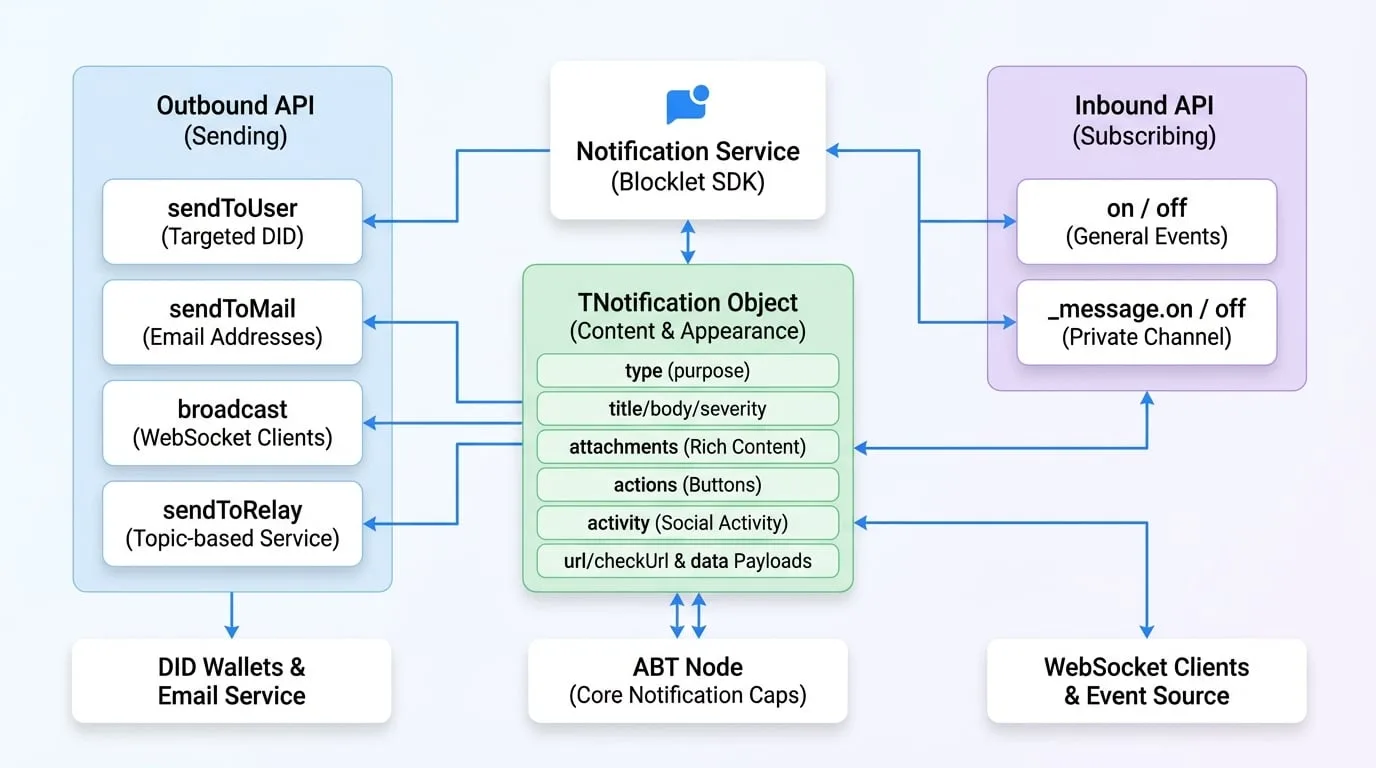
APIリファレンス
sendToUser
DIDによって識別される1人または複数のユーザーに直接通知を送信します。これは、ターゲットを絞ったユーザーコミュニケーションの主要な方法です。
パラメータ
- receiver
string | string[](required) — 受信者のDID。単一のDID文字列、DIDの配列、またはblockletの全ユーザーに送信するための * を指定できます。 - notification
TNotification | TNotification[](required) — 送信する通知オブジェクトまたは通知オブジェクトの配列。詳細な構造については、通知オブジェクト (TNotification) セクションを参照してください。 - options
TSendOptions— 通知を送信するための追加オプション。- keepForOfflineUser
boolean— trueの場合、通知は保存され、ユーザーがオンラインになったときに配信されます。 - locale
string— 通知のロケール(例:'en'、'zh')。 - channels
('app' | 'email' | 'push' | 'webhook')[]— 通知を配信するチャネルを指定します。 - ttl
number— メッセージの生存期間(分単位、0-7200)。この時間が経過すると、メッセージは失効します。 - allowUnsubscribe
boolean— trueの場合、ユーザーはこのタイプの通知の購読を解除できます。
- keepForOfflineUser
戻り値
- Promise
Promise— 送信が成功すると、サーバーからのレスポンスオブジェクトで解決されるPromise。
例
Send a simple notification
import notification from '@blocklet/sdk/service/notification';

async function notifyUser(userDid) {
  try {
    const result = await notification.sendToUser(userDid, {
      type: 'notification',
      title: 'Hello from SDK!',
      body: 'This is a test notification sent to a specific user.',
      severity: 'info',
    });
    console.log('Notification sent successfully:', result);
  } catch (error) {
    console.error('Failed to send notification:', error);
  }
}
レスポンス例
{
  "status": "ok",
  "message": "1人のユーザーに通知が送信されました。"
}
sendToMail
1人または複数の受信者にメールで通知を送信します。通知オブジェクトの構造は sendToUser と同じです。
パラメータ
- receiver
string | string[](required) — 単一のメールアドレスまたはメールアドレスの配列。 - notification
TNotification(required) — 通知オブジェクト。titleはメールの件名として使用され、bodyまたはattachmentsがメールの本文を構成します。 - options
TSendOptions—sendToUserと同じ送信オプション。
戻り値
- Promise
Promise— サーバーからのレスポンスオブジェクトで解決されるPromise。
例
Send an email notification
import notification from '@blocklet/sdk/service/notification';

async function emailUser(userEmail) {
  try {
    const result = await notification.sendToMail(userEmail, {
      type: 'notification',
      title: 'Your Weekly Report is Ready',
      body: 'Please log in to your dashboard to view the report.',
    });
    console.log('Email sent successfully:', result);
  } catch (error) {
    console.error('Failed to send email:', error);
  }
}
レスポンス例
{
  "status": "ok",
  "message": "メールは正常に送信されました。"
}
broadcast
特定のWebSocketチャネルに接続されているクライアントにメッセージをブロードキャストします。デフォルトでは、blockletのパブリックチャネルに送信します。
パラメータ
- notification
TNotificationInput(required) — ブロードキャストする通知オブジェクト。 - options
object— ブロードキャストを制御するためのオプション。- channel
string— ブロードキャストするチャネル。デフォルトはblockletのパブリックチャネルで、getAppPublicChannel(did) で取得できます。 - event
string(default:message) — クライアント側で発行するイベント名。 - socketId
string— 指定された場合、この特定のソケット接続にのみメッセージを送信します。 - userDid
string— 指定された場合、このDIDで認証されたソケットにのみメッセージを送信します。
- channel
戻り値
- Promise
Promise— サーバーのレスポンスで解決されるPromise。
例
Broadcast a message
import notification from '@blocklet/sdk/service/notification';

function broadcastUpdate() {
  notification.broadcast(
    {
      type: 'passthrough',
      passthroughType: 'system_update',
      data: { message: 'A new version is available. Please refresh.' },
    },
    { event: 'system-update' }
  );
}
レスポンス例
{
  "status": "ok",
  "message": "ブロードキャストが送信されました。"
}
sendToRelay
リレーサービスを介して特定のトピックにメッセージを送信し、異なるコンポーネント間、あるいは異なるblocklet間でのリアルタイムなトピックベースの通信を可能にします。
パラメータ
- topic
string(required) — イベントを公開するトピック。 - event
string(required) — 送信されるイベントの名前。 - data
any(required) — イベントのペイロードデータ。
戻り値
- Promise
Promise— サーバーのレスポンスで解決されるPromise。
例
Send a relay message
import notification from '@blocklet/sdk/service/notification';

async function publishNewArticle(article) {
  try {
    await notification.sendToRelay('articles', 'new-published', {
      id: article.id,
      title: article.title,
    });
    console.log('Relay message sent.');
  } catch (error) {
    console.error('Failed to send relay message:', error);
  }
}
レスポンス例
{
  "status": "ok",
  "message": "リレーメッセージが送信されました。"
}
on
ABT Nodeからプッシュされる、内部blockletイベントやチーム関連イベントなどの一般的なイベントを購読します。通知サービスはこの機能のために EventEmitter インターフェースを使用します。
パラメータ
- event
string(required) — リッスンするイベントの名前。 - callback
Function(required) — イベントが発行されたときに実行する関数。
例
Listen for team member removal
import notification from '@blocklet/sdk/service/notification';
import { TeamEvents } from '@blocklet/constant';

function onMemberRemoved(data) {
  console.log('Team member removed:', data.user.did);
  // アプリケーションの状態を更新するロジックを追加
}

// イベントを購読
notification.on(TeamEvents.MEMBER_REMOVED, onMemberRemoved);
off
on で以前に追加されたイベントリスナーを削除します。
パラメータ
- event
string(required) — リッスンを停止するイベントの名前。 - callback
Function(required) — 削除する特定のリスナー関数。
例
// 前の例の購読を解除するには
// notification.off(TeamEvents.MEMBER_REMOVED, onMemberRemoved);
_message.on
これは、blockletのプライベートメッセージチャネルに直接送信されるメッセージ専用の特殊なリスナーです。blocklet自体を対象とした直接の応答やコマンドを処理するのに役立ちます。
パラメータ
- event
string(required) — リッスンする受信メッセージのtype。 - callback
Function(required) — 指定されたタイプのメッセージが受信されたときに実行する関数。
例
Listen for direct messages
import notification from '@blocklet/sdk/service/notification';

function handleDirectMessage(response) {
  console.log('Received direct message:', response);
}

// messageChannelからの'message'イベントは、response.typeをイベント名として発行されます
// 例:response.typeが'payment_confirmation'の場合、ここでのイベントは'payment_confirmation'です
notification._message.on('payment_confirmation', handleDirectMessage);
_message.off
_message.on で追加されたダイレクトメッセージリスナーを削除します。
パラメータ
- event
string(required) — リッスンを停止するメッセージタイプ。 - callback
Function(required) — 削除する特定のリスナー関数。
通知オブジェクト (TNotification)
通知オブジェクトは、通知のコンテンツと外観を定義する柔軟なデータ構造です。その構造は、さまざまなユースケースに合わせてカスタマイズできます。
- type
'notification' | 'connect' | 'feed' | 'hi' | 'passthrough'(required) — 通知の主要なタイプで、その全体的な目的と構造を決定します。 - title
string— 通知のタイトル。notificationタイプで使用されます。 - body
string— 通知の主要なコンテンツ/本文。notificationタイプで使用されます。 - severity
'normal' | 'success' | 'error' | 'warning'— 重要度レベル。ウォレットでの通知の外観に影響を与える可能性があります。notificationタイプで使用されます。 - attachments
TNotificationAttachment[]— リッチコンテンツの添付ファイルの配列。これらはDID Wallet内でブロックとしてレンダリングされます。- type
string(required) — 添付ファイルのタイプ。asset、vc、token、text、image、divider、transaction、dapp、link、または section を指定できます。 - data
object— 添付ファイルのデータペイロード。タイプによって異なります(例:text タイプの添付ファイルには text プロパティがあります)。
- type
- actions
TNotificationAction[]— 通知と共に表示されるアクションボタンの配列。- name
string(required) — アクションの識別子。 - title
string— ボタンに表示されるテキスト。 - link
string— ボタンがクリックされたときに開くURL。
- name
- activity
TNotificationActivity— コメントやフォローなどのソーシャルアクティビティを記述するオブジェクト。これは、ソーシャルインタラクションを構造化された方法で表現する方法です。- type
'comment' | 'like' | 'follow' | 'tips' | 'mention' | 'assign' | 'un_assign'(required) — アクティビティのタイプ。 - actor
string(required) — アクションを実行したユーザーのDID。 - target
TActivityTarget(required) — アクションが実行されたオブジェクト(例:ブログ投稿)。
- type
- url
string—connectタイプで必須。DID ConnectセッションのURL。 - checkUrl
string—connectタイプで任意。セッションステータスを確認するためのURL。 - feedType
string—feedタイプで必須。フィードのタイプを識別する文字列。 - passthroughType
string—passthroughタイプで必須。パススルーデータのタイプを識別する文字列。 - data
object—feedおよびpassthroughタイプで必須。これらのタイプのデータペイロード。