This section delves into the fundamental principles and architectural patterns that power the @blocklet/did-space-js SDK. Understanding these concepts will help you use the library more effectively and troubleshoot issues with greater confidence. The SDK is built on three main pillars: a robust Command Pattern, flexible Authentication methods, and a secure Request Signing mechanism.
The Command Pattern
Instead of having dozens of methods on the main SpaceClient object, the SDK adopts the Command Pattern. This design choice offers a clean and scalable architecture.
How it works:
Encapsulation
Every distinct operation (like uploading a file or listing a directory) is encapsulated into its own
Commandclass. For example, to upload a file, you usePutObjectCommand.Standardization
Each command has a standardized structure, accepting an
inputobject for its parameters and returning a structuredoutputobject.Execution
The
SpaceClientacts as a universal executor. You create an instance of a command and then pass it to theclient.send()method, which handles the underlying logic of authentication, request signing, and HTTP communication.
This separation of concerns—the command defining what to do and the client handling how to do it—makes the SDK predictable and easy to extend.
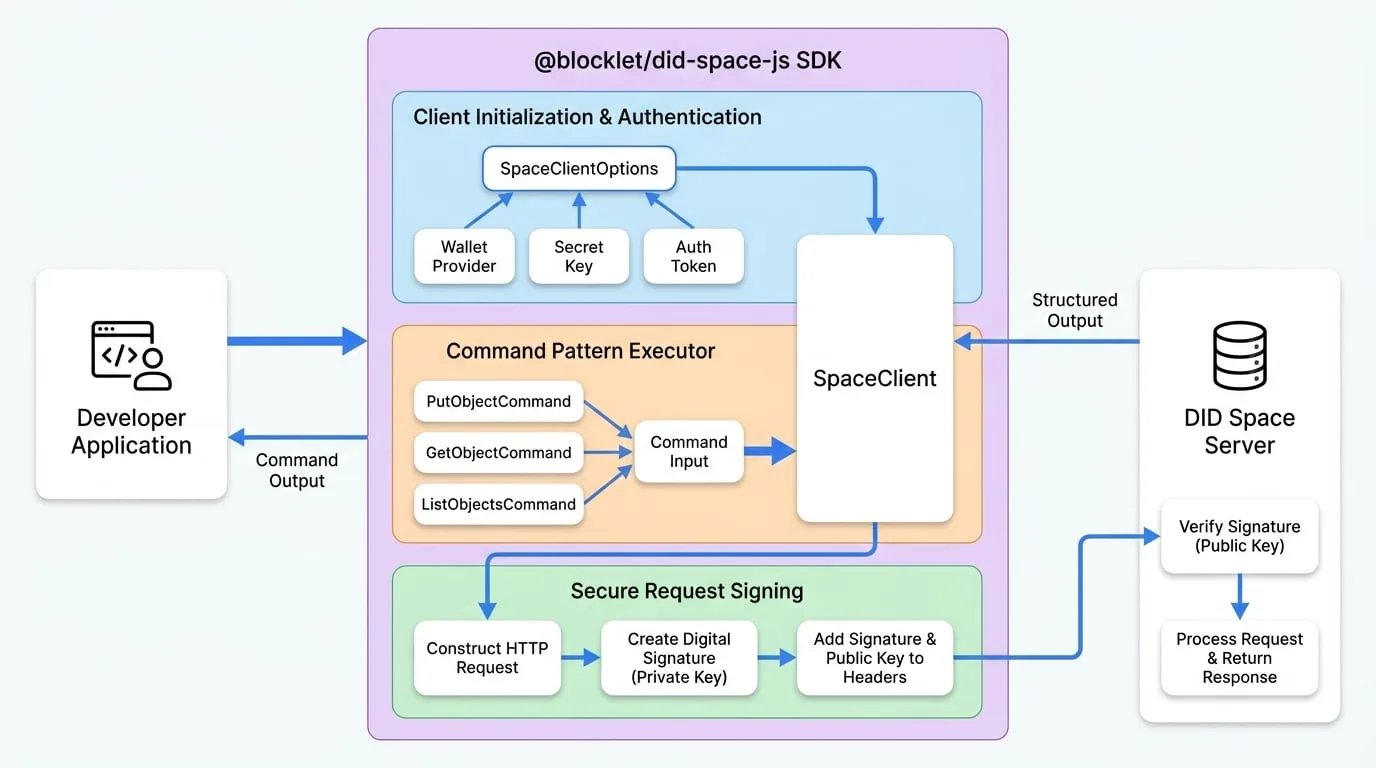
Client Initialization & Authentication
Before you can send any commands, you must initialize a SpaceClient instance with the proper configuration and authentication credentials. The SDK is designed to be flexible, supporting multiple authentication strategies to fit different use cases, from server-side applications to client-side components.
The primary way to configure the client is through the SpaceClientOptions object passed to its constructor. This object specifies the target DID Space and the credentials needed to access it.
Client Initialization & Auth
Learn about the different methods for initializing the SpaceClient, including using a wallet, a secret key, or an authorization token.
Secure by Design: Request Signing
Security is a cornerstone of DID Spaces. Every API request sent by the SDK is cryptographically signed to ensure its authenticity and integrity. This prevents unauthorized access and tampering with data in transit.
Here’s a high-level overview of the process:
- When you call
client.send(command), the SDK constructs the full HTTP request. - It then creates a unique digital signature for that specific request by hashing its contents (URL, method, body) and signing the hash with the private key from your wallet.
- This signature, along with your public key, is sent as part of the request headers.
- The DID Space server receives the request, re-calculates the signature on its end, and verifies it against the one you sent using your public key.
If the signatures match, the server knows the request is authentic and came from you. If not, it rejects the request.
Request Signing
Dive deeper into the security model, exploring how requests are cryptographically signed and verified to guarantee data integrity.
Next Steps
Now that you have a high-level understanding of the core concepts, you can explore them in more detail or move on to practical guides.
Client Initialization & Auth
Learn the specifics of configuring and authenticating your client.
Request Signing
Understand the cryptographic security behind every API call.
Guides
Follow step-by-step tutorials for common tasks like syncing folders.
API Reference
Browse the detailed documentation for every available command and class.