The useConnect hook provides a powerful, programmatic way to open, close, and manage the DidConnect UI modal. It's the ideal solution when you need more control over the connection flow than the declarative Button component offers, such as triggering the modal from a custom UI element, a menu item, or in response to an application event.
This hook is the engine behind the Button component and gives you direct access to the same core functionalities.
How It Works
The useConnect hook returns two main elements:
`connectHolder`
A React element that must be rendered in your component tree. This element is responsible for rendering the
DidConnectmodal when it's activated. It remains invisible until theopenfunction is called.`connectApi`
An object containing the functions (
open,close,openPopup,loginOAuth) you'll use to control the modal's lifecycle.
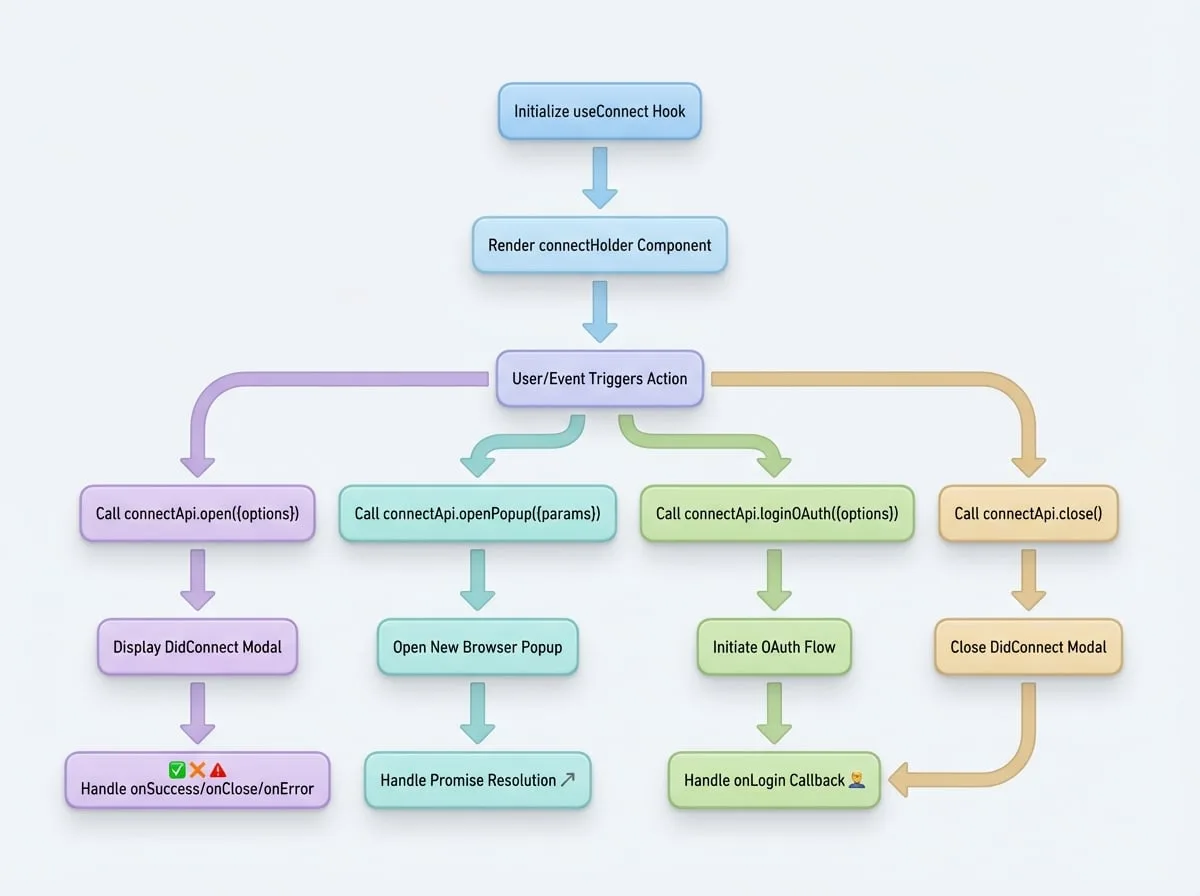
Setup
To use the hook, import it and call it within your component. Then, ensure you render the connectHolder somewhere in your application, preferably at a top-level component to ensure the modal can overlay all other content.
Basic Setup
import React from 'react';
import { useConnect } from '@arcblock/did-connect-react';

function MyComponent() {
  // 1. Initialize the hook
  const { connectHolder, connectApi } = useConnect();

  const handleLogin = () => {
    // 2. Use the API to open the modal
    connectApi.open({
      action: 'login',
      onSuccess: (result) => {
        console.log('Login successful!', result);
      },
      onClose: () => {
        console.log('Modal closed by user.');
      }
    });
  };

  return (
    <div>
      <button type="button" onClick={handleLogin}>
        Login with DID
      </button>

      {/* 3. Render the holder component */}
      {connectHolder}
    </div>
  );
}

export default MyComponent;
API Reference
The connectApi object provides the following methods to control the connection process.
connectApi.open(options)
This is the primary function to trigger and display the DidConnect modal. It accepts a single options object to configure the behavior, appearance, and callbacks for the connection session.
Parameters (options)
- action
string(required) — The purpose of the connection request, e.g., login, claim, sign, etc. This determines the workflow within the wallet. - onSuccess
(result: object) => void— Callback function executed when the user successfully completes the action in their wallet. The result object contains the response from the wallet. - onClose
() => void— Callback function executed when the user manually closes the modal without completing the action. - onError
(error: any) => void— Callback function executed if an error occurs during the process, such as a timeout or a network issue. - messages
ConnectMessages— An object to customize the text displayed in the modal. See ConnectMessages type for details.- title
string— Modal title. - scan
string— Text accompanying the QR code. - confirm
string— Text for the confirmation step. - success
ReactNode— Content for the success screen.
- title
- popup
boolean(default:true) — If true, the UI is displayed as a modal dialog. If false, it renders inline, requiring containerEl to be set. - containerEl
Element— A DOM element where the DidConnect component will be rendered if popup is set to false. - closeTimeout
number(default:2000) — The delay in milliseconds before the modal automatically closes after a successful connection. - checkInterval
number(default:2000) — The interval in milliseconds for polling the server to check the session status. - checkTimeout
number(default:300000) — The total time in milliseconds before the connection attempt times out. - extraParams
object(default:{}) — Any extra parameters to be included in the session creation request, which can be retrieved on the server-side.
connectApi.close()
Manually closes the DidConnect modal. The modal closes automatically on success or user cancellation, but you can call this function if you need to close it programmatically for other reasons.
// Example: Close the modal after a short delay in the success callback
connectApi.open({
  action: 'login',
  onSuccess: () => {
    showTemporarySuccessMessage();
    setTimeout(() => {
      connectApi.close();
    }, 1500);
  },
  closeTimeout: 999999 // Prevent auto-close
});
connectApi.openPopup(params, options)
This function provides an alternative connection method that opens the DID Connect flow in a new browser popup window instead of a modal within the current page. This is useful for certain OAuth-like flows or when integrating with sites where you cannot inject a modal.
Parameters
- params
ConnectProps(required) — Similar to the open method's options. A key difference is that params.extraParams.provider is required to identify the authentication method (e.g., 'github', 'google'). - options
object— Configuration for the popup window itself.- baseUrl
string— The base URL for constructing the popup URL. - locale
string(default:en) — The locale for the popup content. - popupOptions
object— Options passed directly towindow.open()for customizing the popup's size and features.
- baseUrl
Usage
The openPopup function returns a Promise that resolves with the authentication data on success or rejects on failure or cancellation.
const handleGithubLogin = async () => {
  try {
    const result = await connectApi.openPopup({
      action: 'login',
      onSuccess: () => console.log('This callback is also triggered'),
      extraParams: { provider: 'github' } // This is required
    });
    console.log('Login successful via popup:', result);
  } catch (err) {
    if (err.message === 'Popup closed') {
      console.log('User closed the popup window.');
    } else {
      console.error('An error occurred:', err);
    }
  }
};
connectApi.loginOAuth(options)
This is a helper function to directly initiate an OAuth login flow. It's a lower-level utility that is internally used by other parts of the library.
Parameters (options)
- provider
string(required) — The OAuth provider to use, e.g., 'github', 'google'. - action
string(required) — The action, typically 'login'. - extraParams
object— Additional parameters for the OAuth flow. - onLogin
function(required) — Callback function executed upon successful login.