When the interface changes, the work should remain

When an answer in ChatGPT becomes something you can operate, a natural first question is whether we will still need to build interfaces ourselves.
My first question is slightly different. If that interface looks different tomorrow, can a person and an agent continue the work they started today?
Both questions matter. One concerns how quickly software can appear. The other concerns whether the result can become a system we actually rely on.
On October 7, 2026, OpenAI introduced Intelligent UI in ChatGPT as part of its GPT-6 release. Answers can include interactive components that appear progressively during generation. OpenAI describes a streamable component library and a compiler that processes the emerging interface. The model also judges when interaction is useful and when text is enough. The announcement announces the capability rolling out in ChatGPT, rather than publishing a protocol specification from which someone could implement another compatible client.
That distinction matters, but it is not a reason to dismiss the release. Choosing the right form for an answer may be harder than drawing another component. Knowing when to offer an adjustable chart, an interactive view or simply a paragraph is a substantial part of what makes Generative UI interesting.
I am preparing a keynote about AFS-UI, and I want to reveal something early in the talk: the slides the audience is looking at are themselves an AFS-UI application. The site hosting the accompanying learning material is built with the same system.
I expect some people to wonder what is unusual about that. It looks like a website showing slides.
Good. The interesting part will not necessarily be visible in a screenshot.
An answer becomes an interface. What happens next?
Imagine planning a trip with an AI. It produces an itinerary you can rearrange. You change the dates, remove a hotel and leave one reservation undecided. Then you ask for a layout that works better on your phone.
You do not want your confirmed arrangements regenerated along with the layout. Nor should the next agent taking over have to guess from the screen which items you approved, which remain suggestions and what each button actually changes.
The travel example makes the distinction concrete: generating an interface and keeping work intact through repeated interface changes are different engineering tasks.
It would be wrong to say that today's interactive answers have no state. OpenAI's help documentation says some components preserve state when the same chat is refreshed, although that state does not carry between chat threads. The useful questions are more specific. What object owns the state? Within what scope does it exist? Who may change it? After a different presentation appears, does an operation still refer to the same object?
Older software had to answer these questions too. Generative UI makes them more urgent by making change much more frequent. An interface that once changed every few months might now change several times in one conversation. Relying on someone to remember which button corresponds to which API becomes less comfortable.
Several approaches are making different parts of this problem explicit.
MCP Apps lets a tool provide an interactive interface inside a supporting host. The tool declares a UI resource, the host renders it in an isolated environment, and the interface can exchange messages, invoke tools and pass context. That addresses a practical need: bringing a tool provider's experience into the AI application a person is already using.
MCP-UI belongs in that history. Its project now provides implementation tools for MCP Apps alongside experimental and compatibility work. Presenting MCP-UI and MCP Apps as unrelated competing standards would obscure their relationship.
A2UI draws another useful boundary. It sends a declarative description that a client renders using approved components. Data binding and interaction feedback are part of the design; this is not merely a format for static cards. The client retains responsibility for the concrete component implementation and appearance.
These approaches can be combined. A2UI's own documentation discusses working with MCP Apps. And OpenAI's public description of Intelligent UI does not establish whether its internal implementation uses any particular comparable protocol. We should not turn a guess about those internals into a fact.
I find it more useful to ask which boundary each approach emphasizes:
| Approach | The boundary it primarily makes explicit | What the name alone does not establish |
|---|---|---|
| ChatGPT Intelligent UI | Choosing and generating an interactive presentation within an answer | A published general UI protocol that independent hosts can implement |
| MCP Apps, including relevant MCP-UI implementations | How a tool-provided interface enters and interacts with its host | Uniform addressing and lifecycle rules for every business object |
| A2UI | Descriptions, data binding and actions between a generator and a rendering client | A common operational namespace for every external resource |
| AFS-UI | Describing, addressing and operating UI within AFS context | Persistence, authorization or concurrency solved by paths alone |
One system may span several rows of this table. AFS-UI is worth discussing because of the layer behind the interface on which we have chosen to concentrate.
The old ideas worth keeping
I started with the Apple II. Later I wrote DOS programs, worked with character-based windows and Windows development, and used X Window on Unix workstations. Browsers followed, then dynamic pages, Ajax and front-end tools such as React.
As a list of old machines I have used, that story probably has limited value to a younger audience. Why should someone who has never used a green-screen terminal share my nostalgia?
But the questions that surprised me then are still easy to understand. Must a program run on the machine displaying it? Can I look at its work somewhere else? Why must every application decide for itself how its windows are arranged?
What stayed with me from X Window was that these responsibilities could be separated. An application could run somewhere other than the display receiving its output and supplying input. A window manager could take responsibility for placement and decoration. The display could be treated as a device connected to the system, rather than every application being imagined as something sealed inside its own local screen. The X documentation describes this division among clients, display servers and window managers.
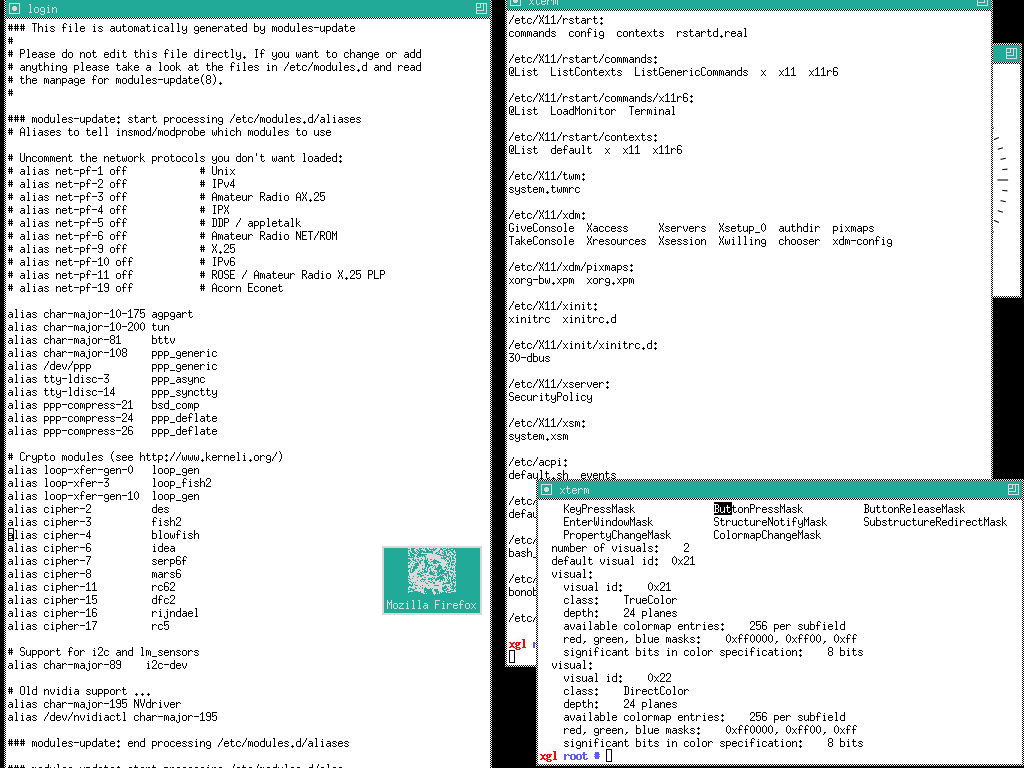
TWM screenshot by DoWhile, 2006, public domain. Original and attribution. A historical example of separate display and window-management responsibilities.

Unix and Plan 9 supplied another lasting idea: the namespace. Resources with different implementations can still be found through a consistent way of naming them. Plan 9 carried that idea into the organization of a distributed computing environment. Its original paper is particularly interesting to revisit now that we are again designing resources, tools and context for computing agents.
Filesystems have not stayed unchanged for decades, and file paths are not the best representation for every kind of data. But giving something a name that can be resolved, while separating that name from its implementation, has survived a great deal of technological change.
Open the interactive interface-history timeline to browse photographs, eras and side stories. You do not need to read an entire history of interfaces to follow this argument.
That is the question behind my keynote title, What Endures When Everything Evolves? What deserves to last may be neither a particular style of window nor a front-end framework. It may be a convention that keeps one kind of change from disturbing another.
AFS-UI borrows the separation of computation and display from X Window, and uniform addressing from filesystems. It applies those ideas under a new condition: people are no longer the only users of an interface. Agents use it too.
A person sees a control, a status and a piece of work in progress. An agent should also have a structured way to find those things and discover their supported operations, without having to infer them from pixels each time. Visual understanding remains valuable. Existing sites can also be operated through the DOM, accessibility trees or APIs. Our question is whether suitable access for both people and agents can be an architectural starting point.
Follow one address
Set the acronyms aside for a moment. Here is an actual experiment we prepared for the talk.
A small interface contains a status reading “Preparing the keynote.” In its running Web Device session, that text node can be read as structured data. Abbreviate the current session's path as S, and its address is:
S = /dev/ui/web/sessions/<current-session>
S/tree/demo-status
The result includes an ID, a node type and its content. With styling properties omitted, it looks like this:
{
  "id": "demo-status",
  "type": "text",
  "props": { "content": "Preparing the keynote" }
}
The three experiment images were captured from one local AUP session on October 8, 2026, running ARC 2.0.0-beta.62. They record actual results; they are neither illustrations nor a live demonstration running inside this article.
We change the parent layout from a column to a row. The arrangement on screen changes. But demo-status remains the same node, and reading the same path returns the same text.

The parent's arrangement changed. The experiment did not delete, recreate or rename the status node.
Next, we update that node through the action exposed by the session:
exec S/.actions/aup_patch{
"ops": [{
"op": "update",
"id": "demo-status",
"props": { "content": "Ready for review" }
}]
}The connected browser displays the new text without a refresh. Reading S/tree/demo-status again returns “Ready for review.”

Two changes have been kept distinct: rearranging the presentation and updating the content of a known node. After the operation, we can return to the same address to check the result. An agent does not need screen coordinates to recognize that text.
It is a small experiment, deliberately so. This node belongs to a UI session, not to a persisted business task. A session path is not a permanent business address. The experiment does not demonstrate survival across restarts, interchangeable providers at no cost or synchronization across an audience's displays. Giving an object a path does not confer those properties.
It does, however, move the discussion from what an AI can draw to what a system can operate on and how the result can be checked.
Now the names are easier to explain. AFS, the Agentic File System, provides a filesystem-like interface for organizing and accessing operational context. Different providers expose that context; underneath there may be files, services or live system resources. Paths place them in an explorable space without requiring everything to become an ordinary file on disk.
AFS-UI brings interfaces into that operational context. Their structure can be addressed, a display device presents it to people, and programs interact through supported operations. Calling a UI a projection means it is a presentation of context. It does not mean that every pixel becomes a file.
AUP, the Agentic UI Protocol, describes UI structure and the related interaction contract. Web Device is a concrete display-device implementation that renders those descriptions in a browser. Protocol and device occupy different layers: changing the device should not require renaming business concepts. What a device can render, and how it handles input, still requires explicit capabilities and implementation. The AFS-UI learning material explores these layers in more detail.
There is a fair objection here. Couldn't a normal website with an API do this?
Yes.
If a website and an agent use the same backend object, operations have stable meanings, authorization is enforced server-side and results can be read back, that system already has many of the properties we care about. AFS-UI does not need to deny good web architecture in order to have a purpose.
Our choice is to put more of the shared conventions for discovery, addressing and operations at the system layer. As interfaces, providers and agents multiply, we want fewer pairs of integrations to explain from scratch how this thing here corresponds to that thing over there. Whether the convention saves work must be tested in implementation and maintenance. An architecture diagram cannot settle it.
A stronger example would connect the view to an actual business task. A person pressing “complete” and an agent invoking the corresponding operation should reach the same business rules. Rearranging the display should not change the task's identity. That requires the business provider, authorization and state lifecycle to work together. The text-node experiment demonstrates part of the mechanism, not validation of that entire application contract.
More freedom for the generator makes some agreements more important
Return to OpenAI's Intelligent UI. It makes a future easier to see in which an interface need not be one set of pages designed in advance for everyone. The system can choose what presentation will help with the current question.
I like that direction. But a generator's freedom is most useful where the system can tolerate change.
It can choose whether a status belongs on the left or the right, whether a chart is clearer than a table, and what a phone should show first. A different drawing should not quietly change an operation's meaning or expand the user's permissions. A control labeled “preview” must not become a real submission in the next generation while still inviting the user to think of it as a preview.
A path helps identify an object; it does not replace the rules governing it. Knowing an address is not permission to act. A confirmation in the interface cannot substitute for server-side validation. Concurrent edits, undo, reconnect behavior and different device capabilities do not disappear because we choose a filesystem-like interface.
So I would not stop evaluating Generative UI at whether the latest output looks good. It needs to look good. We also need to try changing the layout and checking whether the original operation target can still be found. We should change the agent and see whether it can discover permitted actions rather than guess an endpoint. If an action is rejected, does the interface admit that? If its context has expired, can the system explain why work cannot continue, rather than generate another reassuring screen?
AFS-UI should face those tests too. Uniform addressing has a cost. Names must be designed, operational meanings maintained and capability differences handled. We accept that cost because we believe it can let interfaces, agents and context evolve with less disruption to one another. Working systems must continue to justify that belief.
That is also why I want to deliver this keynote in AFS-UI. The slides are not an extra demo introduced after the product explanation. They are there from the beginning. The audience can use the result before remembering what AFS, AUP or Web Device stands for. Once the structure becomes clear, they can look at the same screen differently.
OpenAI is making it more visible that an answer can become an interface you operate. The question we want to pursue is how people and agents keep collaborating on the same work as those interfaces change.
Generate a new interface. Keep it clear what has already been decided, which object is being operated on and what the next action means.
Sources and further reading: descriptions of Intelligent UI availability and state behavior reflect public documentation checked on October 8, 2026, and may change. See the OpenAI announcement, Intelligent UI help page, MCP Apps documentation, MCP-UI and A2UI. The keynote slides and AFS-UI learning path accompany this essay.
Referenced here
Products
-
ARC
active
The runtime for Blocklets. It gives a developer a place to run an application described as a Blocklet, together with the resources that Blocklet declares it needs.