Overview
Welcome to the documentation for @blocklet/did-space-react. This library provides a set of React components designed to streamline the integration of DID Space into your applications. With these tools, you can effortlessly enable users to connect their DID Space and display relevant information, creating a seamless and decentralized user experience.
The primary goal of this package is to abstract away the complexities of DID Space interactions, offering simple, reusable components that handle connection flows, data display, and status updates.
Core Components#
This package is built around two central components that cover the essential functionalities for DID Space integration:
DIDSpaceConnect
A button component that initiates the connection process to a DID Space. It manages authentication flows and handles both initial connections and reconnections for users.
DIDSpaceConnection
A versatile display card for showcasing the details of a connected DID Space, including its name, DID, connection status, and other relevant information. It is designed to be easily customizable.
How It Works#
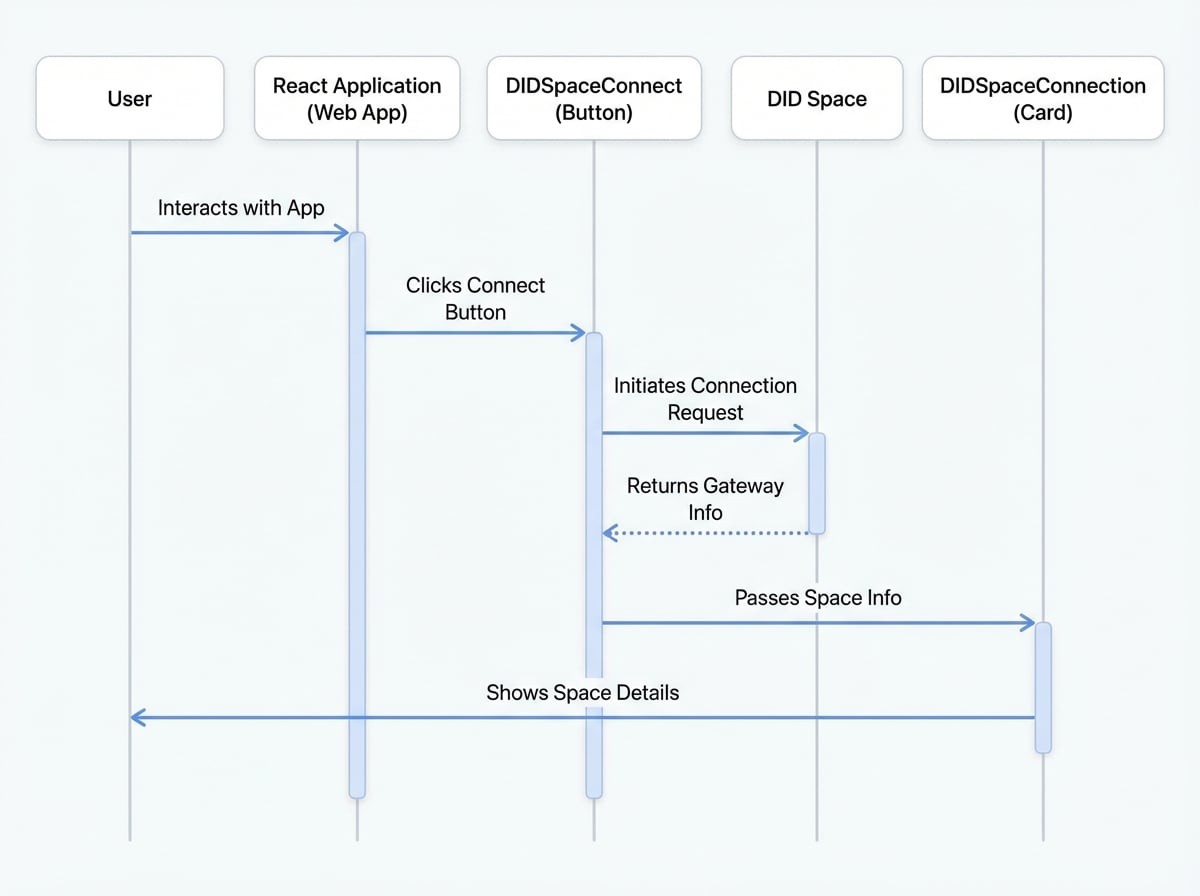
The components work together to provide a complete user journey. The DIDSpaceConnect component handles the authentication and connection logic, while the DIDSpaceConnection component visualizes the result of that connection.
Key Features#
- Simplified Integration: Get up and running quickly with minimal configuration.
- Built-in UI: Provides ready-to-use components for connection and display, saving development time.
- Flexible & Customizable: Easily tailor the appearance and functionality of components, such as adding custom action buttons or footer content to the
DIDSpaceConnectioncard. - Session-Aware: Automatically associates the connected DID Space with the user's session, simplifying data persistence.
- Responsive Design: Components are designed to work seamlessly across both desktop and mobile devices.
Next Steps#
Now that you have an overview of what @blocklet/did-space-react offers, you're ready to start building. Head over to the Getting Started guide for a step-by-step tutorial on installing the package and implementing your first DID Space connection.