Overview
Welcome to the DID Space Client SDK for JavaScript! This is a powerful, modern library designed for Node.js environments, enabling you to seamlessly interact with DID Spaces. If you're building applications where users truly own and control their data, you're in the right place.
This SDK provides a simple yet comprehensive interface for managing files, synchronizing folders, and handling other data objects in a decentralized storage system that is cryptographically secure and user-centric.
Key Features#
Complete Object Management
Perform all essential CRUD (Create, Read, Update, Delete) operations on individual files and data objects with a suite of intuitive commands.
Powerful Folder Synchronization
Effortlessly keep local directories in sync with remote directories in a DID Space using high-level `SyncFolderPush` and `SyncFolderPull` commands.
Specialized NFT Storage
Handle NFT assets with a dedicated command that simplifies uploading the asset file and its associated DID Document, ensuring data integrity.
Secure by Design
All API requests are cryptographically signed using a wallet, ensuring that every operation is authenticated and verifiable, protecting data from unauthorized access.
Core Architecture#
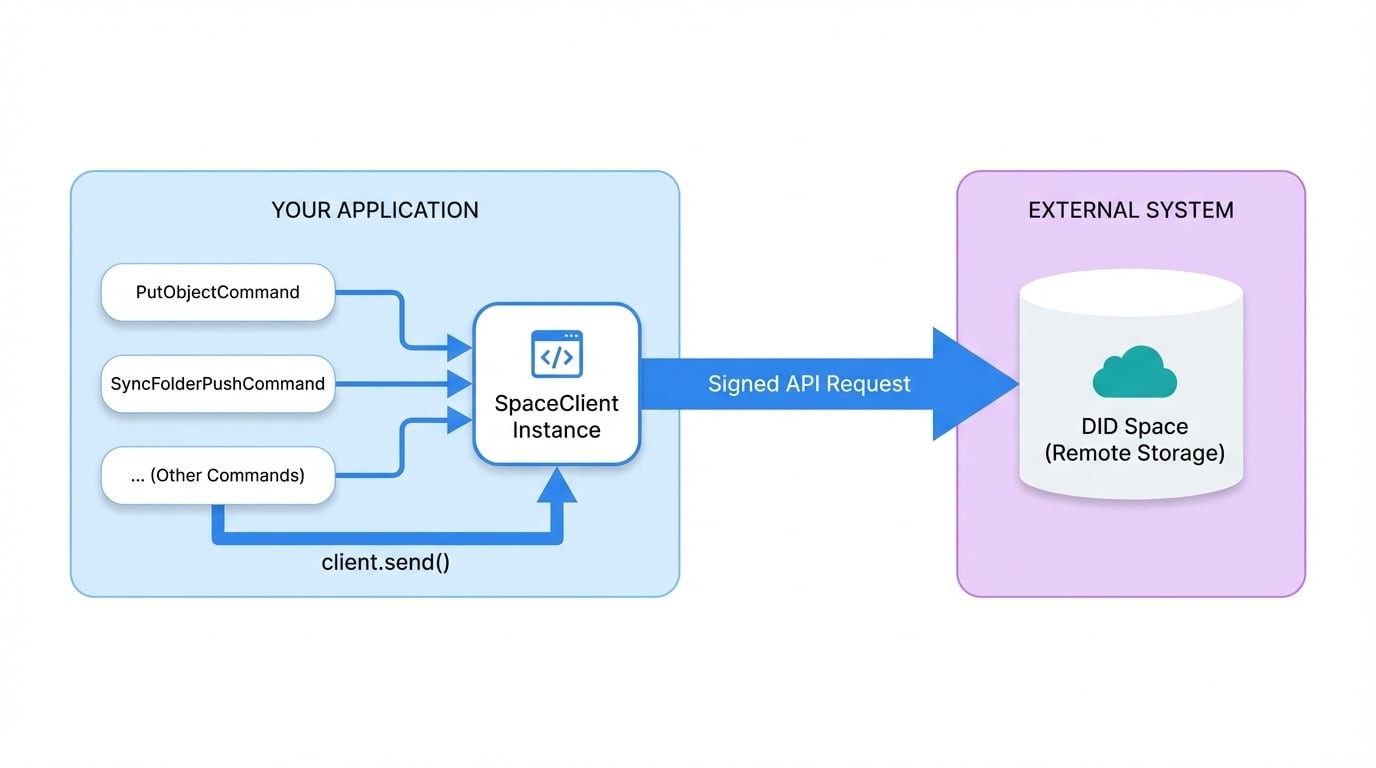
The SDK is built on a simple and robust command-based architecture. You interact with the API through two primary components:
SpaceClient: The main entry point of the SDK. You instantiate it with your configuration and authentication credentials.- Commands: These are classes that represent specific actions you want to perform, such as uploading a file or listing a directory's contents. Each command encapsulates the parameters and logic for its respective operation.
Your application creates a command object, populates it with the necessary input, and then passes it to the SpaceClient's send method to execute the request.
SDK Usage Pattern
import { SpaceClient, PutObjectCommand } from '@blocklet/did-space-js';
import getWallet from '@blocklet/sdk/lib/wallet';

async function uploadFile() {
  // 1. Initialize the client with authentication details
  const client = new SpaceClient({
    auth: {
      endpoint: 'https://www.didspaces.com/app/api/space/...',
      wallet: getWallet(),
    },
  });

  // 2. Create a command with its specific input
  const command = new PutObjectCommand({
    key: 'documents/hello.txt',
    data: 'Hello, DID Space!',
  });

  // 3. Send the command and receive the output
  const output = await client.send(command);

  if (output.statusCode === 200) {
    console.log('File uploaded successfully!');
  } else {
    console.error('Upload failed:', output.statusMessage);
See all 4 lines
This design pattern makes the SDK highly modular and easy to extend. Each command is self-contained, making your code clean and organized.
How to Navigate This Documentation#
This documentation is structured to help you find the information you need, whether you're just starting or looking for specific details.
Next Steps#
Ready to start building? The best way to learn is by doing. Follow our Getting Started guide to install the SDK and make your first API call.