Session Management (SessionProvider)
The SessionProvider is the cornerstone of the @arcblock/did-connect-react library. It's a React Context Provider that encapsulates all session-related logic, state, and actions. By wrapping your application with SessionProvider, you make the user's session information and authentication methods available to any component in your application tree, without having to pass props down manually.
This component handles everything from storing session tokens and managing user data to orchestrating login/logout flows and refreshing sessions automatically.
How It Works#
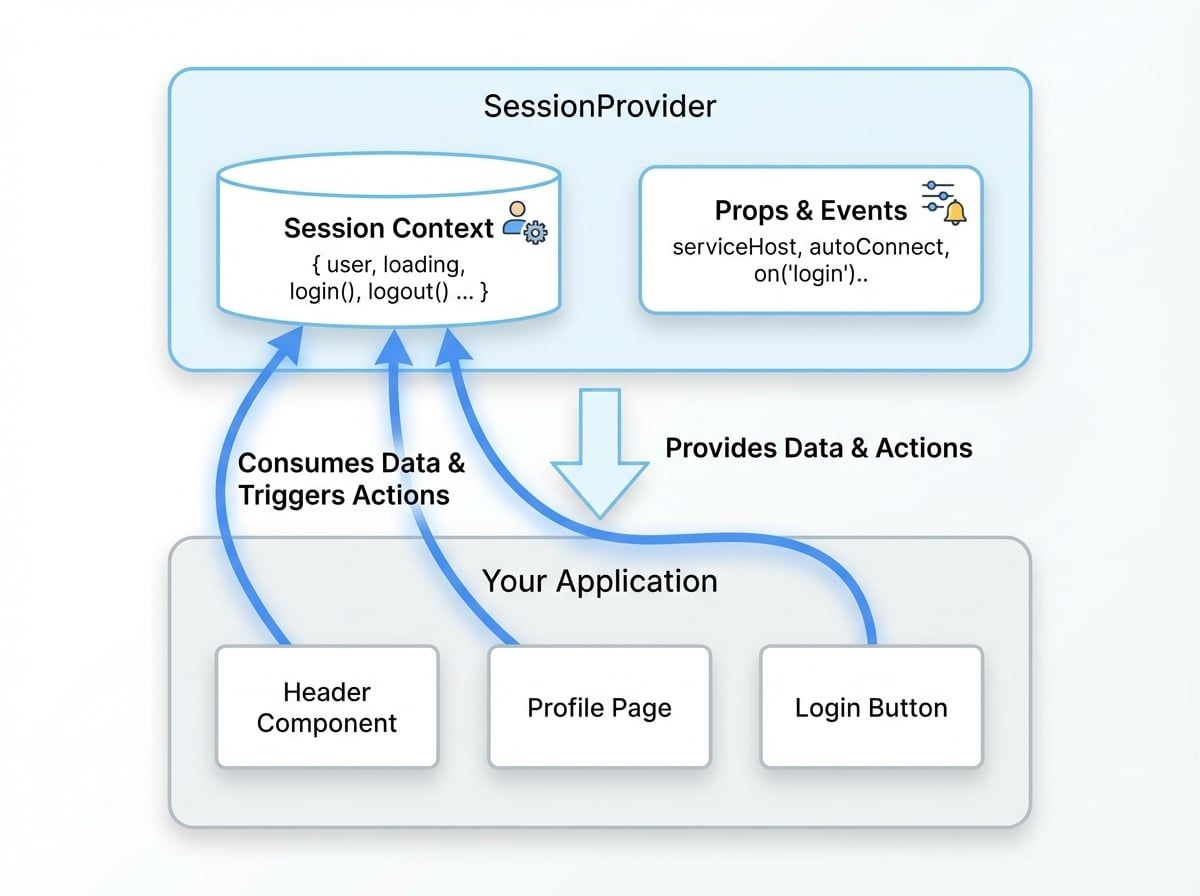
SessionProvider creates a session context that holds the current user's state (user object, loading status, etc.) and provides functions to modify that state (e.g., login, logout). Any component nested within SessionProvider can subscribe to this context to access this data and trigger authentication actions.
Here is a diagram illustrating the basic architecture:
Getting Started#
To use the session management features, you first need to import and wrap your application with SessionProvider. The library exports factory functions to create a configured provider.
Basic Setup#
The most common way to set up the provider is by using createAuthServiceSessionContext, which is pre-configured for applications running within the ArcBlock ecosystem (Blocklets).
App.js
import React from 'react';
import { createAuthServiceSessionContext } from '@arcblock/did-connect-react/lib/Session';
import AuthButton from './AuthButton';

// Create the SessionProvider and a hook to access the context
const { SessionProvider, SessionContext } = createAuthServiceSessionContext();

export const useSession = () => React.useContext(SessionContext);

export default function App() {
  return (
    <SessionProvider>
      <div className="App">
        <h1>Welcome to DID Connect</h1>
        <AuthButton />
      </div>
    </SessionProvider>
  );
}
AuthButton.js
import React from 'react';
import { useSession } from './App';

export default function AuthButton() {
  const { session } = useSession();

  if (session.loading) {
    return <div>Loading...</div>;
  }

  if (session.user) {
    return (
      <div>
        <p>Welcome, {session.user.fullName || session.user.did}</p>
        <button onClick={() => session.logout()}>Logout</button>
      </div>
    );
  }

  return <button onClick={() => session.login()}>Login</button>;
}
In this example, createAuthServiceSessionContext generates a SessionProvider. We wrap our App with it, and now any child component, like AuthButton, can use the useSession hook to access session data and functions.
SessionProvider Props#
You can configure the SessionProvider's behavior by passing it various props.
The Session Context Object#
When you consume the SessionContext, you get an object containing the session state and API. The primary property is session, which holds all the data and methods you'll interact with.
State Properties#
These are read-only properties that describe the current state of the user session.
Action Methods#
These are functions you can call to initiate authentication flows or manage the session.
Initiates the user login process by opening the DID Connect UI. It accepts optional callbacks and parameters.
Logs the current user out, clearing the session from storage. It accepts an optional callback function to be executed upon completion.
Allows a logged-in user to switch to a different DID account. It re-opens the DID Connect UI with a context for switching accounts.
For users logged in via social providers (OAuth) or Passkeys, this function initiates a flow to connect a DID Wallet to their existing account.
Manually triggers a refresh of the user's session data from the server. Useful for fetching updated profile information or permissions.
Opens the DID Connect UI to allow the user to switch between different profiles within the same DID account (e.g., personal, work).
Opens the DID Connect UI to allow the user to switch between different passports, which may represent different sets of credentials or roles.
Initiates a connection to the user's DID Space, requesting full access permissions. This is often required for applications that need to read and write data to the user's personal data store.
A higher-order function that wraps another function, requiring the user to complete a secondary authentication step (e.g., re-enter password, use passkey) before the wrapped function is executed. This is ideal for protecting sensitive actions.
Event Subscription#
The context also provides an events object, which is an instance of EventEmitter3. You can use it to subscribe to various lifecycle events of the session.
EventListener.js
import React, { useEffect } from 'react';
import { useSession } from './App';

function EventListener() {
  const { events } = useSession();

  useEffect(() => {
    const handleLogin = (result) => {
      console.log('User logged in:', result.user.did);
    };

    const handleLogout = () => {
      console.log('User logged out');
    };

    events.on('login', handleLogin);
    events.on('logout', handleLogout);

    // Cleanup listeners on component unmount
    return () => {
      events.off('login', handleLogin);
      events.off('logout', handleLogout);
    };
  }, [events]);
See all 2 lines
Available events include login, login-failed, logout, change, bind-wallet, switch-passport, and more.
Advanced Customization#
For scenarios that require different storage mechanisms or more granular control, you can use the generic createSessionContext factory.
customSession.js
import { createSessionContext } from '@arcblock/did-connect-react/lib/Session';

const { SessionProvider, SessionContext } = createSessionContext(
  'my_app_session_token', // Custom storage key
  'ls',                   // Use localStorage instead of cookies
  {},
  {
    rolling: false,         // Disable automatic token refresh
  }
);

// ... export and use as needed
This allows you to fine-tune session behavior, such as changing the storage engine to localStorage ('ls') or cookie, or adjusting token refresh policies.