通知服务
通知服务是 Blocklet SDK 的核心组件,使您的应用程序能够向用户发送各种类型的通知并订阅实时事件。该服务充当底层 ABT Node 通知功能的接口,处理从简单的用户消息到发送至 DID 钱包、电子邮件和其他渠道的丰富交互式通知的所有事务。
无论您需要提醒用户重要事件、发送交易性电子邮件,还是向所有连接的客户端广播消息,通知服务都提供了一个统一且简单的 API。
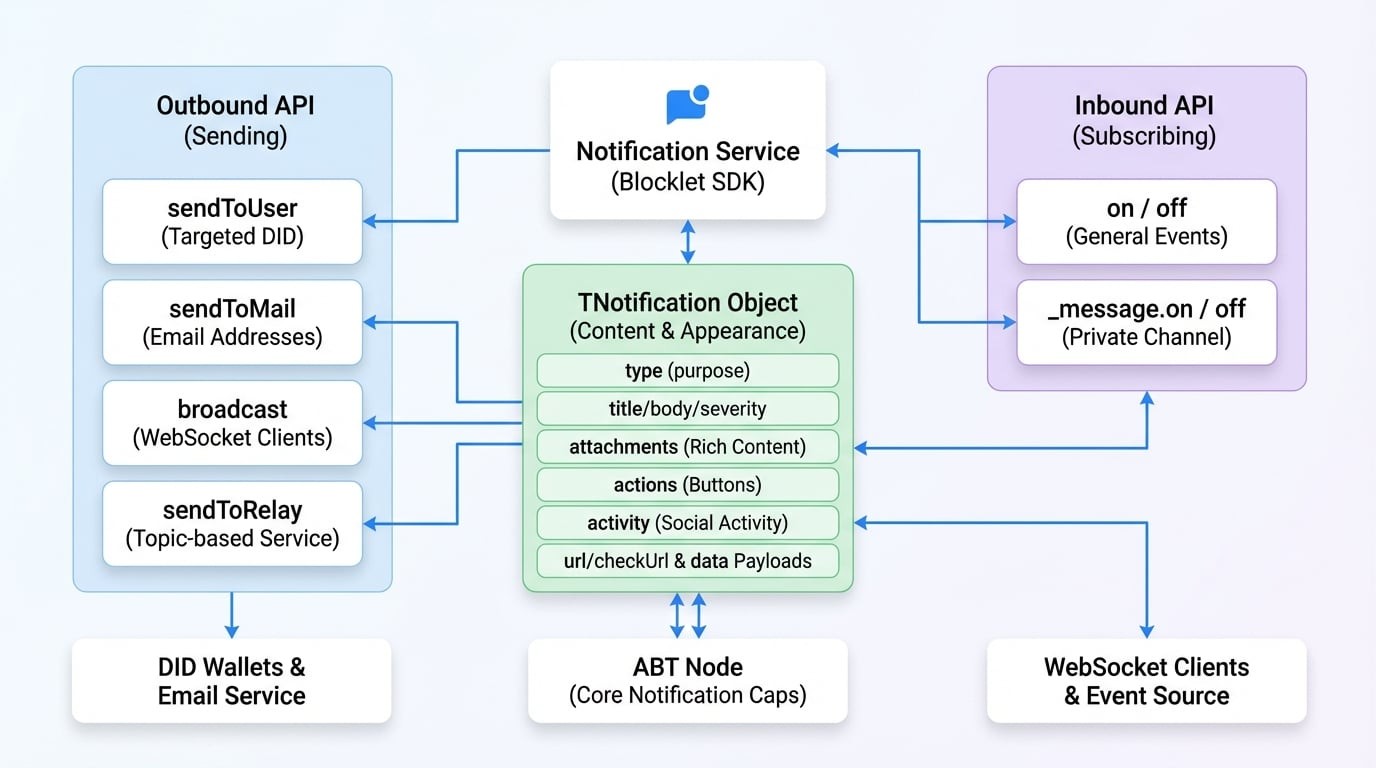
API 参考#
sendToUser#
通过 DID 直接向一个或多个用户发送通知。这是用于定向用户通信的主要方法。
参数#
返回值#
示例#
Send a simple notification
import notification from '@blocklet/sdk/service/notification';

async function notifyUser(userDid) {
  try {
    const result = await notification.sendToUser(userDid, {
      type: 'notification',
      title: 'Hello from SDK!',
      body: 'This is a test notification sent to a specific user.',
      severity: 'info',
    });
    console.log('Notification sent successfully:', result);
  } catch (error) {
    console.error('Failed to send notification:', error);
  }
}示例响应#
{
  "status": "ok",
  "message": "通知已发送给 1 个用户。"
}sendToMail#
通过电子邮件向一个或多个收件人发送通知。通知对象的结构与 sendToUser 相同。
参数#
返回值#
示例#
Send an email notification
import notification from '@blocklet/sdk/service/notification';

async function emailUser(userEmail) {
  try {
    const result = await notification.sendToMail(userEmail, {
      type: 'notification',
      title: 'Your Weekly Report is Ready',
      body: 'Please log in to your dashboard to view the report.',
    });
    console.log('Email sent successfully:', result);
  } catch (error) {
    console.error('Failed to send email:', error);
  }
}示例响应#
{
  "status": "ok",
  "message": "电子邮件发送成功。"
}broadcast#
向连接到特定 WebSocket 频道的客户端广播消息。默认情况下,它会发送到 blocklet 的公共频道。
参数#
控制广播的选项。
返回值#
示例#
Broadcast a message
import notification from '@blocklet/sdk/service/notification';

function broadcastUpdate() {
  notification.broadcast(
    {
      type: 'passthrough',
      passthroughType: 'system_update',
      data: { message: 'A new version is available. Please refresh.' },
    },
    { event: 'system-update' }
  );
}示例响应#
{
  "status": "ok",
  "message": "广播已发送。"
}sendToRelay#
通过中继服务将消息发送到特定主题,从而实现不同组件甚至不同 blocklet 之间的实时、基于主题的通信。
参数#
返回值#
示例#
Send a relay message
import notification from '@blocklet/sdk/service/notification';

async function publishNewArticle(article) {
  try {
    await notification.sendToRelay('articles', 'new-published', {
      id: article.id,
      title: article.title,
    });
    console.log('Relay message sent.');
  } catch (error) {
    console.error('Failed to send relay message:', error);
  }
}示例响应#
{
  "status": "ok",
  "message": "中继消息已发送。"
}on#
订阅从 ABT Node 推送的通用事件,例如内部 blocklet 事件或与团队相关的事件。通知服务为此功能使用 EventEmitter 接口。
参数#
示例#
Listen for team member removal
import notification from '@blocklet/sdk/service/notification';
import { TeamEvents } from '@blocklet/constant';

function onMemberRemoved(data) {
  console.log('Team member removed:', data.user.did);
  // Add logic to update application state
}

// Subscribe to the event
notification.on(TeamEvents.MEMBER_REMOVED, onMemberRemoved);off#
移除先前用 on 添加的事件监听器。
参数#
示例#
// To unsubscribe from the previous example
// notification.off(TeamEvents.MEMBER_REMOVED, onMemberRemoved);_message.on#
这是一个专门用于监听直接发送到你的 blocklet 私有消息频道的消息的特殊用途监听器。它对于处理旨在用于 blocklet 本身的直接响应或命令非常有用。
参数#
示例#
Listen for direct messages
import notification from '@blocklet/sdk/service/notification';

function handleDirectMessage(response) {
  console.log('Received direct message:', response);
}

// The 'message' event from the messageChannel is emitted with the response.type as the event name
// e.g., if response.type is 'payment_confirmation', the event here is 'payment_confirmation'
notification._message.on('payment_confirmation', handleDirectMessage);_message.off#
移除用 _message.on 添加的直接消息监听器。
参数#
通知对象 (TNotification)#
通知对象是一个灵活的数据结构,用于定义通知的内容和外观。其结构可以针对不同的用例进行定制。
通知的主要类型,它决定了其总体目的和结构。
一个富内容附件数组。这些附件在 DID 钱包中呈现为块。
一个与通知一同显示的操作按钮数组。
一个描述社交活动的对象,例如评论或关注。这是一种表示社交互动的结构化方式。