Making API Requests
The @blocklet/js-sdk provides powerful, pre-configured helpers for making API requests to your Blocklet services. These helpers, createAxios and createFetch, are designed to handle the complexities of authentication and session management automatically, so you can focus on building your application's features.
Key features include:
- Automatic Token Injection: Session tokens are automatically included in the
Authorizationheader. - Automatic Token Refresh: If a request fails with a 401 Unauthorized error, the SDK automatically attempts to refresh the session token and retries the original request once.
- CSRF Protection: The
x-csrf-tokenheader is attached to every request for enhanced security. - Base URL Handling: Requests are automatically prefixed with the correct component mount point, eliminating manual URL construction.
- Secure Response Verification: An optional security layer to verify the integrity of responses from the Blocklet server.
Using createAxios#
For developers who prefer the axios library, the createAxios function returns an axios instance with all the benefits of the SDK's request handling baked in. It supports all standard axios configurations and features.
Basic Usage#
Here's how to create an instance and make a simple GET request:
Basic Axios Request
import { createAxios } from '@blocklet/js-sdk';

// Create an axios instance managed by the SDK
const api = createAxios();

async function fetchData() {
  try {
    const response = await api.get('/api/users/profile');
    console.log('User Profile:', response.data);
  } catch (error) {
    console.error('Failed to fetch user profile:', error);
  }
}

fetchData();
In this example, createAxios configures the instance to automatically handle the authentication headers and token refresh logic. The request to /api/users/profile will be correctly routed to the component's backend.
Custom Configuration#
You can pass any valid axios configuration object to createAxios to customize its behavior, such as setting a custom base URL or adding default headers.
Custom Axios Configuration
import { createAxios } from '@blocklet/js-sdk';

const customApi = createAxios({
  baseURL: '/api/v2/',
  timeout: 10000, // 10 seconds
  headers: { 'X-Custom-Header': 'MyValue' },
});

async function postData() {
  const response = await customApi.post('/items', { name: 'New Item' });
  console.log('Item created:', response.data);
}
Using createFetch#
If you prefer a more lightweight solution based on the standard Web fetch API, the createFetch function is the perfect choice. It provides a wrapper around fetch that includes the same automatic token management and security features as the axios helper.
Basic Usage#
The createFetch function returns an async function that has a similar signature to the native fetch.
Basic Fetch Request
import { createFetch } from '@blocklet/js-sdk';

// Create a fetch instance managed by the SDK
const fetcher = createFetch();

async function fetchData() {
  try {
    const response = await fetcher('/api/users/profile');
    if (!response.ok) {
      throw new Error(`HTTP error! status: ${response.status}`);
    }
    const data = await response.json();
    console.log('User Profile:', data);
  } catch (error) {
    console.error('Failed to fetch user profile:', error);
  }
}

fetchData();
Custom Configuration#
You can pass a default RequestInit object to createFetch to set global options for all requests made with that instance. You can also override these options on a per-request basis.
Custom Fetch Configuration
import { createFetch } from '@blocklet/js-sdk';

// Set global options
const fetcher = createFetch({
  headers: {
    'Content-Type': 'application/json',
  },
});

async function postData() {
  const response = await fetcher('/api/items', {
    method: 'POST',
    body: JSON.stringify({ name: 'New Item' }),
  });
  const data = await response.json();
  console.log('Item created:', data);
}
Automatic Token Renewal Flow#
Both createAxios and createFetch handle session expiration gracefully. The diagram below illustrates the automated process that occurs when an API call is made with an expired token.
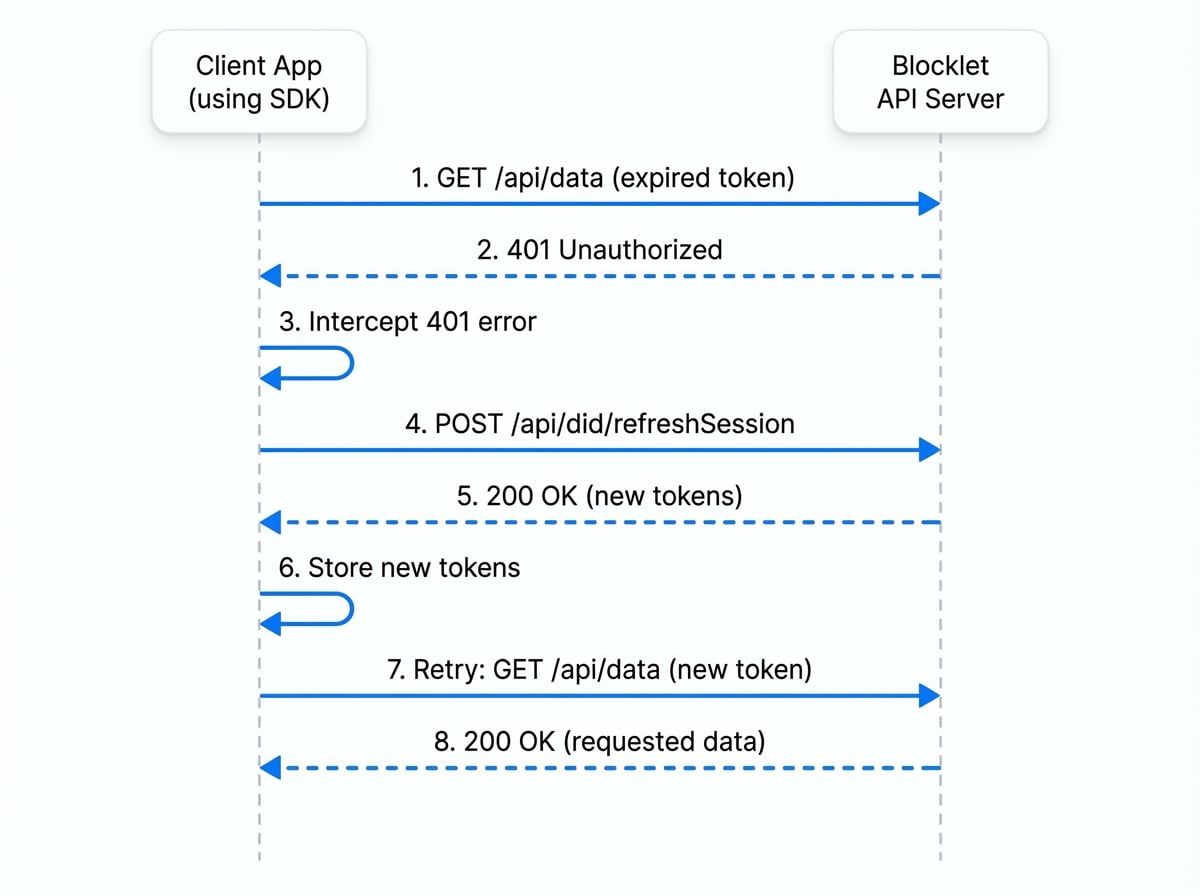
This entire flow is transparent to your application code, ensuring a seamless user experience without manual intervention.
Secure Requests#
For sensitive operations, you can enable an additional layer of security by verifying the signature of the API response. This ensures that the response was not tampered with between the server and the client. To enable this, set the secure option to true in your request configuration.
With createAxios#
Axios Secure Request
import { createAxios } from '@blocklet/js-sdk';
const api = createAxios();

// The SDK will verify the response signature.
// If verification fails, the promise will be rejected with an error.
const response = await api.get('/api/billing/details', { secure: true });
With createFetch#
Fetch Secure Request
import { createFetch } from '@blocklet/js-sdk';
const fetcher = createFetch();

const response = await fetcher('/api/billing/details', { secure: true });
// The response object is only returned if the signature is valid.
const data = await response.json();
Next Steps#
Now that you know how to make authenticated API requests, you may want to dive deeper into how the SDK manages user identity and sessions.