Authentication
The @blocklet/js-sdk is designed to make authentication seamless by automatically handling the complexities of token-based security. It manages session and refresh tokens behind the scenes, allowing you to focus on building your application's features.
This guide explains the automatic token renewal process and demonstrates how to use the AuthService to manage user authentication states, such as fetching profiles and logging out. For a detailed list of all available methods, please refer to the AuthService API Reference.
Automatic Session Token Renewal#
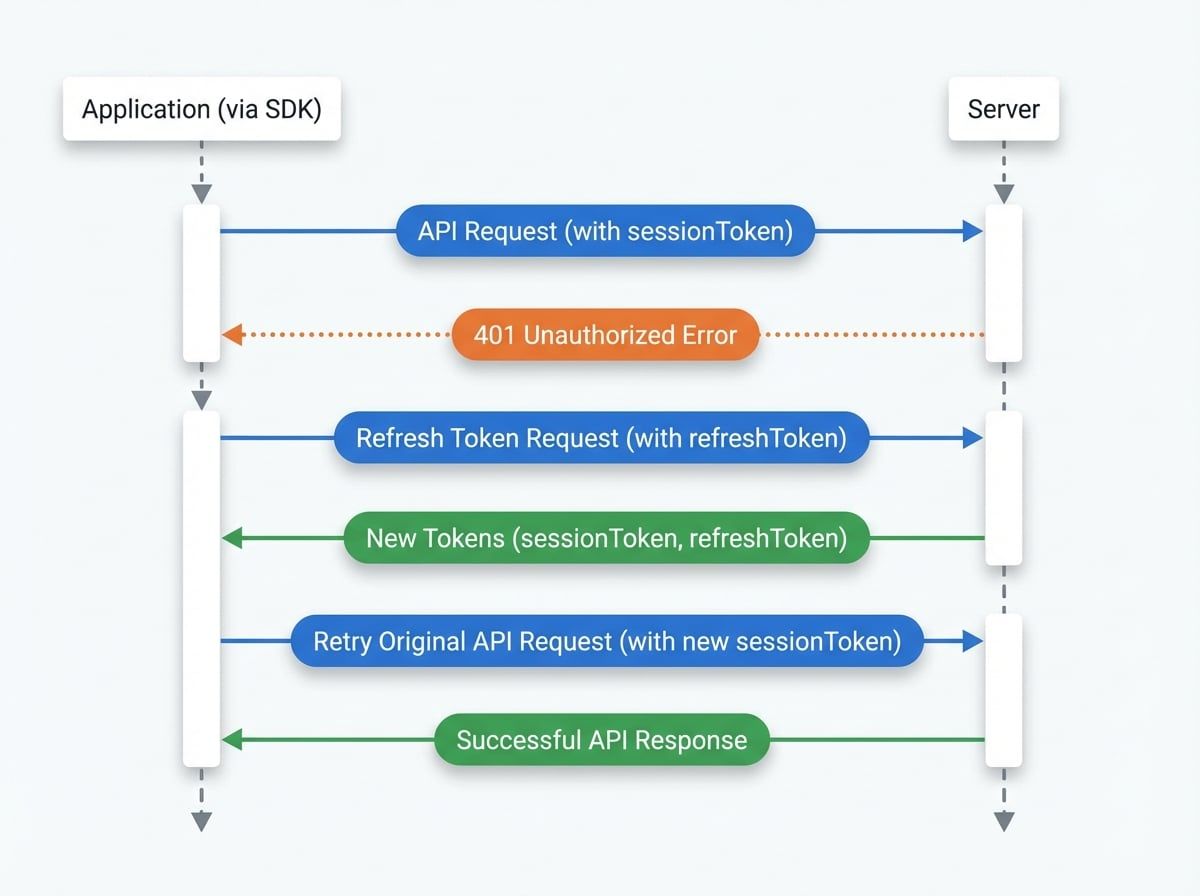
The SDK employs a standard and secure authentication flow using short-lived session tokens and long-lived refresh tokens. When you make an API call using the SDK's request helpers (see Making API Requests), the process is fully automated:
- Request Initiation: The SDK attaches the current
sessionTokento the authorization header of your API request. - Token Expiration: If the
sessionTokenhas expired, the server responds with a401 Unauthorizederror. - Automatic Refresh: The SDK's request interceptor catches this
401error. It then automatically sends the storedrefreshTokento the authentication endpoint to obtain a newsessionTokenandrefreshToken. - Request Retry: Once the new tokens are received and stored, the SDK transparently retries the original API request that failed. The new, valid
sessionTokenis used this time. - Successful Response: The server validates the new token and returns a successful response, which is then passed back to your application code.
This entire process is invisible to your application logic, ensuring that user sessions remain active without interrupting the user experience.
The diagram below illustrates this flow:
Managing User State with AuthService#
The AuthService provides a high-level API for common authentication and user management tasks. You can access it through the main SDK instance.
Getting the Current User's Profile#
To fetch the profile information of the currently logged-in user, use the getProfile method.
Getting the User Profile
import { getBlockletSDK } from '@blocklet/js-sdk';

const sdk = getBlockletSDK();

async function fetchUserProfile() {
  try {
    const profile = await sdk.auth.getProfile();
    console.log('User Profile:', profile);
    return profile;
  } catch (error) {
    console.error('Failed to fetch profile:', error);
  }
}

fetchUserProfile();
Logging Out#
The logout method invalidates the user's current session on the server. You can call it without arguments to log out the current device, or pass a visitorId to log out a specific session, which is useful for managing sessions across multiple devices.
Logging Out a User
import { getBlockletSDK } from '@blocklet/js-sdk';

const sdk = getBlockletSDK();

async function handleLogout() {
  try {
    // Logs out the current session
    await sdk.auth.logout();
    console.log('Successfully logged out.');
    // Redirect to the login page or update UI state
  } catch (error) {
    console.error('Logout failed:', error);
  }
}
Deleting a User Account#
For users who wish to delete their accounts, the SDK provides the destroyMyself method. This is a destructive and irreversible action that permanently removes the user's data.
Deleting the Current User's Account
import { getBlockletSDK } from '@blocklet/js-sdk';

const sdk = getBlockletSDK();

async function deleteAccount() {
  // It's crucial to confirm this action with the user
  if (window.confirm('Are you sure you want to delete your account? This action is irreversible.')) {
    try {
      const result = await sdk.auth.destroyMyself();
      console.log(`Account for DID ${result.did} has been deleted.`);
      // Perform cleanup and redirect the user
    } catch (error) {
      console.error('Failed to delete account:', error);
    }
  }
}
Next Steps#
Now that you understand how authentication works in the @blocklet/js-sdk, you might want to explore how to manage all of a user's active sessions.