Setup with AWS EC2
Running in AWS#
We provide a Blocklet Server AMI image to quickly run a server based on our AMI image when creating EC2.
Step 1: Find Blocklet Server AMI#
- Open the Amazon EC2 console page at https://console.aws.amazon.com/ec2/
- Select the
Images -> AMIpage in the sidebar - Select
Public Mirrorin the filter criteria - Enter
Blocklet Serverto search - Select the latest version of the mirror, the latest version is blocklet-server-1.8.26 as shown below:
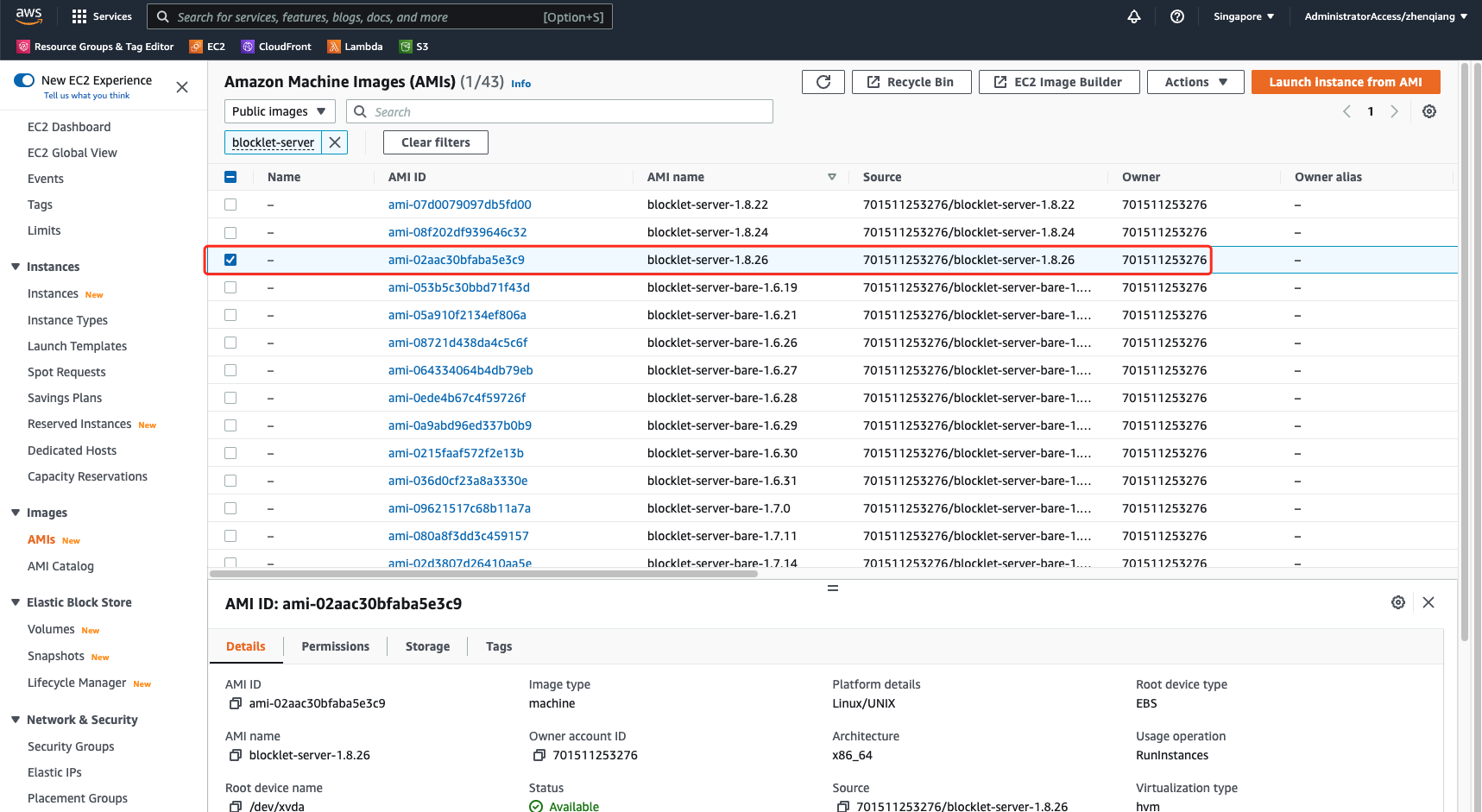
!!!Note: Do not select the blocklet-server-bare-xxx image,
- Click on "Launch instance from AMI"
Step 2: Set up security groups and other basic information#
- Fill in the instance name
- Select the instance type, the minimum memory requirement for Blocklet Server is 1G
- Select the secret key pair
- Configure the network security group, Blocklet Server requires open ports 80 and 443
- Configure storage, the recommended minimum storage is 20G
- Other configurations can be set according to the actual situation
- Click "Launch Instance", wait for the instance to start successfully
Step 3: Access the server via IP Echo address#
EC2 instances can be accessed through their public IP Echo addresses after they are started. For example, if the public IP is 192.168.0.10, then the IP Echo address is https://192-168-0-10.ip.abtnet.io/.