Stop Server
The blocklet server stop command gracefully shuts down the running Blocklet Server instance. This process includes stopping all running blocklets, the routing engine, core server processes, and any associated Docker containers.
Usage#
Basic Usage
blocklet server stop [options]Graceful Shutdown Process#
By default, running blocklet server stop initiates a sequential shutdown process to ensure all services terminate cleanly and prevent data corruption. The server has a 5-minute timeout for this process to complete.
Here’s a diagram illustrating the flow:
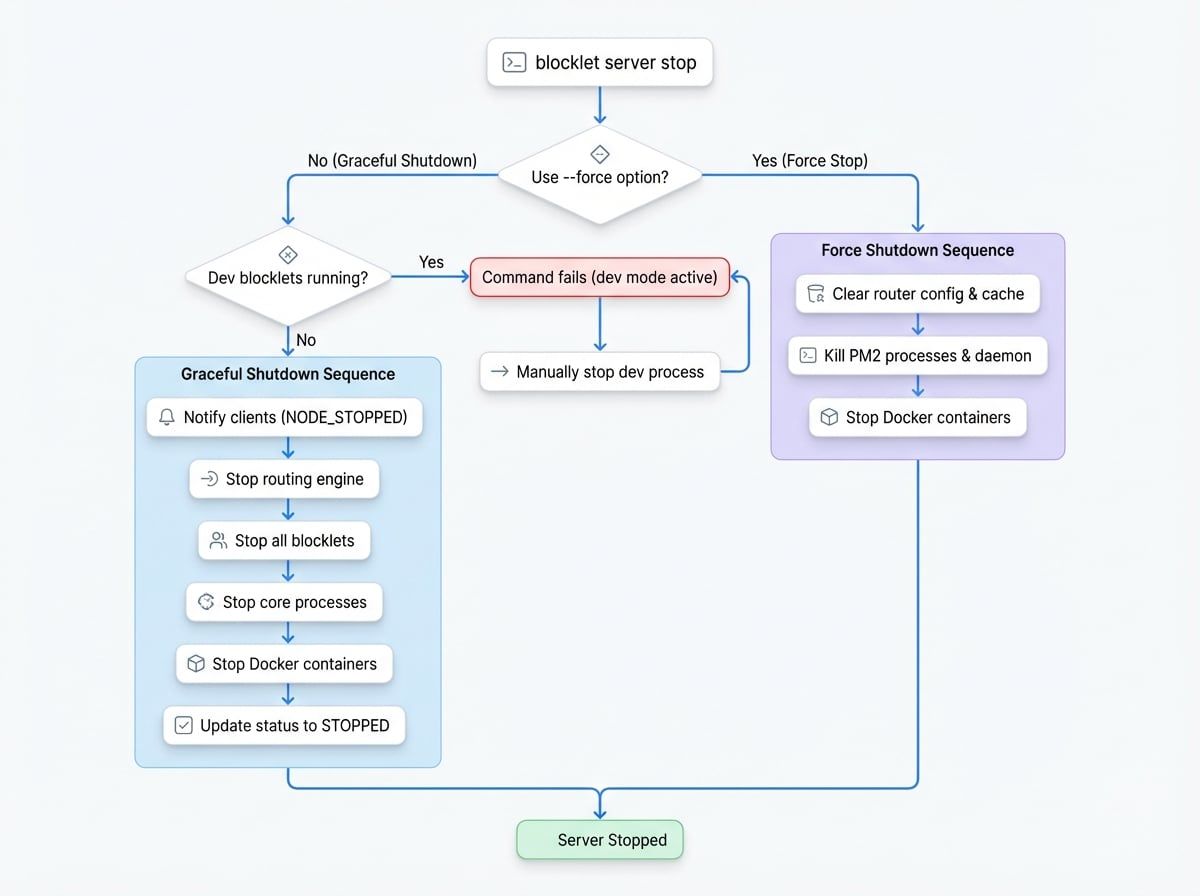
The key steps in a graceful shutdown are:
- Check for Development Blocklets: The server first checks if any blocklets are running in development mode. If so, the stop command will fail, and you must manually stop the development process first.
- Notify Clients: A
NODE_STOPPEDevent is broadcast to notify any connected web dashboard users about the impending shutdown. - Stop Routing Engine: The server's routing engine is stopped.
- Stop Blocklets: Each running blocklet is stopped individually.
- Stop Core Processes: The main Blocklet Server processes managed by PM2 (
daemon,service,event-hub) are terminated. - Stop Docker Containers: Any Docker containers managed by Blocklet Server are stopped.
- Update Status: The server's status is updated to
STOPPED.
Options#
Option | Description |
|---|---|
| Forcibly stops all Blocklet Server-related processes. This option bypasses the graceful shutdown sequence and should be used if the server fails to stop normally. |
Force Stop#
Using the --force flag initiates a more aggressive shutdown with a 20-second timeout. This process will:
- Immediately clear all router configurations and caches.
- Directly kill all PM2 processes associated with Blocklet Server and any blocklets.
- Kill the main PM2 daemon itself.
- Stop any managed Docker containers.
This is the recommended solution when the server becomes unresponsive and the graceful stop command times out.
Examples#
Standard Graceful Stop#
To perform a standard, graceful shutdown of the server:
Basic Stop Command
blocklet server stopYou will see output indicating the successful shutdown of each component:
Expected Output
Sending shutdown notification to web dashboard users ✔
Routing engine is stopped successfully ✔
Blocklet My-Blocklet is stopped successfully ✔
...
daemon is stopped successfully ✔
service is stopped successfully ✔
event-hub is stopped successfully ✔
Docker containers managed by blocklet server are stopped ✔
Done! ✔
Forcing the Server to Stop#
If the server is unresponsive or the graceful stop fails, use the --force flag.
Force Stop Command
blocklet server stop --forceThis command will attempt to stop all related processes directly.
Expected Output for Force Stop
nginx router is stopped successfully ✔
All blocklet processes stopped successfully ✔
Docker containers managed by blocklet server are stopped ✔Troubleshooting#
Blocklets in Development Mode#
If you have a blocklet running in development mode (using blocklet dev), the blocklet server stop command will fail with a message similar to this:
Error Message for Dev Mode
Unable to stop Blocklet Server, please stop the development by pressing Ctrl + C in the terminal of my-dev-blockletYou must navigate to the terminal where the development process is running and press Ctrl + C to stop it before you can stop the main server.
Server Fails to Stop#
If the graceful shutdown process takes too long (the default timeout is 5 minutes), you will see an error message. In this case, you should use the force stop command:
Timeout Error Message
Blocklet Server failed to stop within 5 minutes
You can stop blocklet server with blocklet stop --force