Start Server
The blocklet server start command is the primary method for launching your Blocklet Server instance. It initializes and runs all necessary components as background daemon processes, making your server and its blocklets accessible.
Basic Usage#
To start the server from its configuration directory, simply run:
Basic Start Command
blocklet server startUpon a successful start, the command will output the access URLs for your server's dashboard.
The Startup Process#
When you execute blocklet server start, the CLI performs a sequence of critical tasks to ensure the server starts correctly and in a consistent state. Understanding this process can help with configuration and troubleshooting.
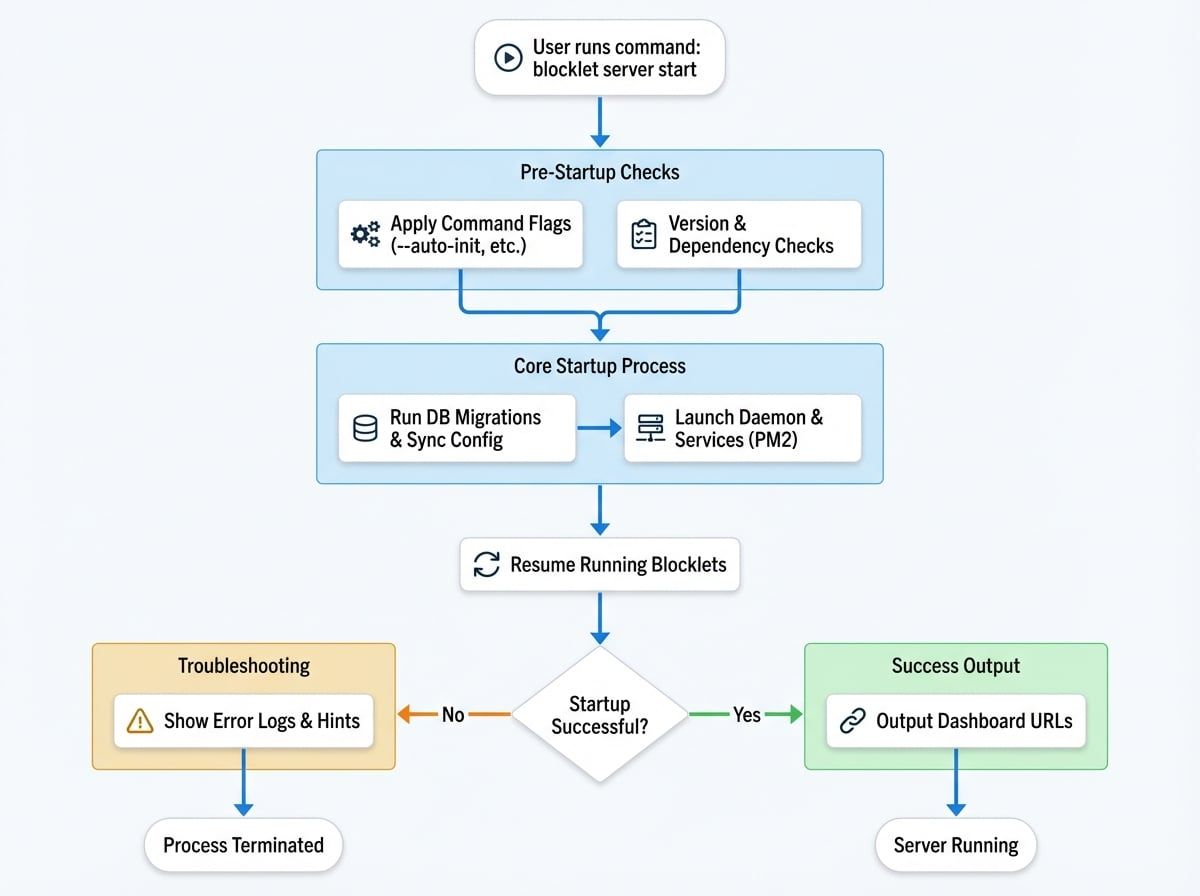
- Version Check: The CLI first verifies that its version is compatible with the version specified in the server's
config.ymlfile to prevent potential conflicts. - Database Migrations: If a version upgrade is detected, the CLI automatically runs any necessary database schema and data migrations to ensure the database is up-to-date.
- Configuration Sync: It compares the settings in
config.ymlwith the configuration stored in the database. If differences are found, it will issue a warning. - Dependency Checks: The server ensures required services like Redis or PostgreSQL are available, attempting to start them if configured to do so (e.g., via Docker).
- Process Launch: Using PM2, the CLI starts the core background processes: the main Daemon (handles web requests and routing), the Blocklet Service (manages blocklet lifecycle and services), and the Event Hub (facilitates inter-process communication).
- Blocklet Resumption: Any blocklets that were in a
runningstate before the server was last stopped are automatically restarted. - Output URLs: Once all processes are confirmed to be healthy and running, the CLI prints the access URLs for the server dashboard.
Command Options#
You can modify the startup behavior using the following flags:
Option | Description |
|---|---|
| Forces the server to update its database configuration from the values in |
| If a Blocklet Server instance is not found in the current directory, this flag will automatically initialize one before starting it. This is a convenient way to set up and run a new server with a single command. |
| Restricts the server to run in intranet mode, ignoring any external IP addresses and only providing local network access URLs. |
| Starts the server in a specific operational mode. For example, using |
Example: Updating Configuration#
If you've changed a setting in your config.yml, such as the server port, you must use the --update-db flag for the change to be applied.
Applying Configuration Changes
# 1. Stop the server if it's running
blocklet server stop

# 2. Restart the server with the flag to apply config changes
blocklet server start --update-db
Example: Auto-Initialization#
To quickly spin up a new server instance in an empty directory:
Quick Setup with Auto-Init
# This will create a .blocklet-server directory and then start the server
blocklet server start --auto-initTroubleshooting#
If the server fails to start, the CLI will provide immediate feedback:
- Error Logs: The last 15 lines of the daemon's error log (
daemon.stderr.log) will be printed directly to your console. For more detailed information, you should inspect the full log file mentioned in the output. - Router Issues: Sometimes, startup failures are related to the routing engine. Running
blocklet server startagain can often resolve these issues. - Forced Stop: If the server becomes unresponsive, you can ensure a clean shutdown by running
blocklet server stop --forcebefore attempting to start it again.
Once your server is running, you'll want to check on its health and manage your blocklets. Learn how to Check Status or Stop the Server.