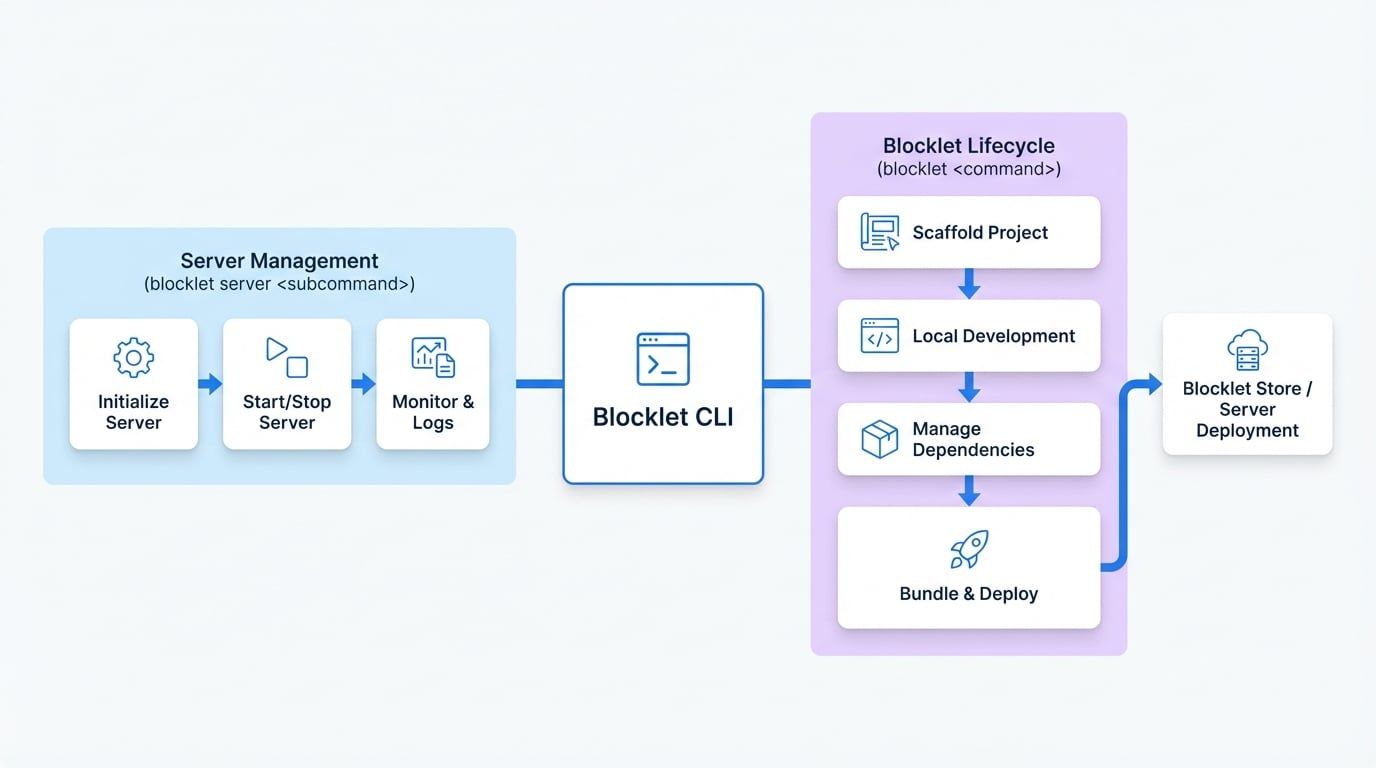
The Blocklet CLI is your primary tool for managing Blocklet Server and developing blocklets. It provides a comprehensive set of commands to handle everything from local development and testing to packaging and deploying your applications.
Its commands are organized into two main categories, providing a clear separation of concerns between managing the server environment and working on individual blocklet projects.
Command Structure#
blocklet server <subcommand>: This group of commands is dedicated to managing the Blocklet Server daemon. You'll use these to initialize, start, stop, and monitor the server process itself.blocklet <command>: These commands are used for the entire lifecycle of an individual blocklet. This includes scaffolding new projects, running a local development environment, managing dependencies, bundling for production, and deploying to a server.
Key Capabilities#
Server Management
Control the Blocklet Server lifecycle. Start, stop, check status, view logs, and manage server configurations.
Project Scaffolding
Quickly create new blocklet projects from official starter templates or initialize an empty project structure.
Local Development
Run your blocklet in a live-reloading development mode, execute scripts, and manage a local test environment.
Packaging & Distribution
Bundle your blocklet and its dependencies into a distributable package, deploy it to a server, or upload it to a Blocklet Store.
First Run Experience#
Upon your first use of the CLI after a fresh installation, you'll be greeted with a welcome message. This is a one-time display to confirm that the CLI is installed correctly and ready to use.
First-run welcome message
Powered By
   _            _                      _
  / \   _ __ | | __ _ | |__    ___  _ __ | | __
 / _ \ | '__|| |/ /` || '_ \  / _ \| '__|| |/ /
/ ___ \| |   |   < | || |_) ||  __/| |   |   <
/_/   \_\_|   |_|\_\_||_.__/  \___||_|   |_|\_\

        Blocklet CLI vX.Y.Z
Getting Help#
You can get help for any command by appending --help to it. To see a list of all available commands, simply run blocklet with no arguments.
Getting help for a command
# Get help for the 'deploy' command
blocklet deploy --help

# List all top-level commands
blocklet --help
Next Steps#
Now that you have a high-level understanding of what the Blocklet CLI can do, let's get it installed and running.