Core Concepts
This section introduces the fundamental concepts behind the @ocap/wallet package. You'll learn what a Wallet object is, its structure, the different ways to create one, and its crucial relationship with Decentralized Identities (DIDs).
A Wallet object is more than just a container for a key pair; it's a powerful, self-contained utility for performing all necessary cryptographic operations related to a DID. It encapsulates the keys, the DID type information, and the methods for signing, verifying, and hashing data according to the rules defined by its type.
The Wallet Object#
The WalletObject is the central piece of this library. It holds all the information and functionality needed to manage a digital identity. Every wallet is composed of the following key properties:
The private key. This is required for signing operations. Keep it secret, keep it safe.
Understanding Wallet Types#
A wallet's behavior is entirely determined by its type, which is a DIDType object from the @arcblock/did package. This type object specifies which cryptographic algorithms and formats to use.
A DIDType is composed of four main parts:
Property | Description |
|---|---|
role | Defines the purpose of the DID (e.g., Account, Application, Node). |
pk | The public key algorithm to use (e.g., ED25519, ETHEREUM). |
hash | The hashing algorithm to use (e.g., SHA3, KECCAK). |
address | The encoding format for the final DID string (e.g., BASE58, BASE16). |
The library provides convenient shortcuts for common configurations, such as 'default' (for ArcBlock DIDs) and 'ethereum'.
You can also define a custom wallet type for specific use cases, like creating an Application DID:
Wallet Type Configuration
const { WalletType } = require('@ocap/wallet');
const { types } = require('@ocap/mcrypto');

const appWalletType = WalletType({
  role: types.RoleType.ROLE_APPLICATION,
  pk: types.KeyType.ED25519,
  hash: types.HashType.SHA3,
  address: types.EncodingType.BASE58,
});

// Now you can use this type to create a new wallet
// const wallet = fromRandom(appWalletType);
Creating a Wallet#
You can instantiate a wallet in several ways, depending on what information you have available. The following diagram illustrates the general process:
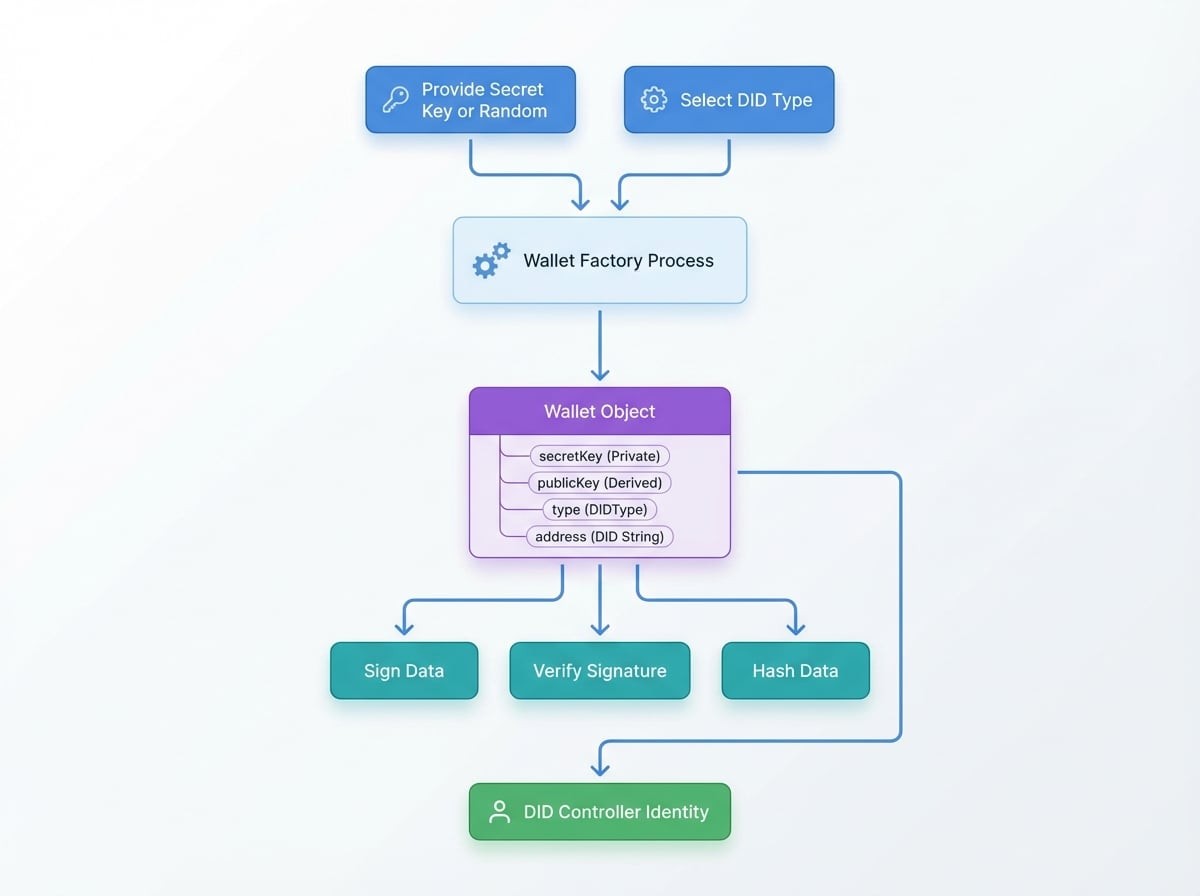
Here are the primary factory functions:
fromRandom#
This is the simplest way to create a brand new wallet. It generates a new random secret key and derives the corresponding public key and address.
const { fromRandom } = require('@ocap/wallet');

// Create a new wallet with the default ArcBlock type
const wallet = fromRandom();

console.log('New Wallet Address:', wallet.address);
console.log('Secret Key:', wallet.secretKey);fromSecretKey#
Use this function to restore a wallet when you already have the secret key. This is the most common way to load an existing identity.
const { fromSecretKey } = require('@ocap/wallet');

const sk = '0xD67C071...'; // Your existing secret key
const wallet = fromSecretKey(sk);

console.log('Restored Wallet Address:', wallet.address);fromPublicKey#
If you only have a public key, you can create a "read-only" wallet. This wallet can be used to verify signatures and derive the address, but it cannot be used to sign messages because it lacks the secret key.
const { fromPublicKey } = require('@ocap/wallet');

const pk = '0xE4852B7...'; // An existing public key
const wallet = fromPublicKey(pk);

console.log('Address from PK:', wallet.address);
// wallet.sign('message'); // This would throw an errorfromAddress#
Creating a wallet from just a DID address is useful for parsing the type information embedded within the address string. This type of wallet is very limited and cannot sign or verify data.
const { fromAddress } = require('@ocap/wallet');

const did = 'zNKtCNqYWLYWYW3gWRA1vnRykfCBZYHZvzKr';
const wallet = fromAddress(did);

// You can inspect the type information derived from the address
console.log('Wallet Type:', wallet.type);fromJSON#
This function allows you to reconstruct a wallet from a serialized JSON object that was previously created using the wallet.toJSON() method. This is ideal for storing and retrieving wallets.
const { fromRandom, fromJSON } = require('@ocap/wallet');

// 1. Create a wallet and serialize it
const originalWallet = fromRandom();
const serialized = originalWallet.toJSON();

// 2. Later, restore it from the JSON object
const restoredWallet = fromJSON(serialized);

console.log('Restored successfully:', originalWallet.address === restoredWallet.address);
Relationship with DIDs#
The Wallet object and a Decentralized Identity (DID) are intrinsically linked:
- A Wallet is the controller of a DID. The secret key within the wallet is the proof of ownership, granting the holder the ability to perform actions on behalf of the DID.
- The
wallet.addressis the DID. It's the public identifier that can be shared with others. - The
wallet.typedefines the DID's properties. It determines how the DID was constructed and how it should behave cryptographically.
In essence, the @ocap/wallet library provides the practical tools to create, manage, and utilize the identities defined by the @arcblock/did specification.
With these core concepts in mind, you can now explore the API Reference for detailed information on all available methods and their parameters.