The ArcBlock team is excited to announce a major enhancement to Payment Kit: Advanced Promotions. This new feature gives you granular control over your discounts through a versatile system of Coupons and Promotion Codes. Read on to learn how you can easily launch marketing campaigns to drive user acquisition and increase revenue.
Feature Highlight: Advanced Promotions with Coupons and Promotion Codes.#
Well-designed promotional strategies can significantly boost user conversion and customer retention for both subscription and one-time payments. Payment Kit's new promotional features are seamlessly integrated with the settlement process, empowering you to:
- Create versatile coupon templates (e.g., percentage-off, fixed amount, recurring discounts).
- Distribute targeted promotion codes to specific user groups.
- Allow users to activate offers flexibly at checkout.
Why distinguish between coupons and promotion codes? #
This two-layer structure is designed for maximum flexibility and control.
- Coupon: Defines the rules of the discount. Think of this as the deal itself, such as "10% off" or "$10 off."
- Promotion Code: Controls access to a Coupon. This is the key that unlocks the deal, dictating who is eligible, when they can use it, and under what conditions.
This structure prevents misuse. For example, you can create a single "10% discount" Coupon and use multiple Promotion Codes (e.g., WELCOME10, PARTNER10) to control which user segments can redeem it.
User Guide#
1. Create a Coupon (Template)#
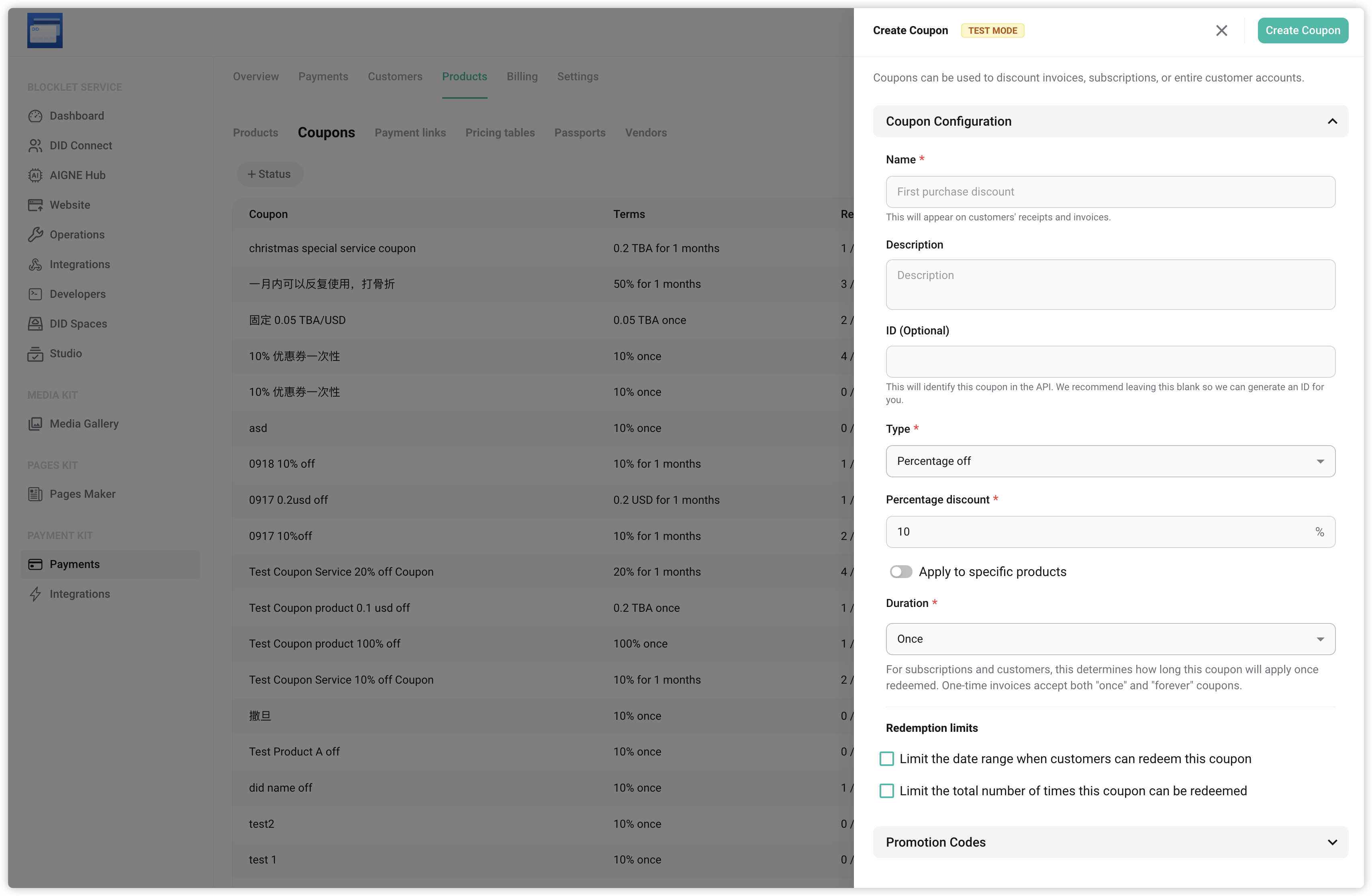
Navigate to Payment Management → Products → Coupons to create coupon templates. Key configurations include:
- Discount: Set a fixed amount or a percentage.
- Duration: Apply it once, permanently, or for a specific number of months on a subscription.
- Redemption Limits: Set a maximum number of total redemptions and a valid date range.
- Create Promotion Code
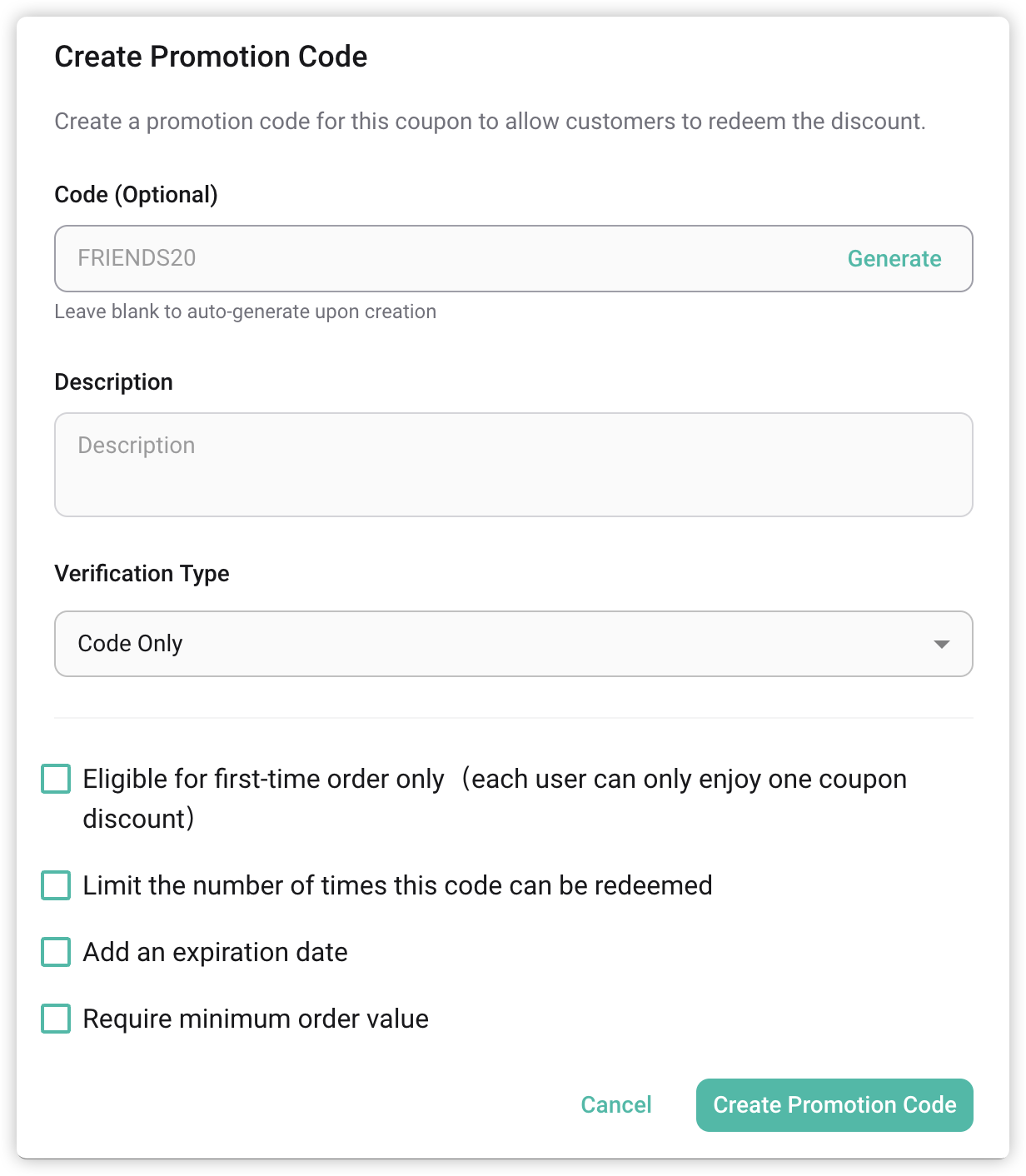
Based on a Coupon, you can create one or more Promotion Codes for distribution. This level controls distribution and usage limits. Key configurations include:
- Format: Use a fixed code (e.g.,
VIP2025) or let the system generate random ones. - Audience: Restrict usage to specific user IDs or groups.
- Rules: Define an expiration date, a redemption limit per user, and an optional minimum purchase amount.
This allows the Coupon rules to remain general while Promotion Codes provide targeted control.
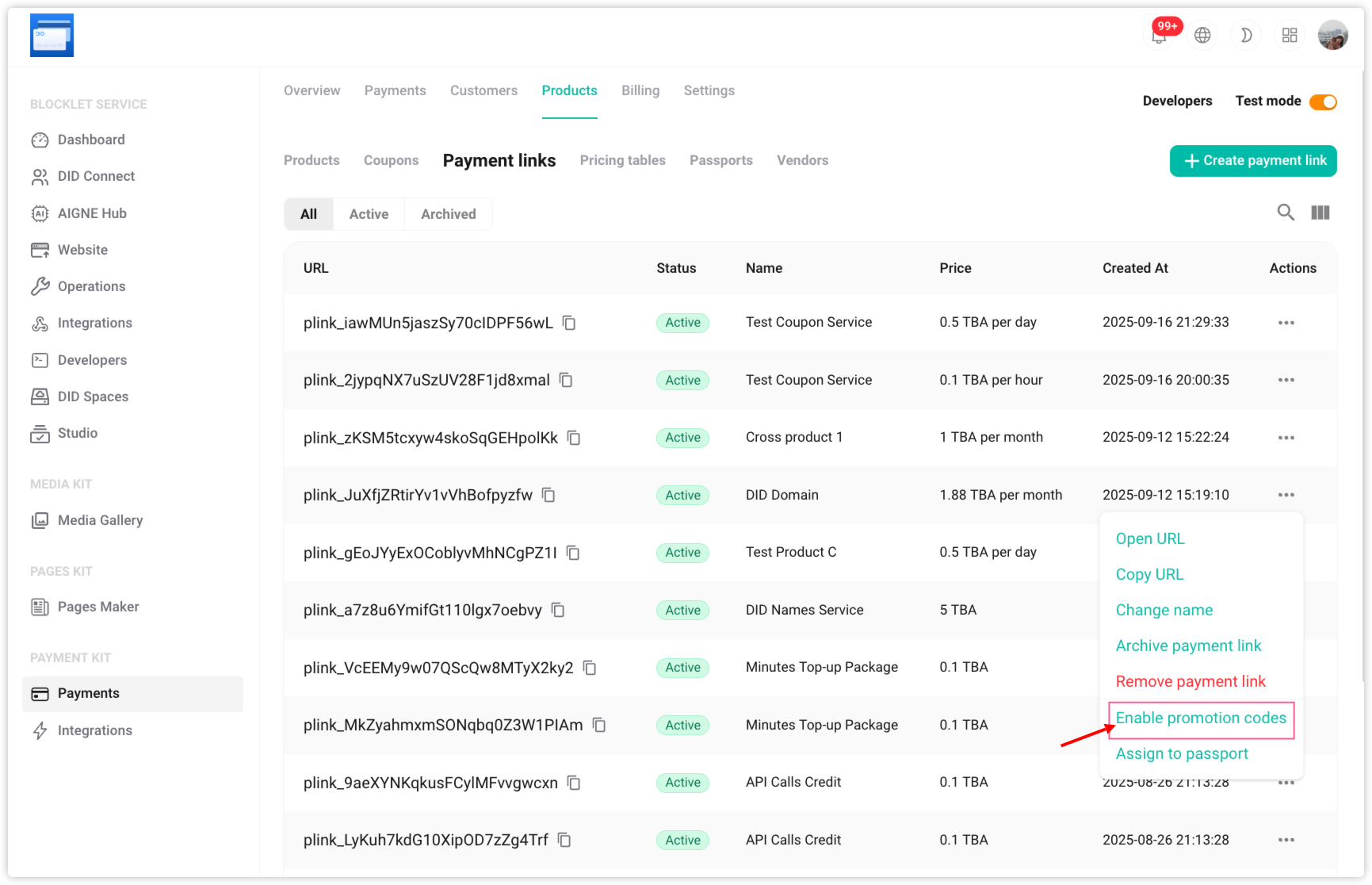
- Enabling Promotion Codes in Payment Links
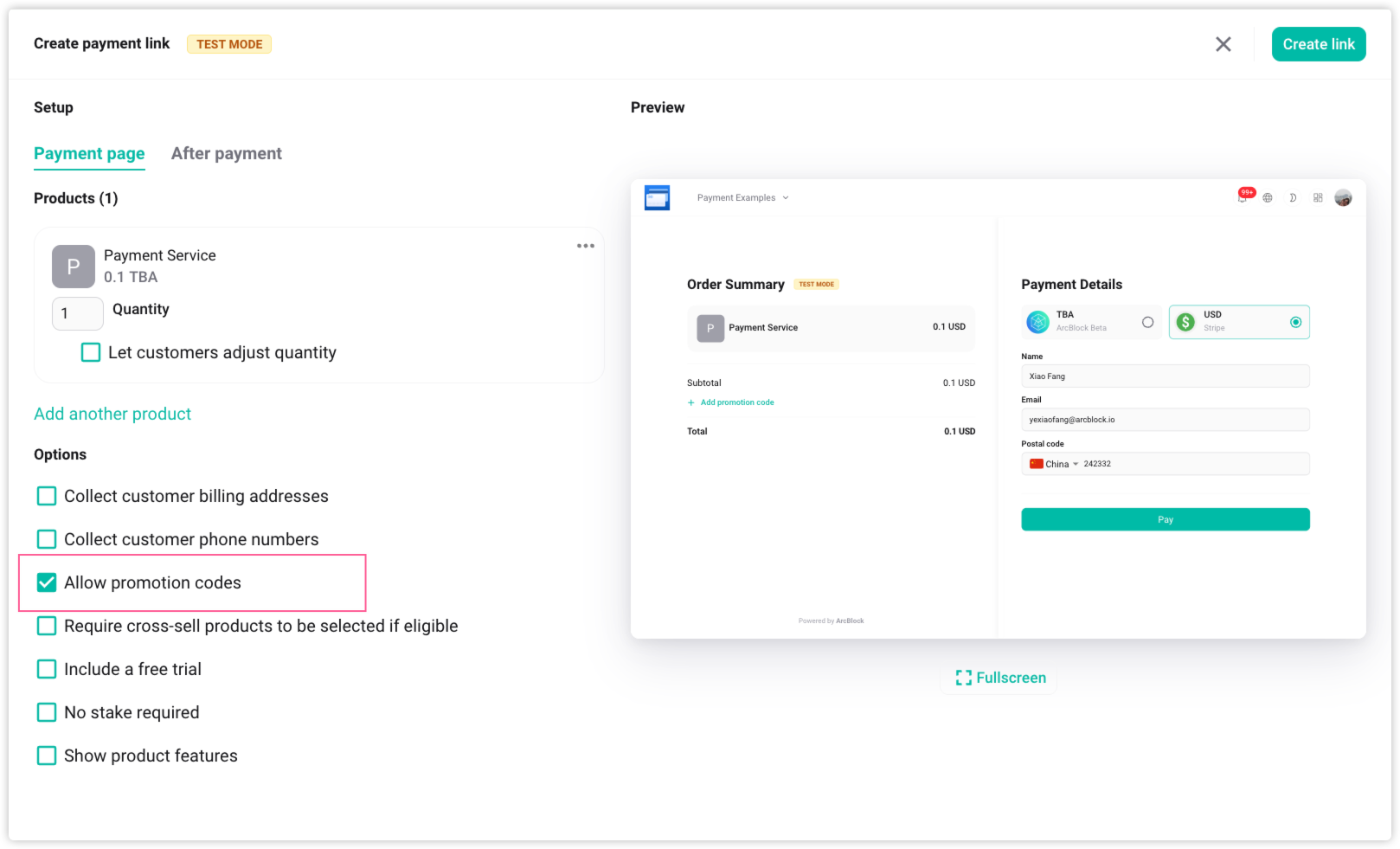
To let customers use a Promotion Code, you must enable the feature on the payment link. When creating or editing a payment link, check the box for “Allow promotion codes.” This will display the input field at checkout.
Use Cases#
Here are some common yet intricate promotional scenarios, demonstrating how to implement refined marketing strategies by strategically combining coupon and promotion code restrictions.
Scenario Goals | Coupon Configuration | Promotion Code Configuration | Impact and Significance |
|---|---|---|---|
Free first month trial | Duration: Multi-month discount during the subscription period (set to 1 month); Discount: 100% off. | User Restrictions: New users only; Redemptions: Unlimited; Expiration: Valid indefinitely. | To lower the subscription barrier for new users and attract widespread trials, with the understanding that the promotional offer will not extend into the second month. |
Limited-Time Offer for Existing Users | Duration: Permanent; Discount amount: Fixed amount or Percentage discount(e.g., $5 off/month). | User Restrictions: Designated list of existing user IDs; Redemption Limit: Eligible for first-time order only; Expiration: one week only for redemption. | Exclusive, long-term offers are extended to designated high-value users as a retention or loyalty incentive, requiring activation within one week. |
Clearance Blowout: Spend and Save | Duration: One-time; Discount Amount: Fixed Amount (e.g., $20 off). Redemption Time Limit: Set as the overall deadline for this major promotion. | Redemption Count: a maximum of 500 times. Minimum payment: $100. Promotion code expires: this weekend (earlier than the coupon's expiration date). | The Coupon's time limit acts as a final safety net for the promotion's overall duration; the Promotion Code's 500-use and "this weekend" limits are strategically implemented for short-term, limited-quantity flash sales, fostering urgency. |
Channel-Exclusive Offers | Duration: One-time; Discount Amount: 20% Off. Maximum Redemption Limit: Set to 2000 (total quota across all channels). | Promotion Code (Code): Fixed (e.g., User restrictions: None; Minimum payment amount requirement: None; | Promotion rules are universal, and conversion performance across different channels is tracked using fixed Promotion Codes. The Coupon's maximum redemption limit dictates the overall quota available for all channels. |
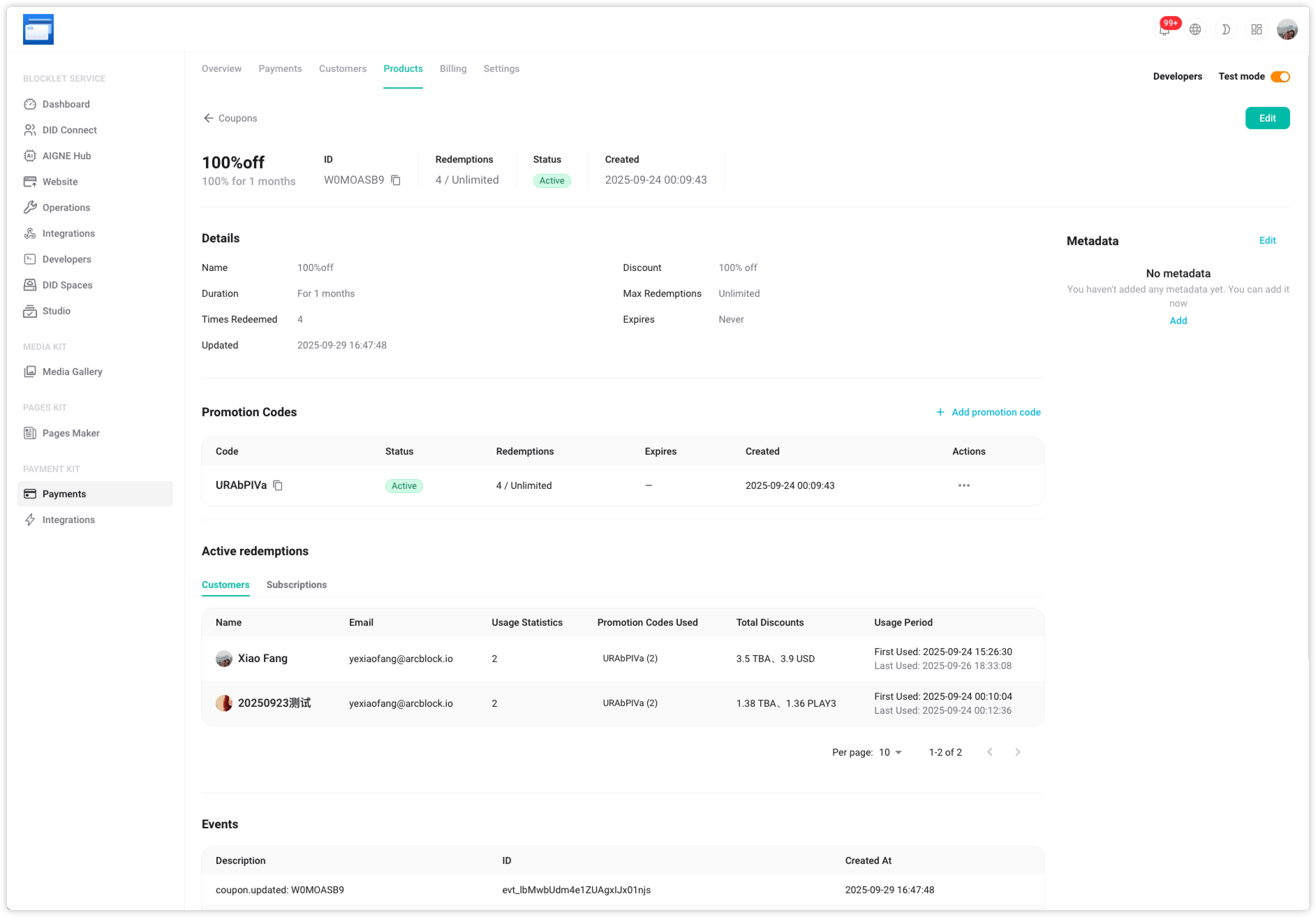
Data Tracking and Management#
All promotion code usage is tracked automatically, giving you real-time insight into redemption counts, total discount amounts, and the specific users involved. This allows you to accurately measure campaign effectiveness and adjust your strategy to maximize ROI.
Next Steps#
ArcBlock will continue to expand the functionality of Payment Kit to provide more tools for growth including:
- Service Integration, Connecting to a Broader Range of Platforms and Tools
- Expand payment options and enhance global accessibility
The development roadmap remains focused on enhancing flexibility, strengthening integration capabilities, and delivering a smoother payment experience for all users.
Related Resources#
For more information about Payment Kit and full documentation, please visit the following resources: