@blocklet/js-sdk 提供了功能强大、预先配置好的辅助工具,用于向您的 Blocklet 服务发起 API 请求。这些辅助工具,createAxios 和 createFetch,旨在自动处理身份验证和会话管理的复杂性,让您可以专注于构建应用程序的功能。
主要功能包括:
- 自动注入令牌:会话令牌会自动包含在
Authorization请求头中。 - 自动刷新令牌:如果请求因 401 未授权错误而失败,SDK 会自动尝试刷新会话令牌并重试原始请求一次。
- CSRF 保护:
x-csrf-token请求头会附加到每个请求中,以增强安全性。 - 基础 URL 处理:请求会自动添加正确组件挂载点的前缀,无需手动构建 URL。
- 安全响应验证:一个可选的安全层,用于验证来自 Blocklet 服务器响应的完整性。
使用 createAxios
对于偏好使用 axios 库的开发者,createAxios 函数会返回一个 axios 实例,该实例内置了 SDK 请求处理的所有优点。它支持所有标准的 axios 配置和功能。
基本用法
以下是如何创建实例并发起一个简单的 GET 请求:
Basic Axios Request
import { createAxios } from '@blocklet/js-sdk';

// 创建一个由 SDK 管理的 axios 实例
const api = createAxios();

async function fetchData() {
  try {
    const response = await api.get('/api/users/profile');
    console.log('User Profile:', response.data);
  } catch (error) {
    console.error('Failed to fetch user profile:', error);
  }
}

fetchData();在此示例中,createAxios 配置实例以自动处理身份验证头和令牌刷新逻辑。对 /api/users/profile 的请求将被正确路由到组件的后端。
自定义配置
您可以将任何有效的 axios 配置对象传递给 createAxios 以自定义其行为,例如设置自定义的基础 URL 或添加默认请求头。
Custom Axios Configuration
import { createAxios } from '@blocklet/js-sdk';

const customApi = createAxios({
  baseURL: '/api/v2/',
  timeout: 10000, // 10 秒
  headers: { 'X-Custom-Header': 'MyValue' },
});

async function postData() {
  const response = await customApi.post('/items', { name: 'New Item' });
  console.log('Item created:', response.data);
}
使用 createFetch
如果您偏好基于标准 Web fetch API 的更轻量级解决方案,createFetch 函数是完美的选择。它提供了一个 fetch 的包装器,包含了与 axios 辅助工具相同的自动令牌管理和安全功能。
基本用法
createFetch 函数返回一个异步函数,其签名与原生的 fetch 类似。
Basic Fetch Request
import { createFetch } from '@blocklet/js-sdk';

// 创建一个由 SDK 管理的 fetch 实例
const fetcher = createFetch();

async function fetchData() {
  try {
    const response = await fetcher('/api/users/profile');
    if (!response.ok) {
      throw new Error(`HTTP error! status: ${response.status}`);
    }
    const data = await response.json();
    console.log('User Profile:', data);
  } catch (error) {
    console.error('Failed to fetch user profile:', error);
  }
}

fetchData();
自定义配置
您可以将一个默认的 RequestInit 对象传递给 createFetch,为使用该实例发出的所有请求设置全局选项。您也可以在单个请求的基础上覆盖这些选项。
Custom Fetch Configuration
import { createFetch } from '@blocklet/js-sdk';

// 设置全局选项
const fetcher = createFetch({
  headers: {
    'Content-Type': 'application/json',
  },
});

async function postData() {
  const response = await fetcher('/api/items', {
    method: 'POST',
    body: JSON.stringify({ name: 'New Item' }),
  });
  const data = await response.json();
  console.log('Item created:', data);
}
自动令牌续期流程
createAxios 和 createFetch 都能优雅地处理会话过期。下图说明了当使用过期令牌发起 API 调用时发生的自动化过程。
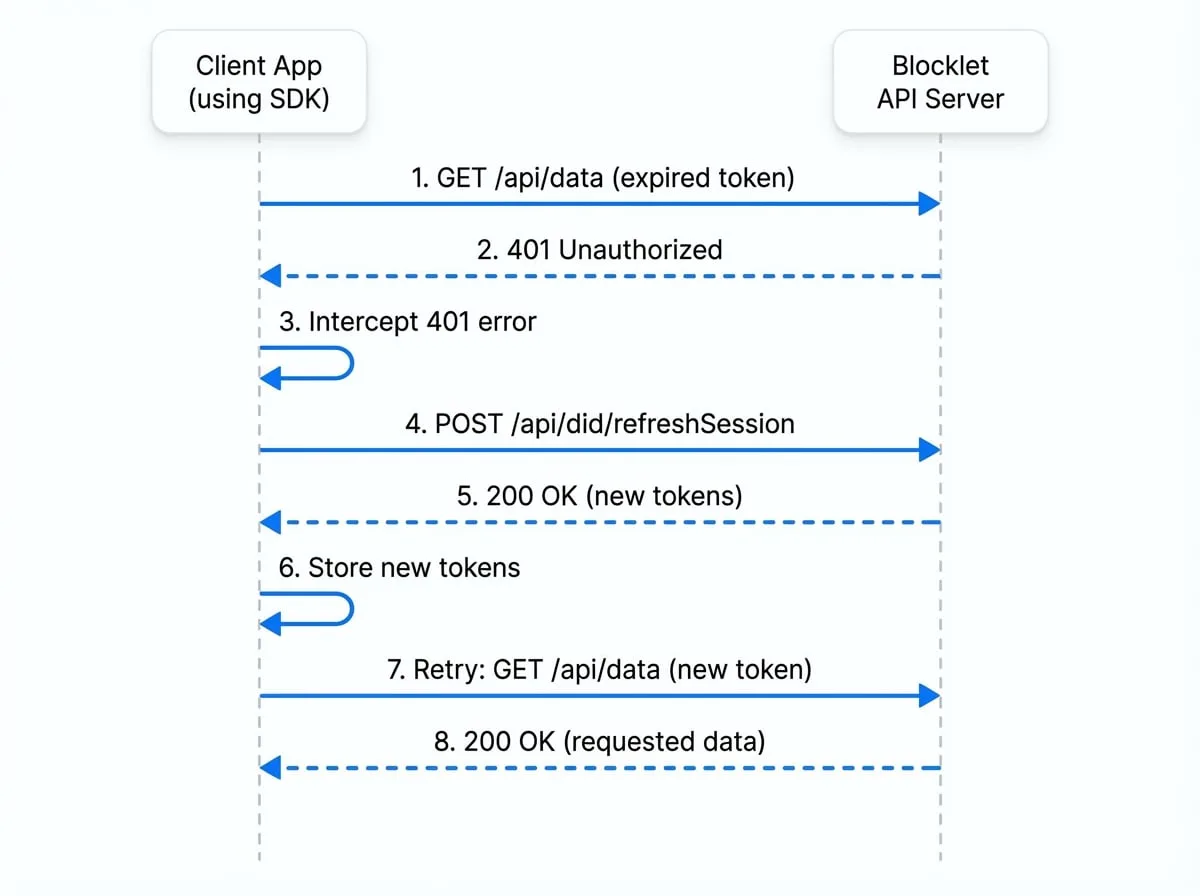
整个流程对您的应用程序代码是透明的,确保了无缝的用户体验,无需手动干预。
安全请求
对于敏感操作,您可以通过验证 API 响应的签名来启用一个额外的安全层。这确保了响应在服务器和客户端之间没有被篡改。要启用此功能,请在您的请求配置中将 secure 选项设置为 true。
使用 createAxios
Axios Secure Request
import { createAxios } from '@blocklet/js-sdk';
const api = createAxios();

// SDK 将验证响应签名。
// 如果验证失败,promise 将以错误被拒绝。
const response = await api.get('/api/billing/details', { secure: true });
使用 createFetch
Fetch Secure Request
import { createFetch } from '@blocklet/js-sdk';
const fetcher = createFetch();

const response = await fetcher('/api/billing/details', { secure: true });
// 只有在签名有效时,才会返回响应对象。
const data = await response.json();
后续步骤
现在您已经知道如何发起经过身份验证的 API 请求,您可能希望深入了解 SDK 如何管理用户身份和会话。