Introducing AFS-UI: one interface for people and agents

AFS-UI is Arc's interface system. It brings interface structure, related state and supported operations into the addressable space of AFS, so people and AI agents can directly use the same system.
A person sees text, charts and controls, then clicks, types or touches. An agent can find the corresponding interface nodes through paths, read their structure and state, and invoke supported operations. It does not have to begin with an image of the screen and infer where a button is or what a label means.
That is the main reason we are building AFS-UI: an interface should serve both people and agents from the outset. Their input methods can differ while they refer to the same objects, understand the same state and participate in the same work through explicit conventions.
Generative UI makes this more important. An interface can be created for a particular task and rearranged during a conversation. If software can access it only by recognizing its current appearance, each layout change creates another interpretation problem. AFS-UI gives an agent a different starting point: find the object, then operate on it.
One interface, two forms of access
Consider a status on screen that reads “Ready for review.” A person reads the words. An agent can read the corresponding node through its path and find out that it is a text node with that content.
In a real session prepared for our AFS-UI keynote, this node is named demo-status. Abbreviating the current session path as S, its address is S/tree/demo-status. After changing the parent layout from a column to a row, we could still find that node at the same address. Updating its content changed the text in the connected browser, and reading the original path confirmed the result.
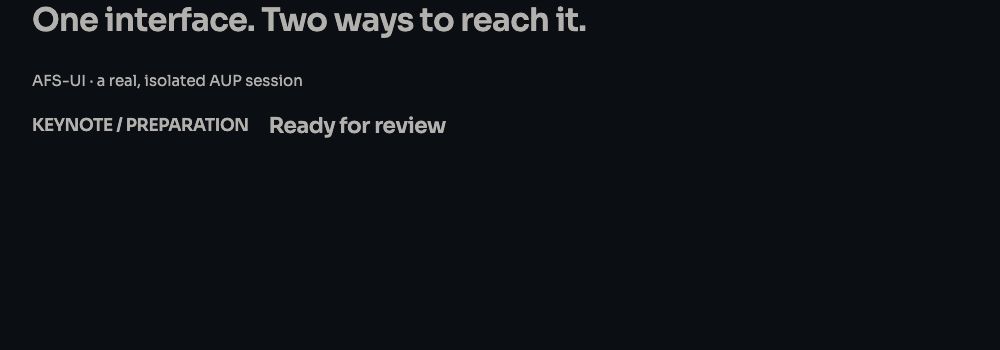
Local runtime capture, ARC 2.0.0-beta.62, October 8, 2026. This demonstrates addressing and updating within one UI session. The lifetime of a session address and the persistence of business data are separate concerns.
A button follows the same idea. A person sees a control to click; an agent can inspect its structure and the operation associated with its event. Once an application connects that operation to its business rules, both can act on the same work through their respective entry points. The path identifies the object, the operation contract describes what can be done, and authorization determines who may do it.
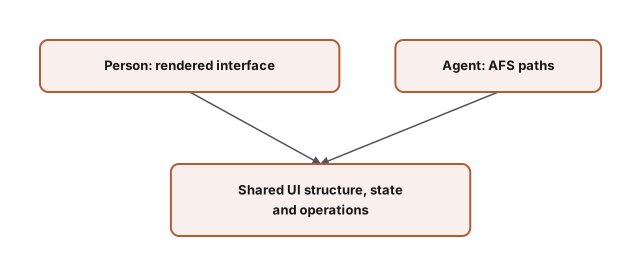
The shared foundation is the correspondence between objects and operations. People do not need to learn paths to use the interface. Agents do not need to imitate mouse movements to reach structure that the system already makes explicit.
Visual understanding still matters, whether for judging a chart's clarity, spotting a crowded layout or operating external software without structured access. The DOM, accessibility trees and APIs already give programs information beyond pixels. AFS-UI's choice is to bring interfaces into the addressing and operation model used by the application's other resources, making them part of the system rather than another picture to interpret.
AFS supplies the foundation; AFS-UI brings in the interface
AFS stands for Agentic File System. It borrows a familiar idea from filesystems: find a resource by its path and access it through a consistent set of operations. Different providers bring files, content, services or live resources into that space. A provider is the implementation that connects a particular kind of resource to AFS.
Those resources need not be files on disk. A path gives the caller a way to find a resource and learn more about it. The implementation behind it handles whether the resource is local data or a service.
AFS-UI extends this idea to interfaces. A screen can present a useful view of that context, while the interface's own structure can be found, inspected and operated on in supported sessions. Here, context includes the data, current state and available actions needed for work. It is broader than chat history or a prompt supplied to a model.
Four names describe different responsibilities:
| Name | Responsibility | A useful way to think about it |
|---|---|---|
| AFS | Resource addressing, discovery and access | A space of resources the system can find and use |
| AFS-UI | How interfaces participate in that space for people and agents | The overall interface system |
| AUP | Describing interface structure and related interaction contracts | The protocol for expressing interfaces |
| Web Device | Organizing content, pages and components into websites | The implementation capabilities for a website |
Unix, Plan 9 and X Window helped inspire this design: resources can share naming conventions, display can be separated from computation, and window organization can have its own mechanisms. AFS-UI applies these ideas to an environment shared by people and agents. Understanding those historical systems is not a prerequisite for using it.
AUP describes the interface. Web Device organizes the website.
AUP is the Agentic UI Protocol. It uses structured descriptions to express what an interface contains and how it connects to data and operations.
For example, a task card might contain a title, a status, an input and an action. AUP can describe their types, properties and arrangement, along with supported bindings and events. text expresses words, input receives a value, action expresses an action, and view organizes elements. These basic types are called primitives: the interface protocol's vocabulary. Richer types can express tables, charts or maps. Which types and interactions a particular device supports depends on its implementation.
AUP does not require a model call every time an interface changes. A developer can write a description, a program can assemble it, or an AI can generate it. The source of that description can change while the rules for interpreting it and connecting events to operations remain explicit.
Web Device handles the additional work needed to turn content and interfaces into a website.
Take the article you are reading. Beyond its title and body, it has a URL, language versions, site navigation, a visual theme, and metadata for previews when someone shares its link. A complete site also needs to organize content, assemble pages and produce accessible output. Those are Web Device responsibilities. A few more basic UI nodes do not provide a whole website by themselves.
A Web Device component is a reusable unit of website presentation. An article-header component might receive a title, author and cover image and present them together; a navigation component provides site entry points. Page layouts compose these units. An AUP primitive such as text and a website component such as an article header therefore belong at different levels. One is a basic interface type; the other is an implementation organized around a presentation task.
A practical distinction helps. For “what does this control express, and which operation does it connect to?”, start with AUP. For “where does this article live, how do languages work, and how is the site header reused?”, start with Web Device. They work together without being interchangeable.
There is one more name worth separating: a live, browser-based UI Device session. The demo-status example uses such a session, with its running interface tree, events and updates. Web Device handles website organization, rendering and publication. These paths have related interface capabilities, but appearing in a browser does not make them the same thing.
The ArcBlock site, Learning knowledge maps and keynote slides already use different parts of this technology. It can serve a formal website or support an interface tied more closely to the task at hand. The experience you want to build determines which capabilities you combine.
The same work can have different device interfaces
A device here is more than a physical screen. It can be an environment for input, output and interaction. A terminal works well with text and commands; a browser supports graphics, forms and rich content. The current UI Device implementation includes terminal and browser backends. Websites can also use the Web Device capabilities described above.
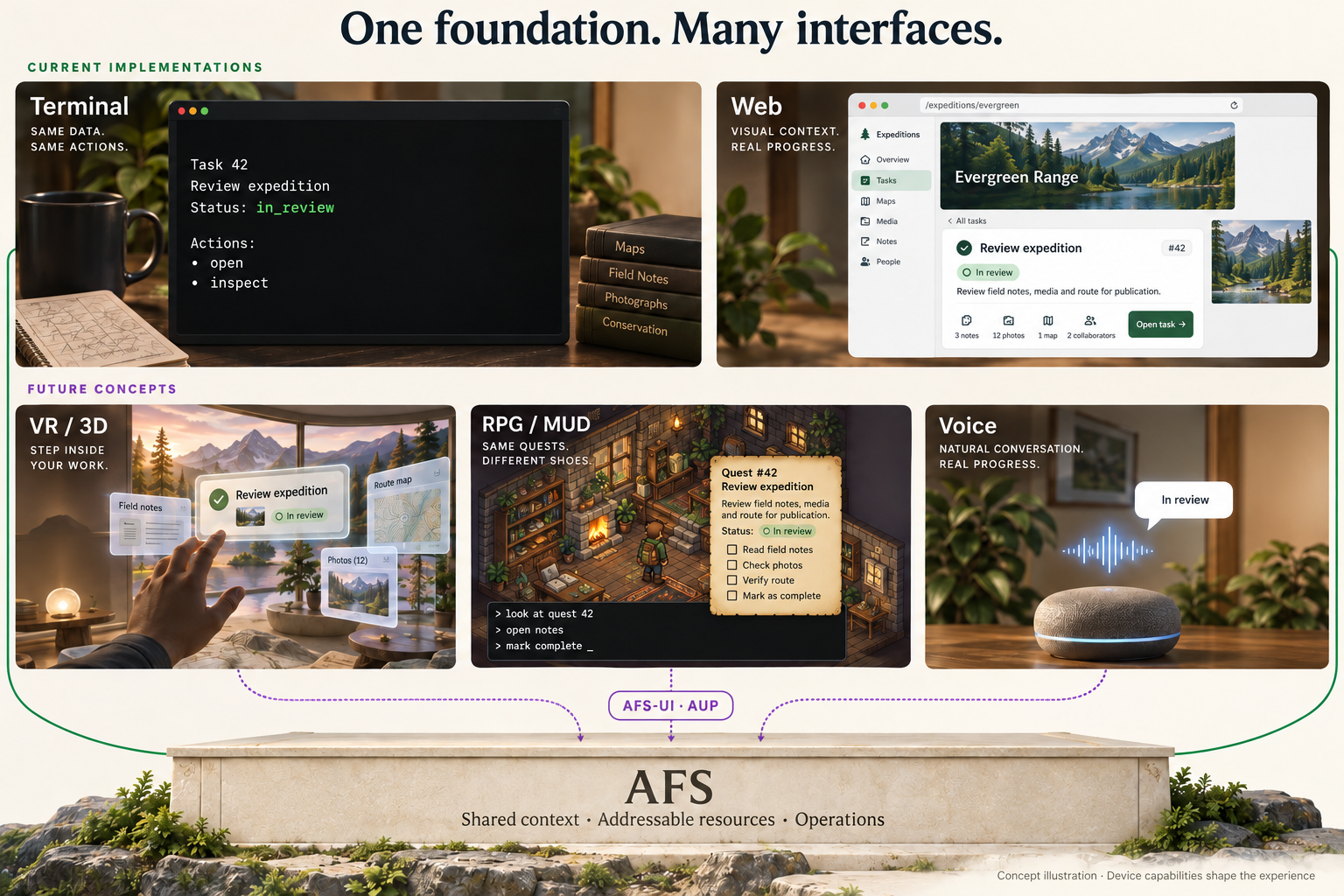
Concept illustration, not product screenshots. Terminal and Web correspond to existing implementation directions. VR/3D, RPG/MUD and Voice are future device concepts. A shared foundation does not mean one interface description already runs automatically on every device.
Imagine one task: reviewing an expedition plan. A terminal could show its title, status and available commands; a website could present a task card. A future VR Device could place it on a spatial workbench. An RPG Device could represent it as a task object in a room, while a MUD Device could describe the scene in text and accept commands. A MUD is a shared-world interaction style built around text and commands. The task's identity, related data and operation meanings would remain recognizable, while each device could offer a different way to encounter and act on it.
A smart speaker makes the need for capability adaptation particularly clear. It can listen and speak, and perhaps has a few touch controls, but it cannot display a full table. For the same task, we envision it reading the status, explaining details on request and asking for confirmation by voice. A fallback should preserve the meaning of the task in a form the device can express. An action that requires confirmation should not lose that requirement because there is no button.
These future devices need their own implementations and carefully designed alternatives for particular interactions. A three-dimensional model cannot always be adequately expressed in a sentence. When a meaningful adaptation is unavailable, the system should explain the limitation or let the user continue on a suitable device. The direction for AFS-UI is to let presentation change while the resources behind it retain explicit names and operation contracts.
Where the neighboring UI approaches fit
There are many names in this field, but they do not all describe the same layer. An interactive product experience, a UI description protocol, a protocol connecting agents to applications, and a system hosting websites can coexist.
This comparison follows the responsibilities described in each project's public documentation:
| Approach | Main concern | Distinction from, or relationship to, AFS-UI |
|---|---|---|
| ChatGPT Intelligent UI | Choosing and generating interactive answers for a question in ChatGPT | A product experience and model capability; AFS-UI concerns access to interfaces within an addressable system |
| A2UI | Declarative UI descriptions rendered with client components, including data bindings and interactions | Related questions to AUP at the description layer; AFS-UI also concerns the relationship to AFS resources |
| MCP | Connecting AI applications to external tools, resources and context | A protocol for connecting capabilities, not itself a UI description system |
| MCP Apps / MCP-UI | Tool-provided interactive UI resources that communicate with a host; MCP-UI supplies related implementation tools | Emphasis on the tool-to-host UI relationship; AFS-UI starts with addressable interface structure and operations |
| AG-UI | Events connecting agent backends and user-facing applications, including messages, tool calls and state changes | Emphasis on the interaction stream; it can work alongside UI description approaches |
| OpenAI plugin development | Combining skills, MCP servers and optional interfaces for ChatGPT and Codex | A host-integration and distribution path, distinct from ChatGPT's own Intelligent UI capability |
| AFS-UI | People use a presentation; agents use paths to reach corresponding interface structure and supported operations | AFS provides the foundation, AUP expresses the interface, and device and website implementations make it usable |
MCP Apps is not limited to static content, and A2UI is not merely a card format. They both define interaction behavior; AG-UI also addresses state. AFS-UI's value does not depend on assuming that neighboring systems lack state or cannot perform actions. Its focus is placing interfaces and other system resources in a shared addressing and operation environment.
These layers can be combined, but working combinations need concrete adapters and capability support. The table is not a claim of implemented interoperability. External descriptions were checked against public sources on October 10, 2026.
For an application that already has a stable API and accessibility support, AFS-UI offers another way to organize the system, rather than a requirement to rebuild every interface. It is particularly relevant when people and agents repeatedly return to the same work, or when presentation changes often while resources and operation meanings need to remain clear. It does not automatically turn arbitrary external software into an AFS interface, and paths do not remove the need for authorization, persistence or concurrency control.
One interface should be understandable and usable by a person, and findable and operable by an agent. AFS-UI provides the latter with direct access through paths and structure.
Start with the AFS-UI learning path, then explore AUP, AUP and Web Device responsibilities and addressable interfaces. For the story behind the design, read When the interface changes, the work should remain. The AUP documentation and Web Device documentation provide the implementation references.