This section introduces the fundamental concepts behind the @ocap/wallet package. You'll learn what a Wallet object is, its structure, the different ways to create one, and its crucial relationship with Decentralized Identities (DIDs).
A Wallet object is more than just a container for a key pair; it's a powerful, self-contained utility for performing all necessary cryptographic operations related to a DID. It encapsulates the keys, the DID type information, and the methods for signing, verifying, and hashing data according to the rules defined by its type.
The Wallet Object
The WalletObject is the central piece of this library. It holds all the information and functionality needed to manage a digital identity. Every wallet is composed of the following key properties:
- type
DIDType(required) — An object that defines the cryptographic algorithms and encoding formats for the wallet. - secretKey
string | Buffer— The private key. This is required for signing operations. Keep it secret, keep it safe. - publicKey
string | Buffer(required) — The public key, derived from the secret key. It's used for verifying signatures. - address
string(required) — The decentralized identifier (DID) string associated with the wallet, derived from the public key.
Understanding Wallet Types
A wallet's behavior is entirely determined by its type, which is a DIDType object from the @arcblock/did package. This type object specifies which cryptographic algorithms and formats to use.
A DIDType is composed of four main parts:
| Property | Description |
|---|---|
| role | Defines the purpose of the DID (e.g., Account, Application, Node). |
| pk | The public key algorithm to use (e.g., ED25519, ETHEREUM). |
| hash | The hashing algorithm to use (e.g., SHA3, KECCAK). |
| address | The encoding format for the final DID string (e.g., BASE58, BASE16). |
The library provides convenient shortcuts for common configurations, such as 'default' (for ArcBlock DIDs) and 'ethereum'.
You can also define a custom wallet type for specific use cases, like creating an Application DID:
Wallet Type Configuration
const { WalletType } = require('@ocap/wallet');
const { types } = require('@ocap/mcrypto');

const appWalletType = WalletType({
  role: types.RoleType.ROLE_APPLICATION,
  pk: types.KeyType.ED25519,
  hash: types.HashType.SHA3,
  address: types.EncodingType.BASE58,
});

// Now you can use this type to create a new wallet
// const wallet = fromRandom(appWalletType);
Creating a Wallet
You can instantiate a wallet in several ways, depending on what information you have available. The following diagram illustrates the general process:
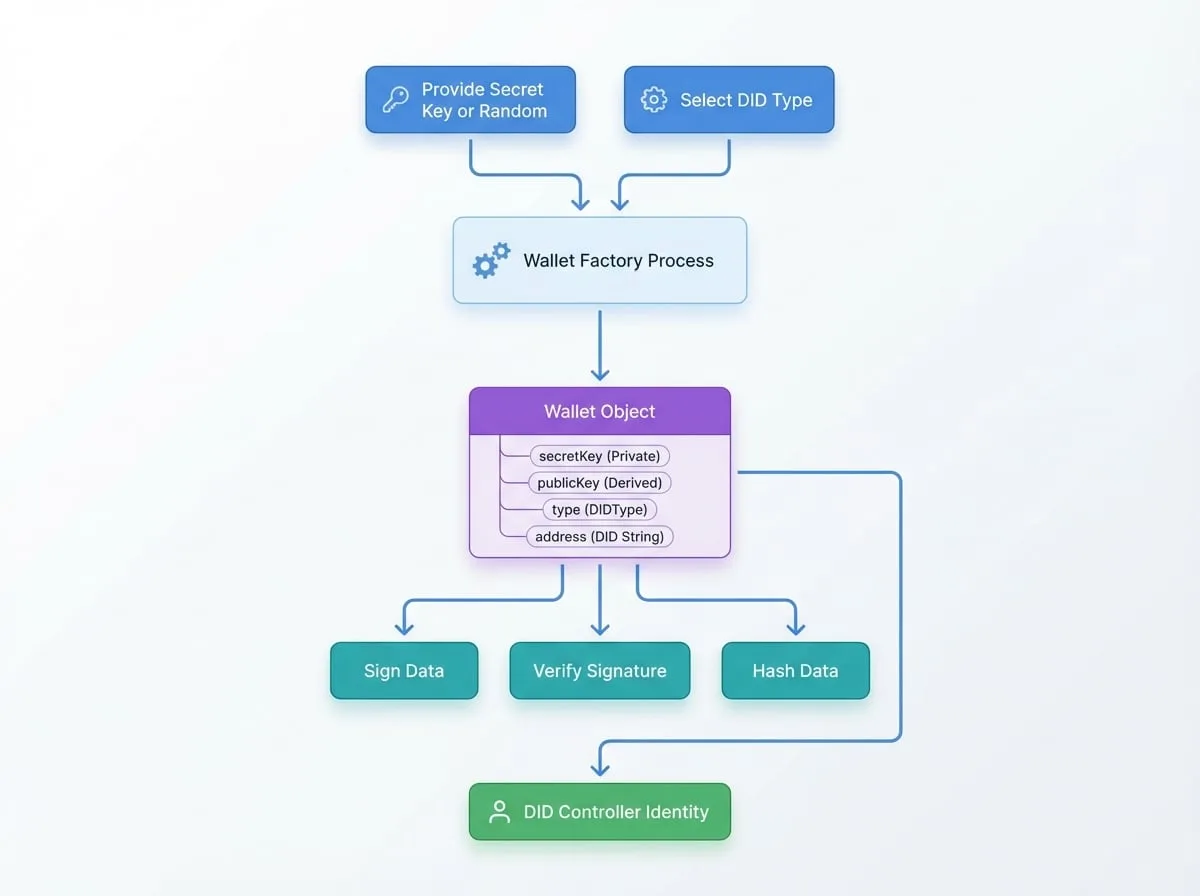
Here are the primary factory functions:
fromRandom
This is the simplest way to create a brand new wallet. It generates a new random secret key and derives the corresponding public key and address.
const { fromRandom } = require('@ocap/wallet');

// Create a new wallet with the default ArcBlock type
const wallet = fromRandom();

console.log('New Wallet Address:', wallet.address);
console.log('Secret Key:', wallet.secretKey);
fromSecretKey
Use this function to restore a wallet when you already have the secret key. This is the most common way to load an existing identity.
const { fromSecretKey } = require('@ocap/wallet');

const sk = '0xD67C071...'; // Your existing secret key
const wallet = fromSecretKey(sk);

console.log('Restored Wallet Address:', wallet.address);
fromPublicKey
If you only have a public key, you can create a "read-only" wallet. This wallet can be used to verify signatures and derive the address, but it cannot be used to sign messages because it lacks the secret key.
const { fromPublicKey } = require('@ocap/wallet');

const pk = '0xE4852B7...'; // An existing public key
const wallet = fromPublicKey(pk);

console.log('Address from PK:', wallet.address);
// wallet.sign('message'); // This would throw an error
fromAddress
Creating a wallet from just a DID address is useful for parsing the type information embedded within the address string. This type of wallet is very limited and cannot sign or verify data.
const { fromAddress } = require('@ocap/wallet');

const did = 'zNKtCNqYWLYWYW3gWRA1vnRykfCBZYHZvzKr';
const wallet = fromAddress(did);

// You can inspect the type information derived from the address
console.log('Wallet Type:', wallet.type);
fromJSON
This function allows you to reconstruct a wallet from a serialized JSON object that was previously created using the wallet.toJSON() method. This is ideal for storing and retrieving wallets.
const { fromRandom, fromJSON } = require('@ocap/wallet');

// 1. Create a wallet and serialize it
const originalWallet = fromRandom();
const serialized = originalWallet.toJSON();

// 2. Later, restore it from the JSON object
const restoredWallet = fromJSON(serialized);

console.log('Restored successfully:', originalWallet.address === restoredWallet.address);
Relationship with DIDs
The Wallet object and a Decentralized Identity (DID) are intrinsically linked:
- A Wallet is the controller of a DID. The secret key within the wallet is the proof of ownership, granting the holder the ability to perform actions on behalf of the DID.
- The
wallet.addressis the DID. It's the public identifier that can be shared with others. - The
wallet.typedefines the DID's properties. It determines how the DID was constructed and how it should behave cryptographically.
In essence, the @ocap/wallet library provides the practical tools to create, manage, and utilize the identities defined by the @arcblock/did specification.
With these core concepts in mind, you can now explore the API Reference for detailed information on all available methods and their parameters.