Blocklet Server v1.16.29: Much Better Builder Support
After 5 weeks of diligent improvements and rigorous testing, encompassing 105 commits, we are thrilled to announce the release of Blocklet Server v1.16.29. This update brings a multitude of enhancements and bug fixes designed to elevate your experience with our next-generation decentralized application platform.
Features and Improvements
Blocklet Launch Workflow
We've made several improvements to the blocklet launch workflow, ensuring a smoother and more reliable user experience.
- The launch workflow now functions correctly in the DID Wallet browser.
- Removed the wording related to free blocklet usage on the launch workflow.
- Corrected the launch button functionality for gateway and pack blocklets.
- Ensured blocklets are not set to stopped when running blocklet hooks.
- Fixed the issue where the blocklet logo was broken when launching from a store mounted on a relative path.
- Prevented owner names from being appended to blocklet titles when they are too long during launch.
User Login Experience
Enhancements to the user login experience have been made to provide more visibility and accuracy in user profile information.
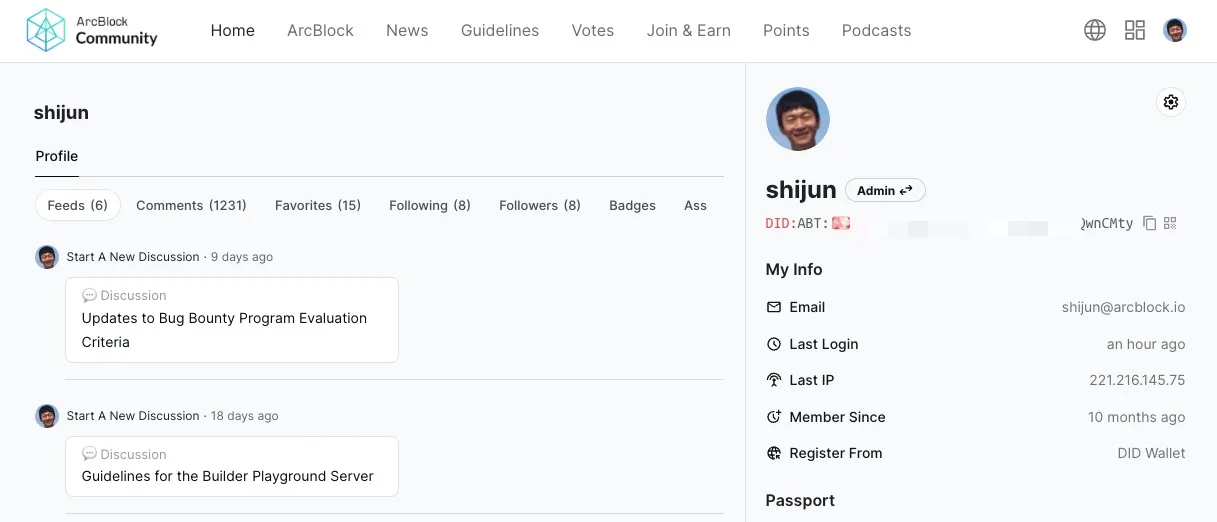
- The creation date of users is now public and displayed on the profile page, check out https://community.arcblock.io/profile.
- Resolved the incorrect claim URL issue when switching passports for the server.
- Supported DID profile with DID Wallet and DID Spaces, check out https://www.arcblock.io/blog/en/did-wallet-5-6-released.
- Enabled user profile refresh when connected from DID Spaces.
App Management Experience
We’ve implemented new features and fixes to streamline app management and improve usability.
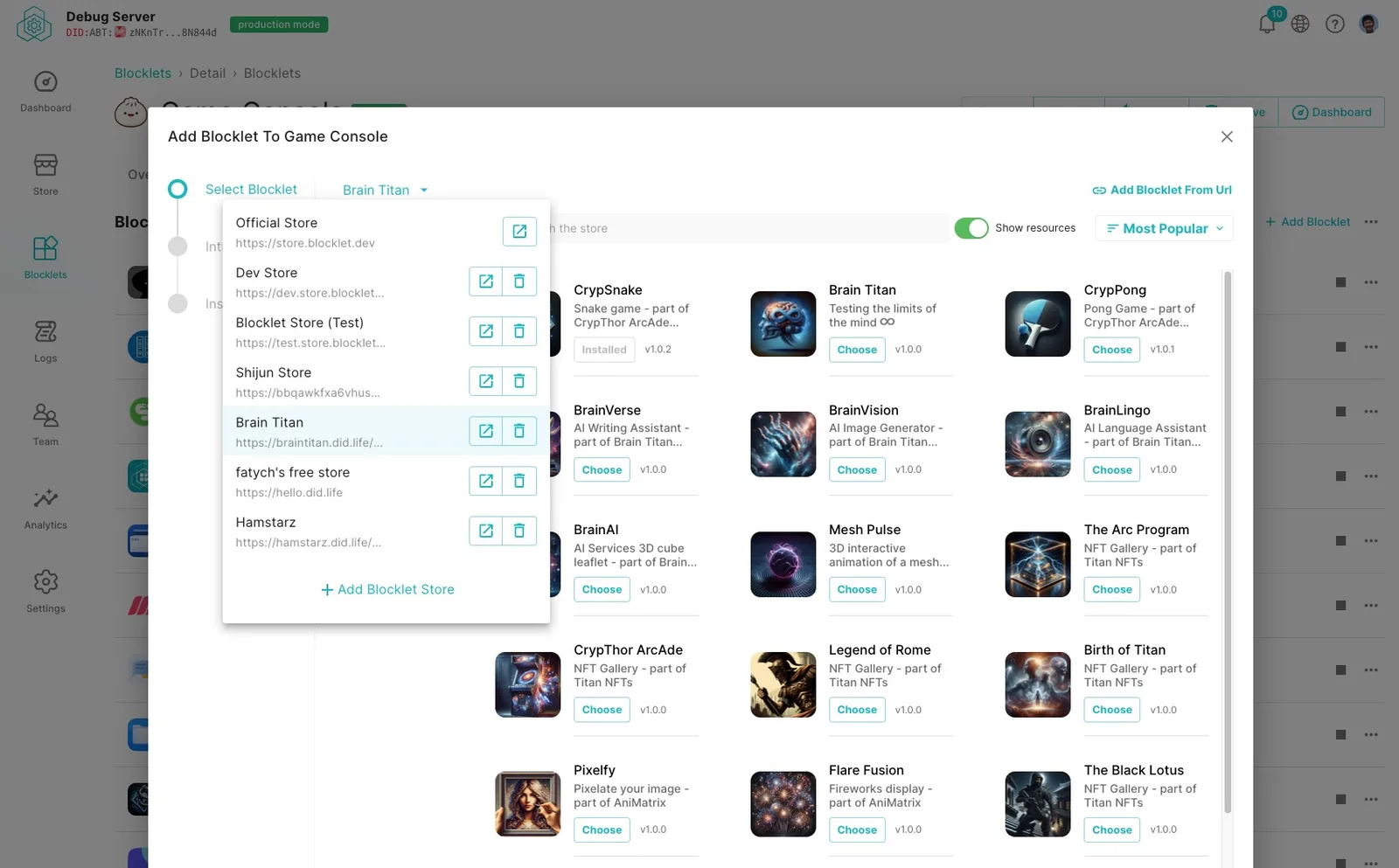
- Added support for adding blocklet stores that are mounted on relative paths.
- Enabled click-to-copy functionality for domains on the blocklet overview page.
- Ensured expiration is checked before starting required components in serverless mode.
- Maintained consistent storage page functionality when DID Spaces were disconnected.
- Added a hover effect for each row on the blocklet list page.
- Fixed the crash on the passport page caused by user input with the DID prefix.
Builder Experience
Blocklet Schema
Enhancements to the blocklet schema provide more customization options for developers.
- Added support for customizing blocklet hook/migration script timeouts in
blocklet.yml.
Blocklet CLI
Significant improvements to the Blocklet CLI enhance its functionality and usability.
- Introduced support for blocklet test subcommands:
init,start,delete, andresetcheckout https://www.npmjs.com/package/@blocklet/testlab - Added
blocklet server rescueto resume blocklets in serverless mode. - Made blocklet environment updates optional on server start for faster starting.
- Supported adding blocklets with DID on
blocklet add. - Ensured the main field is a directory for static blocklets on
blocklet init. - Fixed width issues caused by CJK characters when printing tables from CLI.
- Resolved issues with failed engine component installations when running
blocklet dev. - Fixed log streaming issues when running
blocklet dev. - Ensured the profile argument is respected when running
blocklet config. - Printed the DID Connect URL when running
blocklet connectfor environments without GUI. - Supported blocklet stores mounted on relative paths in
blocklet connect. - Fixed
blocklet bundlefailures caused by CJK characters inblocklet.md. - Ensured non-standard ports are respected when running
blocklet dev.
Blocklet Service
New features and fixes improve the robustness and capabilities of blocklet services.
- Enabled push notifications for all users by default.
- Supported authentication with signatures when updating user settings.
- Added support for selecting apps when inviting users in a federated login context.
- Supported OpenAPI and OpenComponent protocols for developing interoperable blocklets.
- Corrected client IP retrieval while blocklet is behind a CDN.
- Returned a 400 status for requests of non-existent static assets to avoid unexpected cache issues.
Blocklet Studio
Enhancements to Blocklet Studio streamline the development and deployment process.
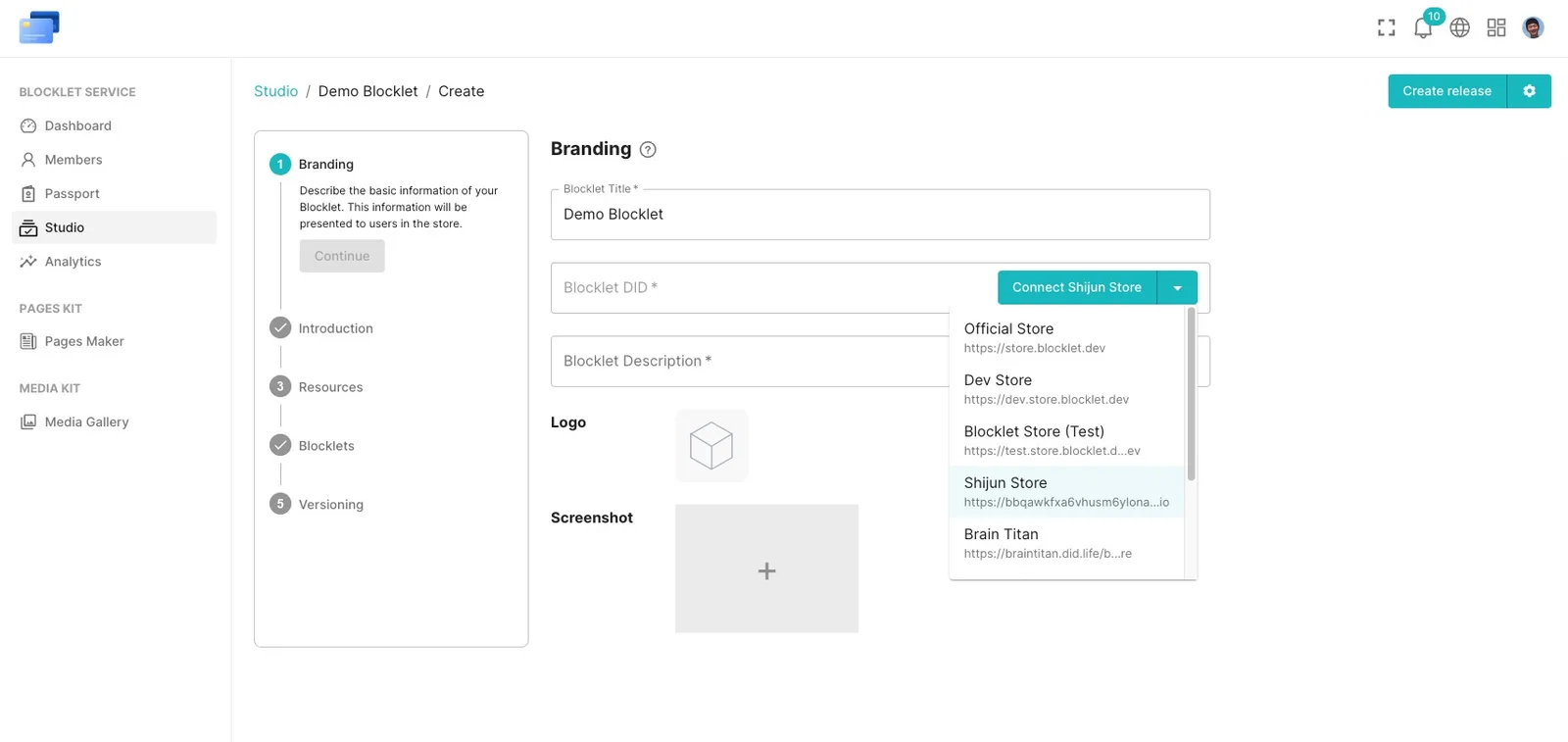
- Supported adding/removing blocklet stores when creating blocklets.
- Set the proper blocklet source when uploading to the Blocklet Store from the studio.
- Supported uploading with dependency blocklets resolving to the same Blocklet Store.
- Supported isolated store lists in serverless and multi-tenant modes.
- Allowed guests to create blocklets in multi-tenant mode.
- Improved developer information display for connected blocklet stores.
- Supported disconnecting and reconnecting from connected blocklet stores.
- Ensured creating blocklets by upload is always available in the studio.
- Enabled auto-uploading to connected stores after release creation.
- Implemented smart selection of dependency blocklets when creating releases.
- Automatically closed the Blocklet Store page upon successful connection.
- Displayed store URL in a toast notification when a new release is uploaded to the Blocklet Store.
- Prevented downloading old releases when creating new releases.
- Persisted blocklet data on store reconnection after page reload.
- Ensured uploaded files are ZIPs when creating releases from uploads.
- Used the static server from the production store when creating releases from uploads.
- Fixed issues preventing publication to blocklet stores mounted on relative paths.
- Ensured non-standard ports are respected when using Blocklet Studio.
Docker Support
We've enhanced Docker support to facilitate easier blocklet development and deployment.
- Released a dedicated Docker image for blocklet development, detailed in the documentation.
- Blocklet Server can now publish Docker images for each beta and production release.
Dependency Management
Improvements in dependency management ensure smoother operations on various platforms.
- Bumped
blocklet/uploaderto fix a ZIP validation issue on Windows.
Security and Reliability
We've focused on enhancing the security and reliability of Blocklet Server with several updates.
- Ignored unavailable blocklet stores when checking for updates.
- Supported retrieving IP addresses on Google Cloud Platform.
- Enabled SQLite WAL mode for improved database read/write performance.
- Set the maximum cluster size for Blocklet Service to 1 by default for faster startup.
- Fixed errors thrown during automatic update checks.
- Improved navigation by using
window.opento open links. - Ensured disk usage alarms function correctly when multiple disks are present.
- Prevent blocklet status from being set to stopped after installation.
- Fixed rule matching for URLs with query parameters in the default routing engine.
- Resolved excessive redirects when opening blocklet mount points.
- Ensured blocklets were initialized when created from input.
- Validated URLs before saving
BLOCKLET_APP_URL. - Improved error handling when validating VC presentations for debugging purposes.
- Avoided errors when canceling or restoring non-existent jobs.
- Ensured no errors are thrown when creating audit logs.
- Provided better tips for isolation mode switching.
- Prevented status synchronization for engine-powered blocklets.
- Improved error messages when visiting the static server directly.
Breaking Changes
There is a breaking change since Blocklet Server v1.16.28, if you are upgrading from an earlier version, please take the following steps:
- Install the latest version:
npm install -g @blocklet/cli - Stop the server:
blocklet server stop -f - Start the server:
blocklet server start. If you encounter errors during this step, trying to start again may help.
Community Spotlight: Your Feedback in Action
In this section, we highlight the latest updates and bug fixes that were inspired by you, our users. From minor tweaks to major changes, every update is a step towards enhancing your experience and meeting your needs. Thank you for your continued support and engagement.
- Blocklet Store 发布应用报错
- blocklet dev 时报引擎问题
- Can not restore from DID Spaces from ArcBlock Launcher
- Error when check for updates
- 个人中心设置下的存储管理这个按钮没有反应
- 开发环境env.isComponent 值不同,该如何配置
- Blocklet Server status 命令行页面小问题
- Blocklet Store 添加组件方式
- 应用商店的这个中英文切换是无效的
- 个人资料里面的会话管理,显示的IP不对
- ubuntu无图形界面创建blocklet
- blocklet的菜单栏显示优化
- blocklet.zh.md打包报错
- 安装命令行工具 @blocklet/cli 报错
- Uptime Kuma 安装异常
- blocklet的开发者信息不统一问题
- did domain 托管域名判断存在逻辑问题
- Adding DID Domain results in error 500
- blocklet删除did space连接后页面
- Member since
- blockelt server添加自建商店失败
- test store 发布应用时无法唤起钱包而是转到谷歌商店应用安装页面
- blocklet studio点击发布新版出现网络错误
- Blocklet Server 增加复制blockelt链接功能
Help us to Improve
If you have any needs, suggestions, or issues during your usage, you can visit the ArcBlock Community to provide feedback. We will do our utmost to assist you. Additionally, if your feedback is selected for our Bug Bounty Program, you will receive an ABT reward.
Referenced here
Products
-
Blocklet Server
superseded
The server that hosted blocklets as subprocesses. ARC is where that work continues; the subprocess hosting model is not being carried forward.
Terms
-
Blocklet
A Blocklet is ARC's deployable unit. It keeps an application's declared content, configuration, and runtime needs together, so the unit being run is easier to understand and manage.