Spinning Up Isolated Spaces Like Crypto Sub-Wallets: How ArcSpace Unifies DID Wallet and Blockchain Security
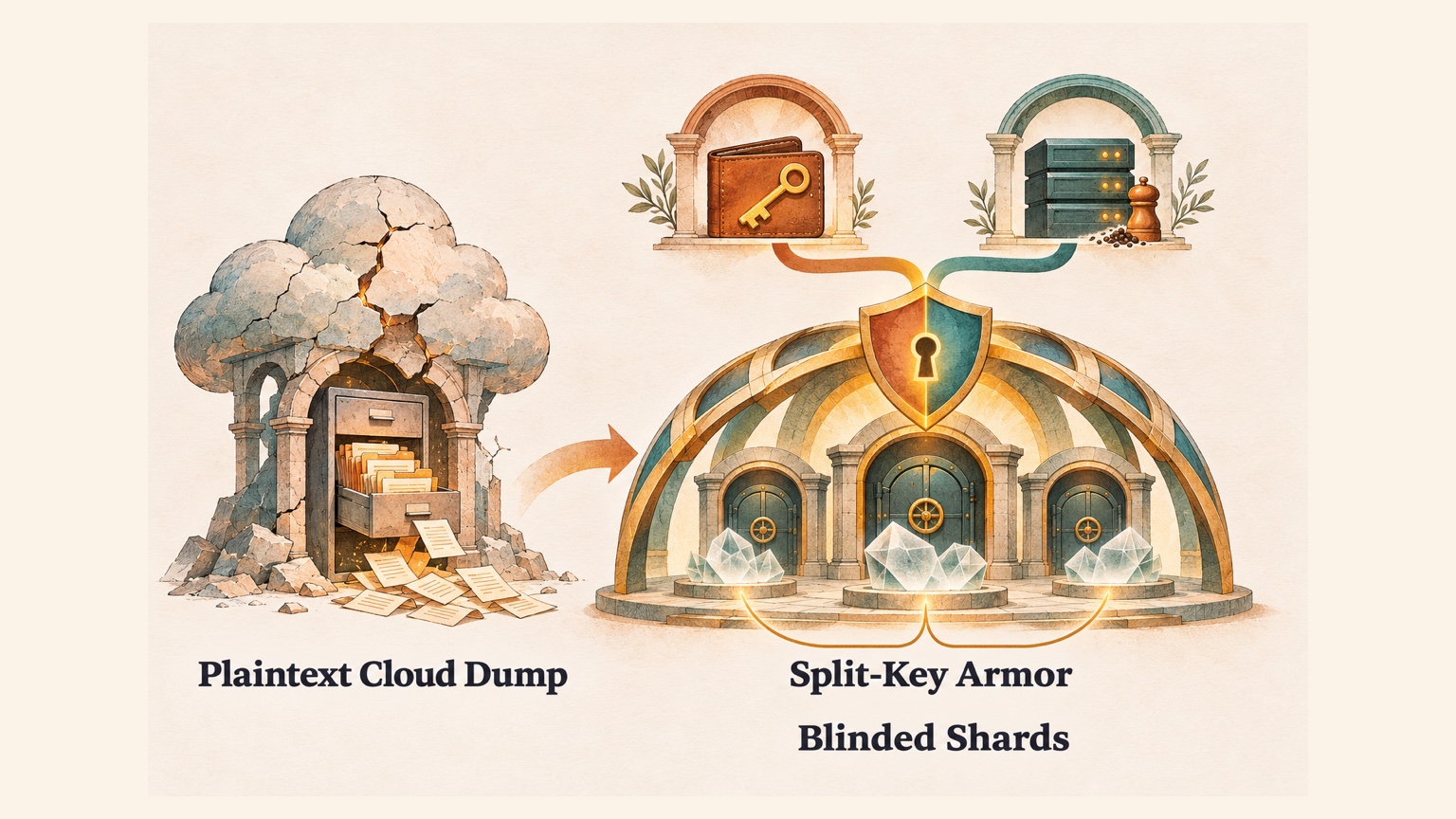
When cloud providers talk about data security, they love to highlight thick firewalls and strict internal policies. Yet as long as the underlying architecture still relies on the server holding a global master key and a database storing plaintext directory trees, user privacy remains exposed on two fronts at once. Externally, if the server suffers a "full dump" (where an attacker exfiltrates the database, object storage bucket, and server configuration together), every user's files are exposed overnight. Internally, the service provider's own operations engineers, database administrators (sysadmins / DBAs), and underlying cloud provider staff can casually browse user folders whenever they log into the backend or inspect a storage bucket. Real data privacy and security cannot rely on a provider promising "we will never peek and our servers will never be breached." It has to structurally strip away the backend's ability to casually inspect user files, and plan for the worst case up front: even if the entire cloud database, storage bucket, and server config are dumped at the same time, the encrypted spaces of offline users must never sit exposed on someone else's hard drive.
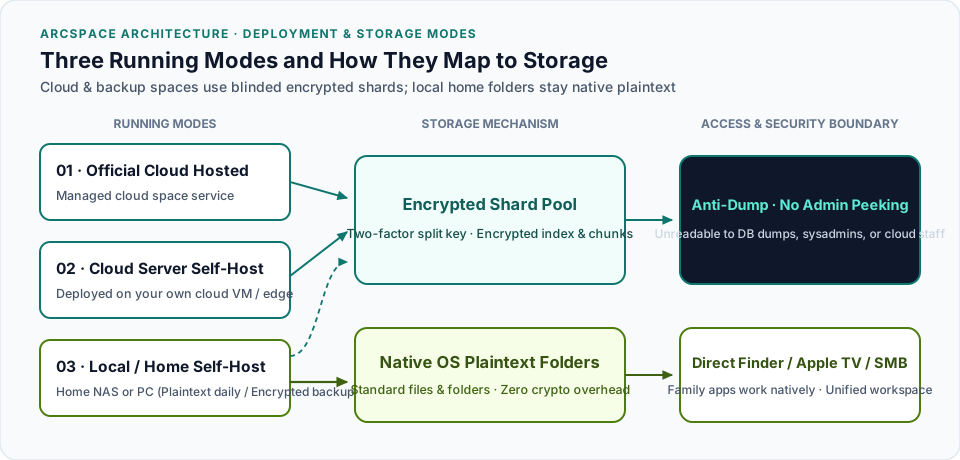
To understand how we designed ArcSpace (personal data spaces) to achieve this, we first need to look at how ArcSpace runs. In practice, ArcSpace supports three deployment modes, each facing a very different physical environment:
- Official Cloud Hosted Mode: Using our managed cloud space service directly, ready out of the box from anywhere;
- Cloud Server Self-Host Mode: Deploying your own ArcSpace node on a cloud VM, VPS, or edge infrastructure that you or your team control;
- Local / Home Self-Host Mode: Running ArcSpace locally on a home NAS, a Mac Mini in your living room, or your personal computer.
Laying out these three running modes up front makes the rest of the architecture click immediately: whenever your data lives in official cloud hosting, a self-hosted cloud server, or an off-site backup, it sits outside your physical room and must be protected by Two-Factor Split Keys and Blinded Encrypted Shards, stopping both external database dumps and internal admin peeking. Conversely, when you self-host ArcSpace locally at home on your own NAS or computer, your everyday folders are already under your physical roof, so they stay 100% native OS plaintext files without turning your family hard drive into an encrypted black box.
With that boundary in place, we unified ArcSpace (personal data spaces), DID Wallet (self-sovereign identity), and ArcBlock Chain under a single Cryptographic Homology architecture. Here is how the pieces fit together.
1. Stopping Both Database Dumps and Admin Peeking: Two-Factor Split Keys and Blinded Shards
You might wonder: don't almost all commercial cloud drives already claim "Encryption at Rest"? Why do we still see headlines about cloud breaches exposing millions of documents, or incidents where insiders and cloud admins snoop on private user files?
The reason is straightforward. Most cloud encryption is like a hotel front desk that locks every guest room, but hangs the building-wide master keycard right on the receptionist's belt. That setup only protects you if someone steals an old hard drive out of a data-center dumpster. Whether an external hacker dumps the database alongside the server config, or an internal sysadmin or cloud vendor employee opens the storage bucket during maintenance, that server-held master keycard unlocks every room in the building.
To remove that master keycard from cloud spaces and encrypted backups, ArcSpace introduces two structural isolation layers at the storage level:
| Traditional Cloud Weak Spot | What Happens in a Dump or Admin Inspection | How ArcSpace Encrypted Spaces Work |
|---|---|---|
| Plaintext Tenant Directories & Index Tables | The database explicitly records which user owns which folders, what every file is named, and which storage object it maps to. Anyone dumping the DB or running an admin query sees everyone's directory tree. | Blinded Shard Pool & Encrypted Directory Tree: Files inside encrypted spaces are sliced into fixed-size ciphertext chunks, and the directory tree itself is encrypted. Storage coordinates are computed through a one-way hash keyed by the user's secret. Looking at the static storage pool, neither hackers nor backend admins can tell which user a chunk belongs to or what its filename was. |
| Single Server Master Key | Even when files are encrypted on disk, they are locked with a single global server key stored in environment variables. Anyone with server config access can decrypt every user's files. | Two-Factor Split Key (Wallet Half + Server Half): The complete decryption key is never stored on the server's disk or database. It must be synthesized transiently in memory from the server's half-key and the user's wallet half-key during an active session. |
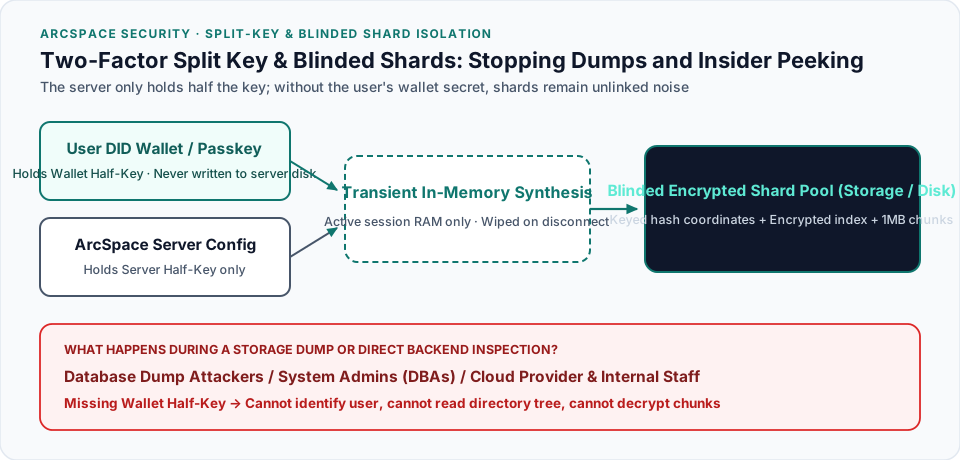
The centerpiece here is the Two-Factor Split Key, which works like a dual-key safe deposit box at a bank.
When you open a bank vault box, the vault manager holds one key and you carry the other in your pocket; neither key can turn the lock alone. In an ArcSpace encrypted space, the server configuration only stores half of the key (the Server Half-Key). The other half (the Wallet Half-Key) is derived on the spot by your DID Wallet or phone Passkey when you sign in, held transiently in memory only while your authenticated session is active, and wiped from memory the moment your session ends or disconnects. Your half of the key is never written to the server's database or disk.
That single design choice shuts down two major privacy threats at once:
- First, it stops static database and storage dumps: For every user who is offline (with no active session in server memory), even if an attacker dumps the entire cloud database, the object storage bucket, and the server's environment variables at the same time, the missing wallet half-key means those dumped shards remain mathematically undecryptable noise that cannot even be grouped by user.
- Second, it stops casual peeking by internal employees, sysadmins, and cloud provider staff: Whether it is our own engineers, a system administrator maintaining the server, or an employee at the underlying cloud provider (such as AWS, Cloudflare, or a data-center operator), nobody logging into the backend or inspecting the storage bucket has your wallet half-key. All they see are de-identified hash filenames and encrypted chunks, eliminating the ability for insiders or admins to casually browse user files.
⚠️ A Critical Security Boundary: ArcSpace Is Not a Secret Vault for Seed Phrases
One boundary must be stated plainly: this architecture is built to isolate everyday personal data, documents, and notes against database dumps and casual admin peeking. It is NOT designed to turn ArcSpace into a hardware-grade secret vault (like an HSM or dedicated password manager), and you should never treat ArcSpace (especially in a cloud environment) as a place to store raw private keys, wallet recovery phrases (seed words), or master passwords.
The reason is fundamental: in this architecture, your DID Wallet recovery phrase and private keys are the root keys that protect and derive your ArcSpace. Root keys belong inside your phone's hardware Secure Enclave or a dedicated wallet, never stored as files inside the cloud space they are meant to guard.
2. Cryptographic Homology: Spinning Up Isolated Spaces Like Blockchain Sub-Wallets
Once storage dumps and admin peeking are addressed, the next question is personal: how do you separate data of different sensitivity levels in your daily life, and how do you let cross-website applications work with your data without granting them blanket access to everything you own?
The answer lies in unifying DID Wallet × Blockchain × ArcSpace under Cryptographic Homology.
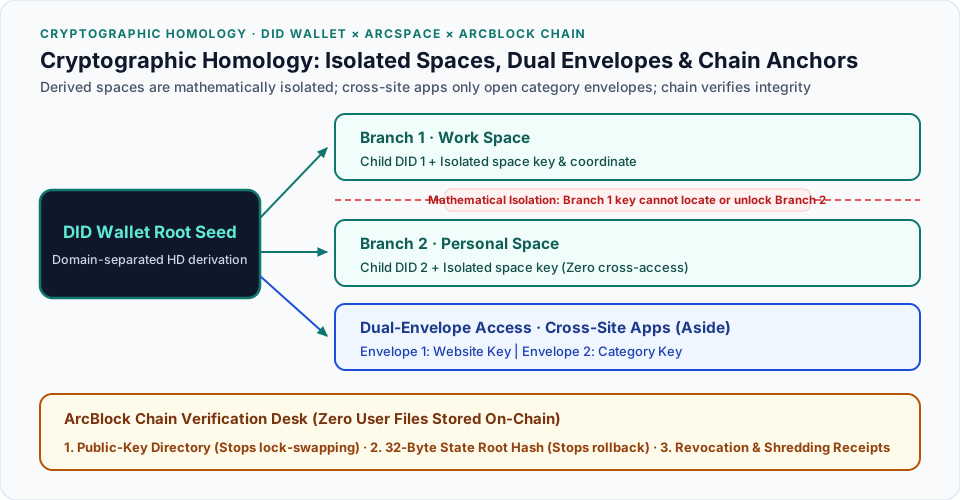
What does "Cryptographic Homology" mean in practice? In conventional systems, "account identity" and "storage space" have nothing to do with each other: you register an account first, then ask a server to create folders. Inside DID Wallet, however, your core cryptographic asset is a single master recovery seed. Just like an HD (Hierarchical Deterministic) wallet in blockchain, that single seed can mathematically derive an unlimited number of independent child branches along different paths.
In our unified architecture, the same derived seed branch uses domain-separated one-way key derivation to produce two capabilities at once:
- Outward as your Identity Card (DID): Asymmetric keys to prove who you are, publish encryption public keys for collaboration, and sign authorizations;
- Inward as the Lock and Blinded Coordinate of an Isolated Space (ArcSpace): Deterministic symmetric keys and blinded directory coordinates that dictate how data in that space is locked and where its index sits inside the shard pool.
Putting identity derivation and space derivation on the same seed tree solves two practical isolation problems right away:
1. Users Can Spin Up Unlimited Mathematically Isolated Spaces Like Sub-Wallets
In everyday use and app authorization, every derived space has its own separate lock and blinded address coordinate. You can spin up a daily work space, a family-shared space, a financial archive space, or a dedicated personal space for sensitive documents (even mixing in an extra user-memorized passphrase on top of wallet derivation).
Because each space's key and directory coordinate are derived one-way from a separate branch, holding the key to Space A gives zero ability to calculate the directory coordinate or unlock a single file in Space B. Purely personal spaces that do not receive external files never need to publish anything on-chain; their encrypted chunks sit mixed together in the same flat shard pool, so an outsider inspecting disk shards cannot even tell how many private spaces you have created.
2. Dual-Envelope Key Boxes Give Cross-Site Apps True Least-Privilege Access
For cross-website applications, a great everyday example is Aside, which lets you collect and organize bookmarks and reading notes across any website you visit.
If an application had to be granted broad master account permissions across your entire space just to aggregate notes across websites, a leaked app token would expose private documents in unrelated folders. That would be like hiring a weekly organizer to tidy up your living-room bookshelf and handing them the master key to every room in your house, when all they really need is a key that opens the living-room bookshelf plus a building pass you can cancel at the front desk.
Instead, ArcSpace uses Dual-Envelope Key Boxes paired with short-lived access passes (Leases) for app-level isolation:
- When you save a bookmark or note on Website A, the item is encrypted with a fresh random one-time file key, and attached to the outside of the encrypted file are two tiny Key Envelopes:
- Envelope 1 (Website Envelope): Locked with Website A's key, so Website A can read and update the content it created;
- Envelope 2 (Category Envelope): Locked with your wallet's dedicated "Bookmarks & Notes" category key.
- When you authorize Aside to aggregate your notes across websites, you only grant Aside the "Bookmarks & Notes" category key plus a short-lived access pass (Lease) for the storage gateway:
- Strict category boundaries: Aside can open Envelope 2 on bookmarks and notes across Websites A, B, and C. Orders or private messages on Website A do not carry a "Bookmarks & Notes" envelope, so Aside cannot decrypt them even if it sees the ciphertext;
- Clean revocation: That short-lived access pass rotates automatically. If you revoke an external app in your wallet, the storage gateway blocks its access pass immediately so it can no longer fetch new ciphertext chunks, without having to re-encrypt tens of thousands of historical notes.
3. Why Bring Blockchain Into This? The Chain Is a Tamper-Proof Verification Desk Against Lying Servers
At this point, you might ask: if all the file shards live off-chain (in cloud object storage, a self-hosted server, or a local drive) and encryption happens with your wallet keys, what is the blockchain doing here?
The answer is direct: user files are never stored on-chain; the blockchain only records compact public anchors, acting as a verification desk so a compromised remote server cannot lie to your client.
Why do you need a verification desk? Because even when a remote server cannot decrypt your envelopes, a hacked or malicious server can still trick your client software by lying. Using three lightweight anchors on ArcBlock Chain verified by your client, we shut down three classic server attacks:
- Stopping the Server from Swapping Locks (On-Chain Public-Key Directory): When another website or collaborator wants to send you an encrypted file, asking a centralized server for your encryption public key is risky: a compromised server could return an attacker's public key instead. By publishing encryption public keys for collaborative identities inside your on-chain DID Document on ArcBlock Chain, the sender's client verifies your signed public key directly from the chain before locking the envelope. If the server tries to swap the lock in transit, the signature check catches it immediately.
- Stopping the Server from Serving Stale Files (32-Byte Anti-Rollback Fingerprint On-Chain): One of the subtlest tricks a compromised storage server can pull is a Rollback Attack: say you updated a document yesterday or deleted an old file, and the hacked server quietly hands your laptop the directory tree from three days ago, pretending your update never happened. By anchoring the latest directory version number and a 32-byte state-root hash fingerprint on-chain (which looks like 32 random bytes to outsiders and reveals zero filenames), your client checks the latest 32-byte fingerprint on-chain whenever it connects. If the server serves a stale directory version, the hash check fails and the client alerts you on the spot.
- Network-Wide Revocation & Destruction Receipts (Revocation & Shredding Anchors On-Chain): When you revoke an app's access pass, publishing the signed revocation event on-chain lets every storage gateway and self-hosted node subscribed to chain events block that pass within seconds. And when you permanently destroy a confidential file by destroying its keys and wiping its encrypted shards (cryptographic shredding), anchoring the signed destruction digest on-chain leaves an immutable, timestamped audit receipt.
Notice the pattern: the blockchain stores zero bytes of your personal files, yet those compact public anchors let your client catch a remote server lying about public keys, directory versions, or revocation status. That is what we mean when we say verifiability matters more than decentralization for its own sake.
4. What Is the Performance Impact? Multi-Dimensional Zero-Friction Speed and Native Plaintext on Your Home NAS
No matter how clean a security architecture looks on paper, if it makes opening files feel sluggish or ruins how your family uses hard drives at home, it fails as engineering. When designing this isolation architecture, we looked at performance impact across four distinct dimensions to make sure users feel virtually zero friction, whether ArcSpace is running on official cloud hosting, a self-hosted cloud server, an edge runtime like Cloudflare, or a local machine at home:
- Separating Sign-In from Everyday Requests (Microsecond Key Synthesis):
The deliberately slow password key-stretching step runs only once when you sign in. On every subsequent read or write request, synthesizing the Two-Factor Split Key in memory takes roughly
10microseconds (0.01milliseconds), which is completely imperceptible compared to normal network I/O. - Streaming Large Files in
1 MBChunks (No Stalls, Minimal RAM): Large files never wait to be downloaded or decrypted as a single giant blob; they stream on the fly in independent1 MBchunks. Using hardware-accelerated crypto instructions built into modern CPUs, encrypting or decrypting a1 MBchunk takes only about0.16milliseconds. Even when streaming a multi-gigabyte video, playback starts immediately with instant scrubbing, while the server buffers less than4 MBof RAM in flight. - On-Demand Space and Envelope Unlocking (Zero Full-Disk Scans): Because each derived space and category envelope has its own deterministic blinded coordinate, opening a space or letting Aside fetch your bookmarks and notes only unlocks the specific shards being requested. Creating a dozen isolated spaces adds zero overhead to directory listing speed.
- Local & Home NAS Self-Host Folders: Zero Crypto Overhead, 100% Native Plaintext: Coming back to the third running mode we introduced at the start: when you self-host ArcSpace locally at home or on a home NAS, there is no way I am turning our shared 20TB family NAS into an opaque pool of encrypted chunks. Just imagine what would happen if I converted our home NAS into encrypted shards that only special software could read, breaking Apple TV movie playback in the living room and stopping Mac Finder from opening family photo albums. My family would fire me as the household IT admin before dinner 🤣.
That is why ArcSpace matches the storage mechanism directly to how and where you run it:
- Home Local Self-Host Everyday Folders (100% Native OS Plaintext): Your local code repositories, family photo libraries, and movie drives on a home NAS stay 100% standard OS folders and native plaintext files at full native disk speed. Your family keeps opening them directly from Mac Finder, Windows SMB shares, Apple TV, or phone photo apps without changing a single habit.
- Cloud Hosted Spaces, Cloud Self-Host Spaces, Remote Backups & Designated Private Spaces (Full Encrypted Shards): Data that leaves your home physical environment for cloud hosting, remote backups, or a specific folder you explicitly designate as an encrypted private space is automatically stored as blinded encrypted shards protected by split keys and envelopes.
- One Unified Workspace: When you open the ArcSpace interface, native plaintext photos from your home NAS and unlocked documents from your cloud encrypted spaces appear side by side in the same workspace.
Stepping back, personal data security usually fails by falling into one of two extremes: either dumping everyone's files into a giant cloud bucket unlocked by a single server key where hackers or backend admins can read everything, or building an unusable cryptographic fortress that locks you out of your own family photo albums at home.
By unifying DID Wallet, ArcBlock Chain, and ArcSpace at the cryptographic root, we let cryptography work quietly where it actually belongs: when you are editing code at home, browsing NAS photos, or saving web notes in Aside, it stays completely out of your way with zero performance penalty. And when your data moves to the cloud, off-site backups, or cross-app collaboration, your wallet seed and on-chain verification anchors keep you in control, protected against external database dumps and internal peeking alike.
Next in This Series: With zero server-side master keys and no customer-support backdoor to reset your password, what happens if you forget your vault passphrase or lose both your phone and recovery phrase? Read the companion architecture deep dive: Zero Compromise Against Hackers, Forgiving When You Forget: ArcSpace's Anti-Self-Lockout and Social Recovery Architecture.