DocSmith 0.9.8Released: Enhanced AI Chart Generation and Evaluation
AIGNE DocSmith has released a new beta that introduces two significant core features for developers and teams. 1. AI Chart Generation: Streamlining Professional Chart Creation for Enhanced Document Readability and Visual Appeal
2. Enhanced Evaluation Features: Global Context for Holistic Quality Analysis## Main Features### 1. AI Chart Generation> Version Requirement: This feature requires AIGNE CLI version 1.57.2 or later. Please ensure your CLI version meets this requirement.Below is a usage preview from the AIGNE DocSmith documentation: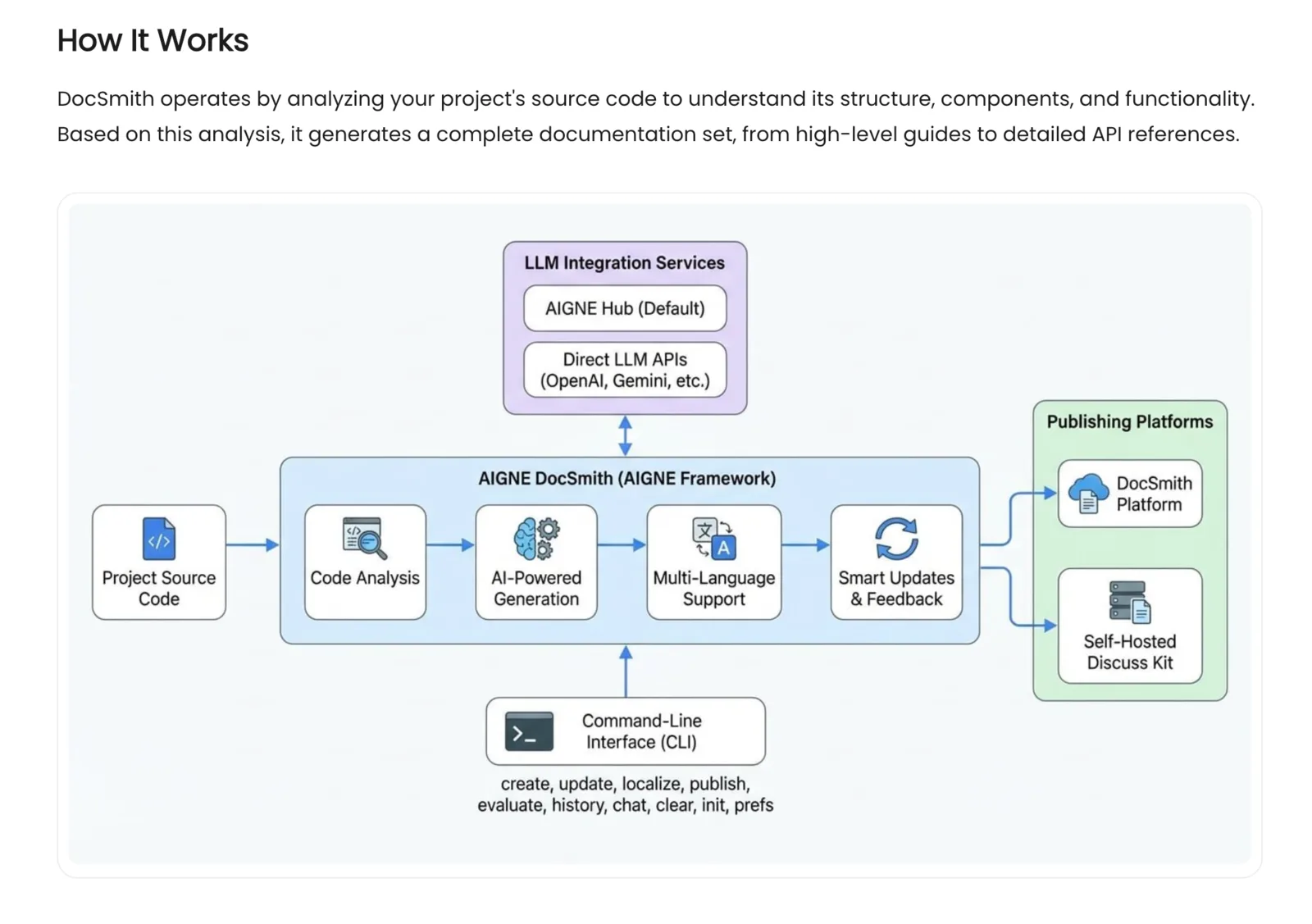 #### Feature DescriptionThe AI analyzes document content, identifies where diagrams would improve comprehension, and generates them automatically. No manual positioning or content specification required.##### Core Capabilities- Identifies suitable locations for charts based on content analysis
- Selects diagram type from context: flowcharts, architecture diagrams, concept maps, sequence diagrams, network diagrams
- Chooses visual style (modern, standard, hand-drawn, flat, minimalist, 3D) and aspect ratio
- Generates Material Design-compliant charts
- Optimizes image size and syncs across translated versions### Usage
| Goal | Command |
|---|---|
| Update single doc with interactive feedback | aigne doc update |
| Select docs containing charts | aigne doc update --diagram |
| Update all charts across all docs | aigne doc update --diagram-all |
Note: --diagram and --diagram-all are for batch operations. For single documents, use aigne doc update and provide feedback interactively.### Example: Interactive FeedbackWhen running aigne doc update, you can request specific chart modifications:```javascript
Feedback: "Add architecture diagram to the deployment section"
Result: Diagram inserted at identified location, style: modern
Feedback: "Change the flowchart to hand-drawn style" Result: Chart regenerated with hand-drawn style
Feedback: "Delete the diagram in section 3" Result: Diagram removed
- Connections and consistency across documents
- Terminology, style, and format inconsistencies
- Duplicate content and missing cross-references
- Inter-document dependency issues
- Documentation organizational structure##### Evaluation Dimensions:The system looks at several factors when reviewing docs including: - <strong>Readability</strong> — Language clarity, grammar, spelling
- <strong>Coherence</strong> — Logic flow, transitions, consistency
- <strong>Content Quality</strong> — Coverage, accuracy, actionability
- <strong>Consistency</strong> — Terminology, style, formatting uniformity
- <strong>Goal Alignment</strong> — Content-to-goal match
- <strong>Audience Fit</strong> — Target audience appropriateness
- <strong>Knowledge Level Match</strong> — Alignment with reader's expected knowledge#### UsageTo start using the evaluator, simply use the command below which will generate an .html ready report. ```javascript
aigne doc evaluate
```Global context is enabled by default. The system collects all document content, runs analysis, and generates an assessment report.## Upgrade Guide### Version Requirements- AI Chart Generation Feature: Requires AIGNE CLI version >= 1.57.2
- Please ensure your CLI version meets the requirements; otherwise, the chart generation feature might not work as intended.### Upgrade Steps#### 1. Check CLI Version```javascript
aigne --version
```Ensure the version is >= 1.57.2. If the version is too low, please upgrade the CLI first:```javascript
npm install -g @aigne/cli@latest
# 或
pnpm add -g @aigne/cli@latest
```#### 2. Get Started- Diagram Generation: Run `aigne doc update --diagram` to get started (Requires CLI >= 1.57.2)
- Enhanced Evaluation: Run `aigne doc evaluate` for a comprehensive global evaluation#### 3. Optional ConfigurationTo customize chart styles, add the `diagramming` configuration in `aigne.yaml`(see the usage guide above).## SummaryVersion 0.9.8 adds:- <strong>AI Chart Generation</strong> — Automatic diagram creation and placement (requires CLI ≥1.57.2)
- <strong>Enhanced Evaluation</strong> — Cross-document analysis with global contextUpdate your CLI to access chart features. Check out [https://docsmith.aigne.io](https://docsmith.aigne.io) to try it now and see live doc sites.
Referenced here
Products
- AIGNE active
A framework for developers building agents. Start from the command line to create and run a project; use the framework documentation for the parts that need detail.
- DocSmith superseded
Generates and maintains documentation alongside the code it describes, including multilingual versions. Its work has been taken into ARC; the standalone tool is no longer maintained.