Overview
AIGNE DocSmith is a documentation tool that uses AI to analyze your project's source code and generate documentation automatically. Built on the AIGNE Framework, it produces structured, multi-language documents that are synchronized with your codebase. This process addresses the challenges of manual documentation, which can be time-consuming, prone to becoming outdated, and inconsistent.
How It Works#
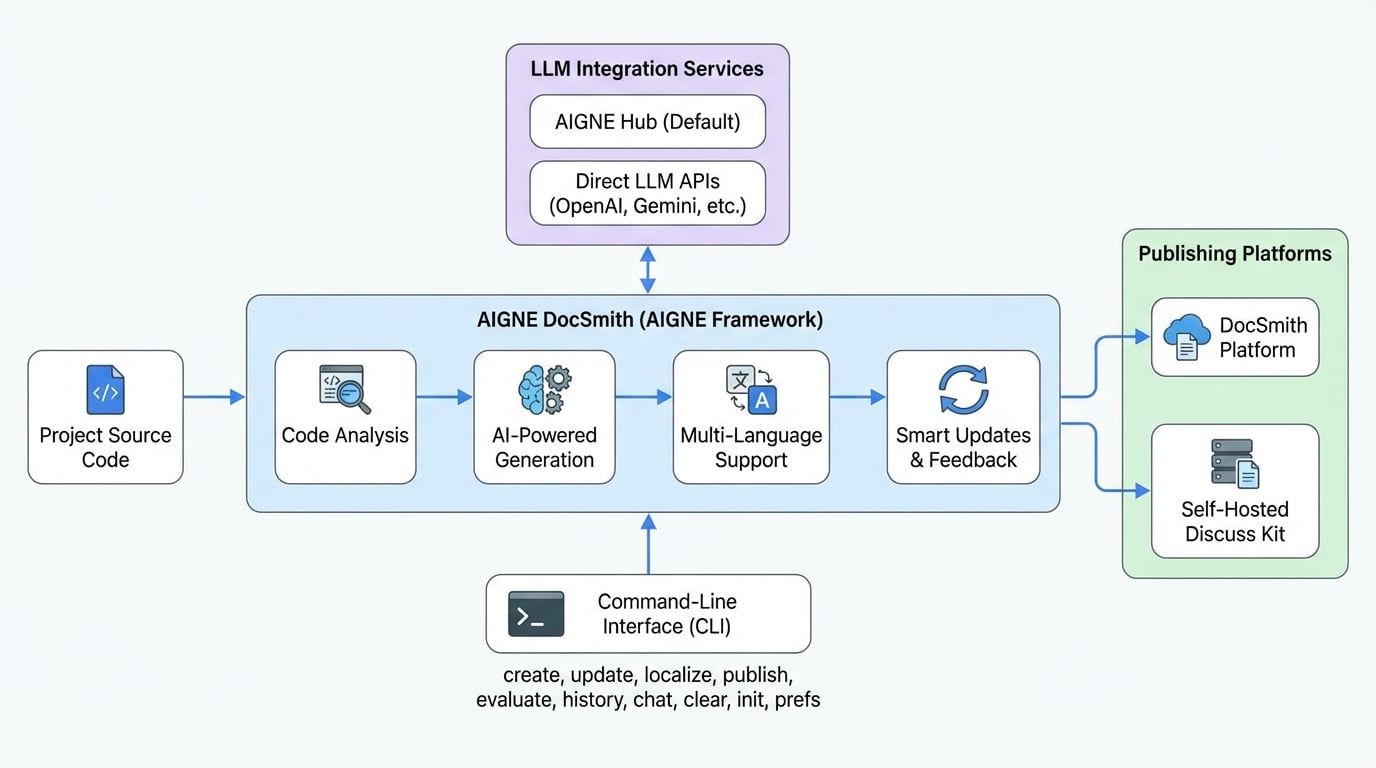
DocSmith works by analyzing your project's source code to understand its structure and functionality. From this analysis, it generates a complete set of documents, including high-level guides and detailed API references.
Core Features#
DocSmith provides a set of features to handle the document lifecycle from creation to publication.
- AI-Powered Generation: Analyzes the codebase to generate a logical document structure and content that explains the code's functionality.
- Multi-Language Support: Translates documents into 12 languages, such as English, Chinese (Simplified), and Japanese, using context-aware translation to maintain technical accuracy.
- LLM Integration: Connects with multiple Large Language Models (LLMs). It uses AIGNE Hub by default, a service for switching between models like Google Gemini and OpenAI GPT without separate API keys. You can also configure your own keys for direct provider access.
- Smart Updates: Detects source code changes and updates the corresponding document sections. You can provide feedback to refine the generated content.
- Publishing Options: Deploys documents with a single command. You can publish to the official DocSmith platform or a self-hosted instance of Discuss Kit, a service for hosting and displaying documents.
Available Commands#
DocSmith is operated through a command-line interface. The following table provides a summary of the main commands and their functions.
Command | Description |
|---|---|
| Guides you through an interactive process to create an initial configuration file. |
| Creates a new set of documents from your source files. |
| Adds a new document to the existing structure. |
| Removes a document from the existing structure. |
| Modifies existing documents based on code changes or new feedback. |
| Translates documents into one or more of the 12 supported languages. |
| Deploys your documents to a live, accessible URL. |
| Assesses the quality and completeness of your created documents. |
| Views the history of updates made to your documents. |
| Starts an interactive mode session to generate and manage documents. |
| Manages saved preferences and configurations for document creation. |
| Removes created files, configurations, and cached data. |
This overview provides a summary of AIGNE DocSmith's purpose and capabilities. To begin using the tool, proceed to the Getting Started guide for installation and setup instructions.