Authentication
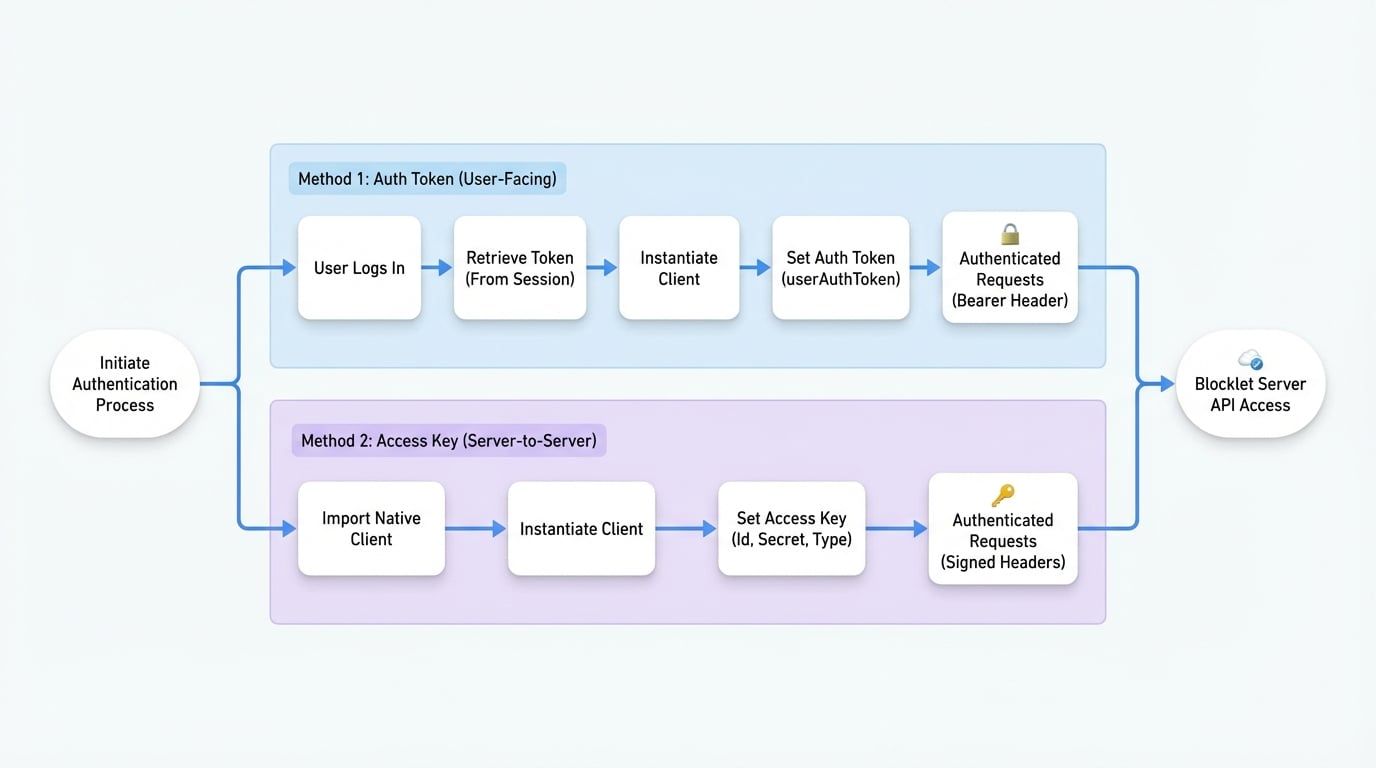
The @blocklet/server-js library provides two primary methods for authenticating API requests: Auth Tokens and Access Keys. The appropriate method depends on your application's environment and security requirements. Auth tokens are typically used in user-facing applications like browsers, while access keys are designed for secure server-to-server communication.
This section explains how to implement both authentication strategies.
Using an Auth Token#
This is the most common authentication method for applications where a user is actively logged in, such as a web application running in a browser. The auth token is typically retrieved from the user's session and is valid for a limited time.
To use this method, instantiate the client and provide the token using the setAuthToken method.
Using setAuthToken
import BlockletServerClient from '@blocklet/server-js';

// The endpoint of your Blocklet Server
const endpoint = 'http://localhost:4000/api';
const client = new BlockletServerClient(endpoint);

// Token obtained from a user's session after they log in.
// You can typically find this in the browser's localStorage under the key `__sst` on your Blocklet Server domain.
const userAuthToken = 'eyJhbGciOiJIUzI1NiIsInR5cCI6IkpXVCJ9.eyJ0eXBlIjoidXNlciIsImRpZCI6Inoxbjd5TG5BRDV3VHJ5RjU2S0IzU3N0MVJlbVpVQTQ4OEhoIiwicm9sZSI6ImFkbWluIiwicHJvdmlkZXIiOiJ3YWxsZXQiLCJreWMiOjAsImVsZXZhdGVkIjpmYWxzZSwiZnVsbE5hbWUiOiJza3lwZXNreSIsImlhdCI6MTc2MTAzODQ1OSwiZXhwIjoxNzYxMDQyMDU5fQ.rLoDz0o2Jg83BP_IGF8bwhHT3Qnyhy8KfVQNzSa1ycY';

client.setAuthToken(userAuthToken);

// All subsequent API calls will be automatically authenticated
async function fetchNodeInfo() {
  try {
    const response = await client.getNodeInfo();
    console.log('Node Info:', response.info.name);
  } catch (error) {
    console.error('Failed to fetch node info:', error);
  }
}

fetchNodeInfo();
Once the token is set, the client automatically includes an Authorization: Bearer <token> header in all subsequent GraphQL requests.
Using an Access Key#
Access keys are intended for server-to-server communication, background services, or any non-interactive environment where a user session is not available. This method provides a more secure and persistent way to grant programmatic access.
To use an access key, you must use the native version of the client, which includes the necessary cryptographic libraries.
Importing the Native Client
import BlockletServerClient from '@blocklet/server-js/native';Then, configure the client using the setAuthAccessKey method. This method accepts an object with the following fields:
The public identifier for the key. This is typically the DID address of the associated wallet.
The secret key (or private key) used to sign requests. Never expose this in client-side code.
The signing algorithm or wallet type. Supported values include wallet types from @ocap/wallet (e.g., eth, arc), as well as 'sha256', and 'totp'. The type must match how the access key was configured in Blocklet Server.
Using setAuthAccessKey
import BlockletServerClient from '@blocklet/server-js/native';

const endpoint = 'http://localhost:4000/api';
const client = new BlockletServerClient(endpoint);

client.setAuthAccessKey({
  accessKeyId: 'zNKjw25A312AbC5A1234567890abcdefABCDEF', // Your Access Key ID
  accessKeySecret: 'sk_1234567890abcdefABCDEF1234567890abcdef', // Your Access Key Secret
  type: 'eth' // The wallet type associated with the key
});

// All subsequent API calls will be authenticated using signed headers
async function fetchBlocklets() {
  try {
    const response = await client.getBlocklets();
    console.log(`Found ${response.blocklets.length} blocklets.`);
  } catch (error) {
    console.error('Failed to fetch blocklets:', error);
  }
}

fetchBlocklets();
When using an access key, the client generates a unique signature for each request and sends it in the x-access-signature header, along with x-access-key-id and other necessary authentication headers. This ensures that each request is securely authenticated without exposing the secret key.
Now that you know how to authenticate your requests, you can proceed to the API Reference to explore the available queries and mutations.