Why Aside Is Built for Working with Agents

You've saved a few travel guides on your phone, collected some photos you like, and added a quick note: “Don't pack too much into each day.” When it's time to plan the trip, you'd like an agent to turn those materials into a draft itinerary.
It's a short request with several jobs behind it. The agent needs to find the relevant items, read their content and your notes, save a draft somewhere useful, and leave it ready for you to edit. If you have to copy material, take screenshots, or move results between apps at every step, that preparation gets in the way of the work.
From the start, Aside was designed around both the human experience and the way agents access the app. The UI and UX people use are one part of that work. Giving agents access to content, a way to understand available operations, and a way to check the results is another part of the foundation we've been developing.
Those design choices help reduce the copying and guesswork involved in collaboration.
Give the material an address
When you open Aside, you see cards, images, tags, and collections. You know that tapping a card opens its content, and the layout helps you distinguish the saved content from the notes you've added. Interfaces have long been designed to make this kind of reading natural for people.
An agent organizing your material needs a different set of information: where the content is, how to read it in full, which collection it belongs to, and which operations are available. Providing that information clearly lets it work directly on the task.
Aside uses AFS, the Agentic File System, underneath. Think of it as a shared way to access things: resources have paths, and reading, searching, and running operations follow defined rules. It applies the familiar file-system idea of “find the location, then read the content” to an app's material and capabilities.
Once connected, for example, the Aside library is mounted under /aside, with separate entry points for items, collections, and tags. An agent can search for travel-related items, read the matching content, and use the available collection or tag operations to organize it. You keep browsing and editing through the phone's interface. Both of you are working with the same library.
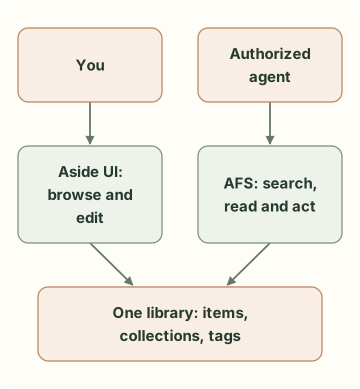
Two ways into the same material. The lines show how each participant accesses the library.
One useful consequence is that content can be read as needed. If a task involves a few travel guides, the agent can find those first. When it needs a particular photo, it can fetch the corresponding attachment. A small task doesn't require loading the whole library into a single conversation.
The library's organization also preserves choices you've already made: which materials you grouped together, which items you tagged, and where you wrote “save this for the last day.” That information can help the agent understand the task. You'll still need to explain your full intent in the current request, but the context you've already left behind remains useful.
AFS UI gives interaction a structure, too
After the agent has read the material, another set of questions comes up. How should it present the result? When it needs you to choose something, how does that choice get back to it?
AFS UI organizes input, output, and sessions into interfaces agents can use. It works with AUP, a declarative UI protocol that describes tables, input fields, buttons, and their events in a structured form. A renderer turns those descriptions into an interface.
The division is straightforward: AFS defines how to access material and operations; AFS UI provides a way to interact with people through an interface; AUP describes what that interface contains and how it responds.
The image below comes from our earlier AFS UI live demo article. An agent built a dashboard using native AUP, with a structured table and buttons for switching views. Clicking the month button causes the runtime to update the displayed data.
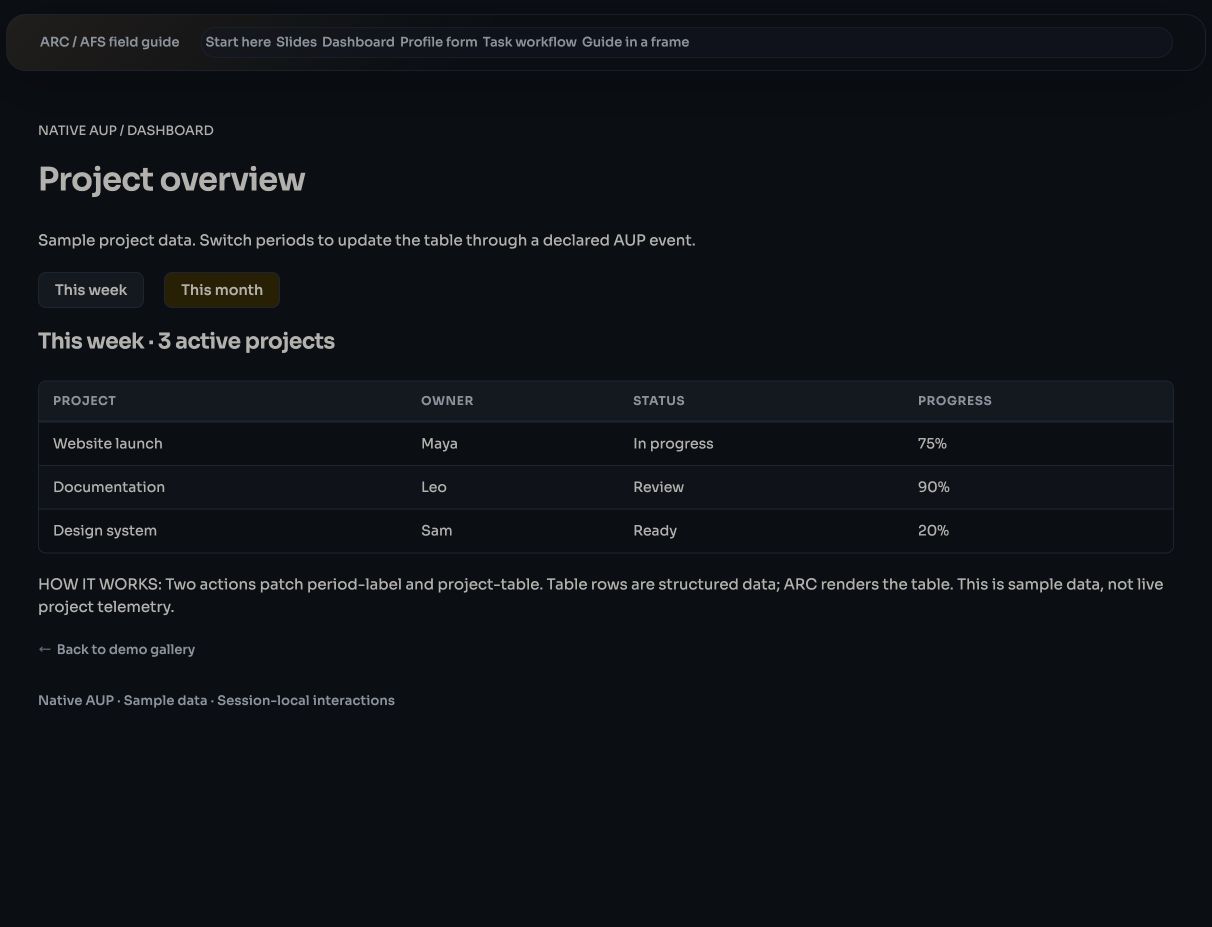
An actual ARC 2.0.0-beta.65 demo, captured on October 12, 2026, using sample table data. It shows how AFS UI and AUP handle interaction.
Aside's interface architecture also uses AFS for data access and AUP for declarative descriptions. This gives the content and operations behind the interface clear definitions. We can keep refining what people see while giving agent access a foundation to build on.
In the phone-and-computer workflow discussed here, the agent uses Aside's exposed content interfaces to search, organize, and save material. The dashboard above is a visible example of the underlying interaction technology.
Save the work so you can pick it up later
Back to the trip. The agent has read the guides and your note about keeping each day relaxed. Following your request, it can organize collections and save a draft itinerary as a note in Aside.
You open the note, remove places you don't want to visit, and add: “Leave the second afternoon free for friends.” The next time you ask the agent to continue planning, it can read the note again and see that decision.
Writing back matters as much as reading. Keeping the source material, the agent's draft, and your edits in the same content space lets you pick up the work next time.
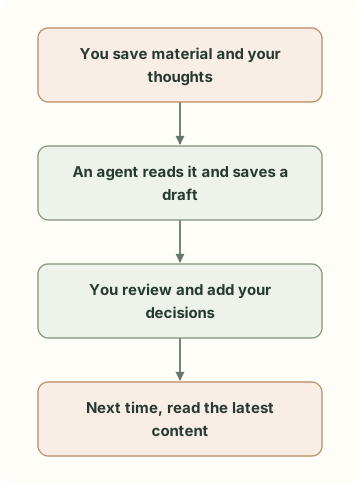
The travel-planning example: each step leaves content that can be used again. The agent's suggestions still need your review and judgment.
Making this dependable involves details users rarely see. If the connection drops partway through a write, will a retry create a duplicate note? If you've just edited something on your phone while the agent is preparing a change, could it overwrite your newer version?
Aside's agent content interfaces use operation identifiers to recognize retries of the same write. When updating existing content, they check the resource version. A mismatch returns a conflict so the agent can read the content again and handle the change. After writing, the agent can also read the saved object back to confirm that the content was saved.
These mechanisms make “done” something the agent can check, and give it a basis for retrying or resuming work. The efficiency here comes from less copying, less guesswork, and the ability to continue where you left off. How long a task takes still depends on the task, the connection, and the agent you're using.
Connect first: three steps on the phone
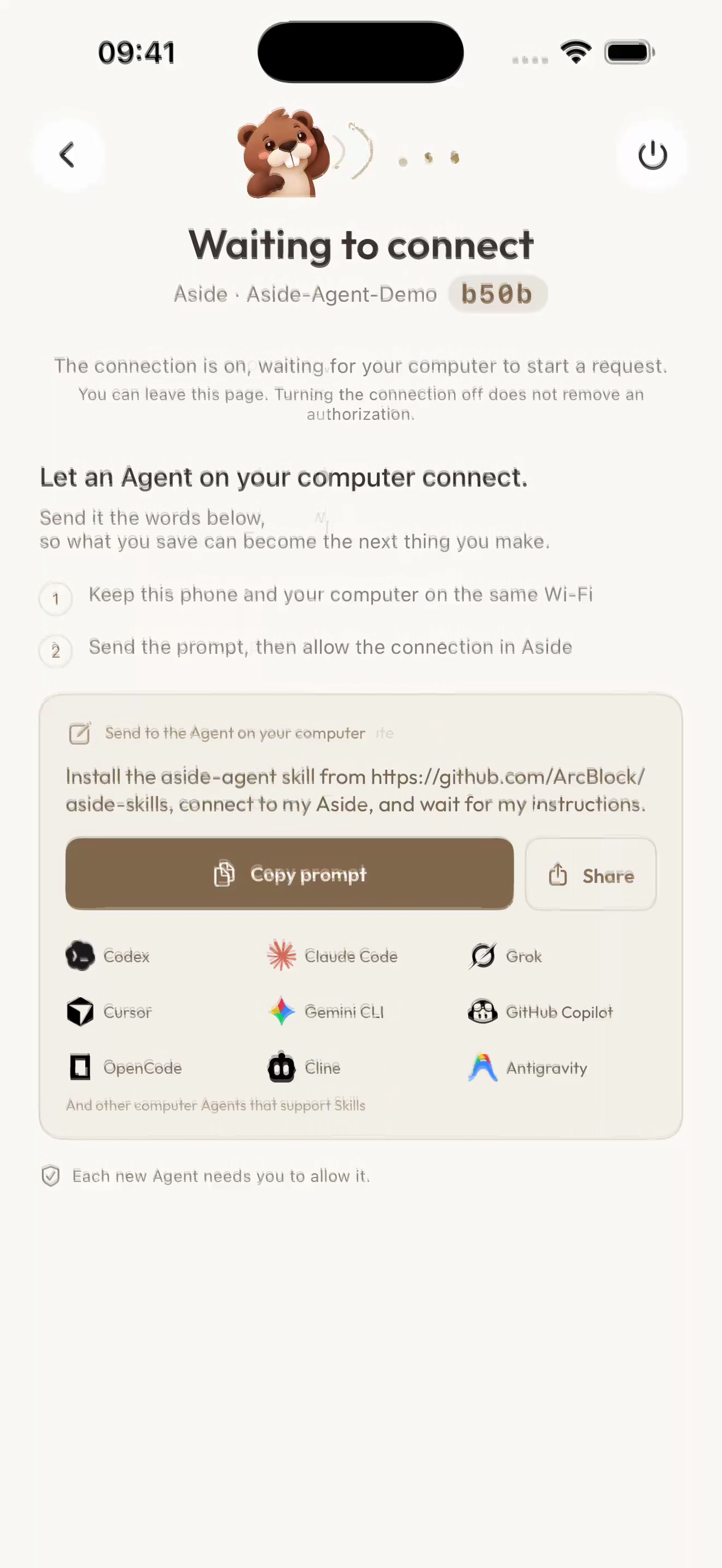
For normal use, put your phone and computer on the same local network, then tap the connection icon at the top of Aside's home screen to open its Agent connection page. These screenshots show the actual interface from a Codex connection demo:
Have the agent request a connection. Turn the connection on. The page shows “Waiting to connect.” Copy its prompt to the agent on your computer. The prompt includes an installation link for the official aside-agent skill. The skill provides connection instructions. On first use, have the agent follow the prompt to install it, then find Aside and request access.
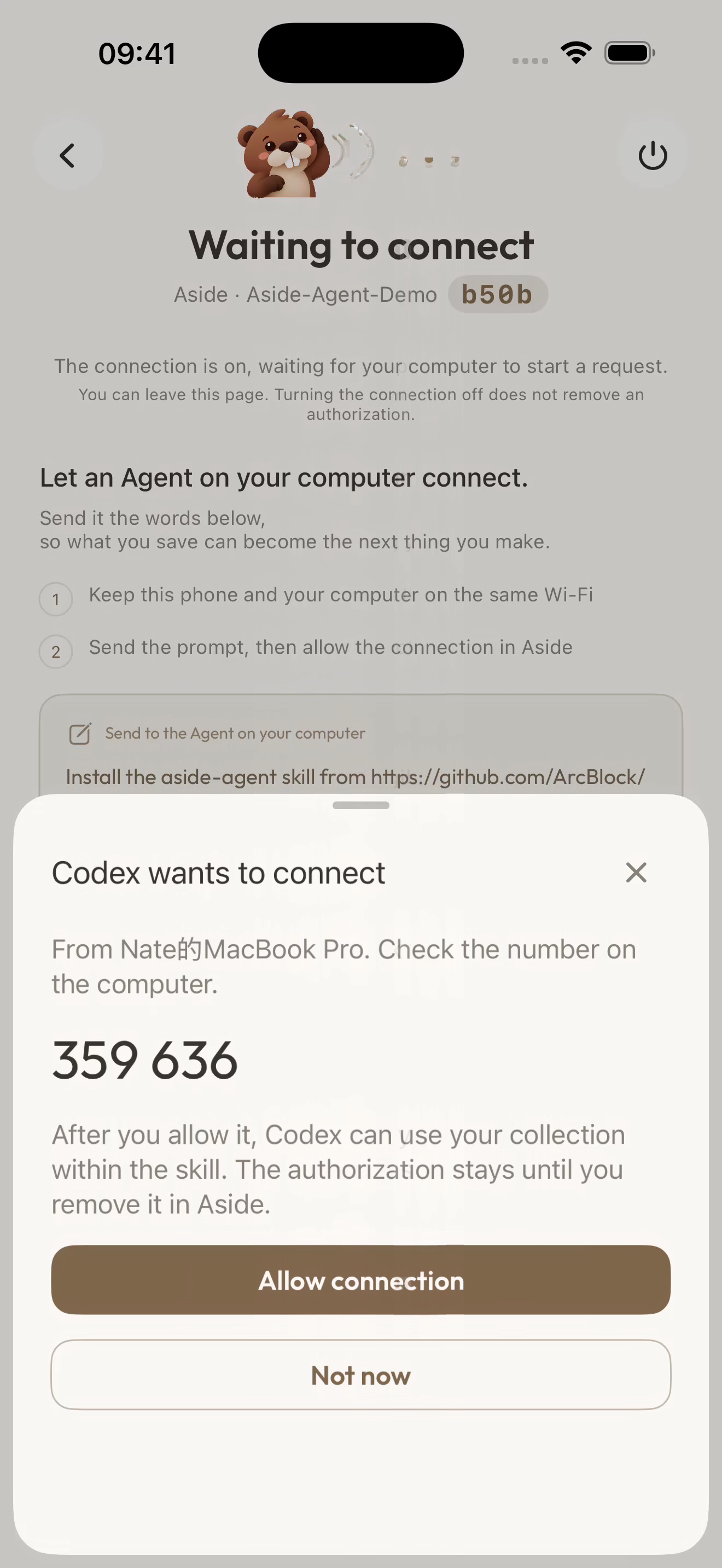
Allow access in Aside. The request shows the agent's name, the computer's name, and a number to compare. Check that this is the request you just started and that the number matches the one on your computer, then tap “Allow connection.”
Check that it connected. The page changes to “Connected,” and Codex appears in the authorized agents list. You can now return to your computer and give it a specific task.
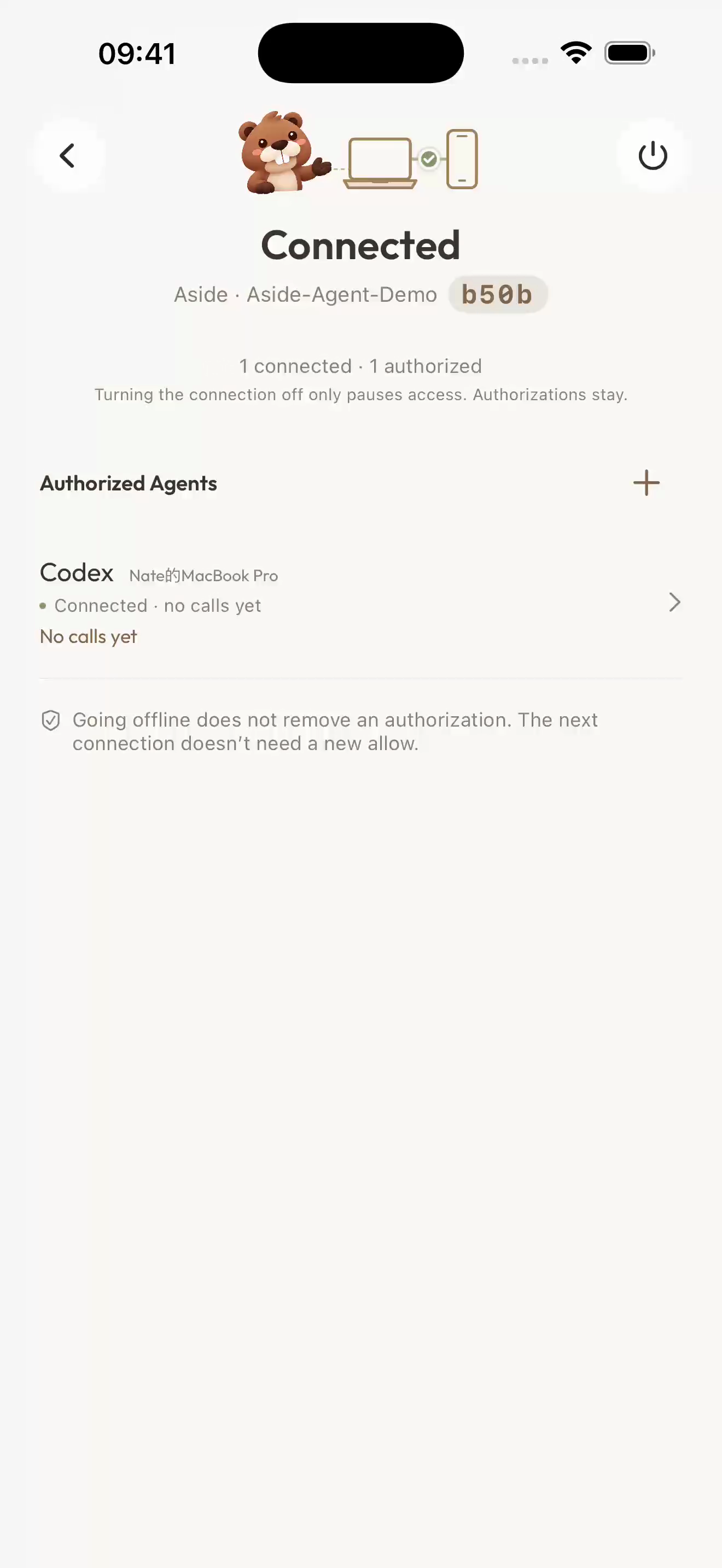
Frames from an iPhone 17 Pro Max simulator screen recording made on October 19, 2026, running iOS 26.5 and Aside Debug 1.3.4 (131), with the interface in English. The user allowed Codex to connect during the demo. The displayed verification number has expired, and the demo authorization has been revoked. Select an image to enlarge it.
The connection page also distinguishes pausing access from removing authorization. Turning the connection off pauses access while keeping existing authorizations. To remove an agent's permission to return, revoke its authorization. This makes reconnecting convenient while leaving you a clear way to withdraw access.
Start with one small task
Choose a clear topic for the first task. For example: “Find the travel guides I've saved, use my notes to put together a draft itinerary, and save it as a note with the reference links.” A well-defined set of materials makes it easier to judge whether the agent has read the right things and organized them sensibly.
The agent can check which capabilities the connection exposes and work within them. You can end the connection; permanent deletion requires confirmation on the phone. The exact entry points and supported operations depend on the version you're using.
The service may pause when your phone locks or Aside moves into the background, so you may need to bring Aside back to the foreground to continue. Your chosen AI tool may send the content it reads to the services it uses. Check how that tool handles data before connecting. This workflow suits organizing and creating with an agent while you're present.
In our earlier article about travel collections, we described saving material on your phone, adding your own thoughts, and bringing related items together. Designing for agent access gives that everyday collection of material another way to be put to use.
When you save something, you don't need to decide which agent might use it later. When you want to work on a topic in more depth, the material can be found, the result can be saved back, and your edits can be read the next time.
We believe future apps should give as much attention to how easily agents can use them as they do to the human experience. How agents access material, invoke operations, and receive people's decisions deserves careful thought from the start. With AFS and AFS UI as part of its underlying architecture, Aside already puts that thinking into practice. Apps that feel natural for people to use and let agents take part in the work are what we believe the next generation of apps should look like.