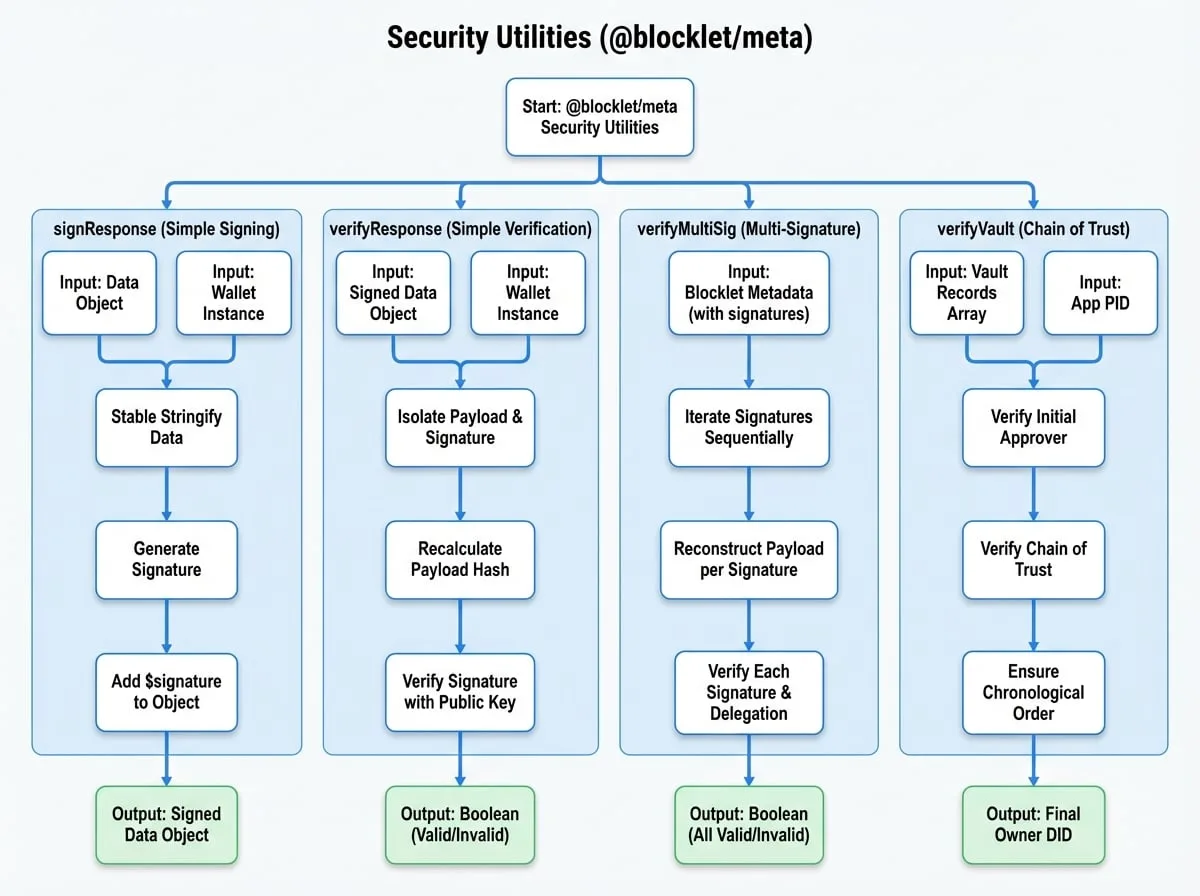
The @blocklet/meta library provides a suite of security utilities for handling cryptographic operations. These functions are essential for ensuring the integrity and authenticity of data, particularly for signing and verifying Blocklet metadata and API responses. They form the backbone of trust within the Blocklet ecosystem.
This section covers functions for simple request/response signing, as well as more complex multi-signature and chained-trust verification schemes.
signResponse
Adds a cryptographic signature to any JSON-serializable object. This function uses a stable stringification method (json-stable-stringify) to ensure the payload is consistent before signing it with the provided wallet object. The resulting signature is added to the object under the $signature key, making it easy to verify.
Parameters
- data
T extends Record<string, any>(required) — The data object to be signed. - wallet
WalletObject(required) — An@ocap/walletinstance used to generate the signature.
Returns
- T & { $signature: string }
object— The original object augmented with a$signatureproperty containing the cryptographic signature string.
Example
Sign a Data Object
import { signResponse } from '@blocklet/meta';
import { fromRandom } from '@ocap/wallet';

// Create a new wallet for signing
const wallet = fromRandom();

const myData = {
  user: wallet.did,
  action: 'updateProfile',
  timestamp: Date.now(),
};

const signedData = signResponse(myData, wallet);

console.log(signedData);
/*
Output:
{
  user: 'z...',
  action: 'updateProfile',
  timestamp: 1678886400000,
  $signature: '...'
}
*/
verifyResponse
Verifies the signature of an object that was previously signed, typically using signResponse. It automatically isolates the payload from the $signature property, recalculates the payload hash using the same stable stringification method, and verifies it against the signature using the provided wallet's public key.
Parameters
- signed
T & { $signature?: string }(required) — The data object containing the$signatureto be verified. - wallet
WalletObject(required) — An@ocap/walletinstance corresponding to the key pair that was used for signing.
Returns
- Promise
Promise<boolean>— A promise that resolves totrueif the signature is valid, andfalseotherwise.
Example
Verify a Signed Object
import { signResponse, verifyResponse } from '@blocklet/meta';
import { fromRandom } from '@ocap/wallet';

async function main() {
  const wallet = fromRandom();
  const myData = { user: wallet.did, action: 'updateProfile' };

  // 1. Sign the data
  const signedData = signResponse(myData, wallet);
  console.log('Signed Data:', signedData);

  // 2. Verify the valid signature
  const isValid = await verifyResponse(signedData, wallet);
  console.log(`Signature is valid: ${isValid}`); // Expected: true

  // 3. Tamper with the data and try to verify again
  const tamperedData = { ...signedData, action: 'grantAdminAccess' };
  const isTamperedValid = await verifyResponse(tamperedData, wallet);
  console.log(`Tampered signature is valid: ${isTamperedValid}`); // Expected: false
}

main();
verifyMultiSig
A sophisticated utility for verifying blocklet metadata (blocklet.yml) that has been signed by multiple parties. It processes signatures sequentially, respecting excludes and appended fields from each signature to correctly reconstruct the exact payload that each party signed. This allows for a collaborative and auditable metadata authoring process where different actors (e.g., developer, publisher, marketplace) can contribute to and sign off on the metadata.
The function also handles delegated signatures, where one DID authorizes another to sign on its behalf via a JWT (delegation field in the signature object).
Multi-Signature Verification Flow
Parameters
- blockletMeta
TBlockletMeta(required) — The full blocklet metadata object, including thesignaturesarray.
Returns
- Promise
Promise<boolean>— A promise that resolves totrueif all signatures in the chain are valid according to the multi-sig rules, andfalseotherwise.
Example
Verify Blocklet Metadata with Multiple Signatures
import verifyMultiSig from '@blocklet/meta/lib/verify-multi-sig';

async function verifyMetadata() {
  const blockletMeta = {
    name: 'my-multi-sig-blocklet',
    version: '1.0.0',
    description: 'A blocklet with multiple authors.',
    author: 'did:abt:z1...',
    signatures: [
      {
        // Developer's signature
        signer: 'did:abt:z1...',
        pk: '...',
        sig: '...',
        // The first signer signs the content *before* `signatures` and `publisherInfo` are added.
        excludes: ['signatures', 'publisherInfo'],
      },
      {
        // Publisher's signature, who might add their own field.
        signer: 'did:abt:z2...',
        pk: '...',
        sig: '...',
        // The publisher added this field before signing.
        appended: ['publisherInfo'],
      },
    ],
    publisherInfo: {
      name: 'Blocklet Store',
      did: 'did:abt:z2...',
    },
  };

  const isValid = await verifyMultiSig(blockletMeta);
  console.log(`Multi-signature metadata is valid: ${isValid}`);
}

verifyMetadata();
verifyVault
Verifies a chain of trust for a "vault," which represents a sequence of ownership or control changes for a specific application context. Each entry in the vault must be chronologically ordered and cryptographically signed. For entries after the first, the signature must be approved by the previous owner, creating an unbroken, verifiable chain. This mechanism is crucial for features like secure, DID-based ownership transfer of assets or administrative roles.
Vault Chain of Trust
Vault Verification Process
direction: down

initial-approver: {
  label: "Initial Approver\n(e.g., App DID)"
  shape: c4-person
}

vault-1: {
  label: "Vault 1\nOwner: User A"
  shape: rectangle
}

vault-2: {
  label: "Vault 2\nOwner: User B"
  shape: rectangle
}

vault-3: {
  label: "Vault 3\nOwner: User C"
  shape: rectangle
}

initial-approver -> vault-1: "1. Approves User A as first owner"
vault-1 -> vault-2: "2. User A approves User B as next owner"
vault-2 -> vault-3: "3. User B approves User C as final owner"
Parameters
- vaults
VaultRecord[](required) — An array of vault records, sorted chronologically by theattimestamp. - appPid
string(required) — The application's DID or a unique identifier for the vault's context. - throwOnError
boolean(default:false) — Iftrue, the function will throw an error on verification failure instead of returning an empty string.
Returns
- Promise
Promise<string>— A promise that resolves to the DID of the final valid owner in the chain. It returns an empty string on failure unlessthrowOnErroristrue.
Example
Verify an Ownership Vault
import { verifyVault } from '@blocklet/meta';

// A simplified example of a vault chain for an application
async function checkVault() {
  const vaults = [
    {
      pk: 'pk_user1',
      did: 'did:abt:user1',
      at: 1672531200,
      sig: 'sig_user1_commit',
      approverPk: 'pk_app',
      approverDid: 'did:abt:app',
      approverSig: 'sig_app_approve_user1',
    },
    {
      pk: 'pk_user2',
      did: 'did:abt:user2',
      at: 1672534800,
      sig: 'sig_user2_commit',
      // Approved by the previous owner (user1)
      approverSig: 'sig_user1_approve_user2',
    },
  ];
  const appDid = 'did:abt:app';

  try {
    const finalOwnerDid = await verifyVault(vaults, appDid);
    if (finalOwnerDid) {
      console.log(`Vault is valid. Final owner: ${finalOwnerDid}`);
      // Expected: Vault is valid. Final owner: did:abt:user2
    } else {
      console.error('Vault verification failed.');
    }
  } catch (error) {
    console.error('Vault verification threw an error:', error.message);
  }
}

checkVault();