This section provides a detailed reference for the functions used to read, parse, and validate blocklet.yml files. These utilities are the programmatic interface for working with the Blocklet Specification, ensuring that your blocklet's metadata is correct, complete, and ready for use by Blocklet Server and other tooling.
These functions are essential for building tools that interact with blocklets, validating configurations in CI/CD pipelines, or programmatically reading blocklet metadata.
parse
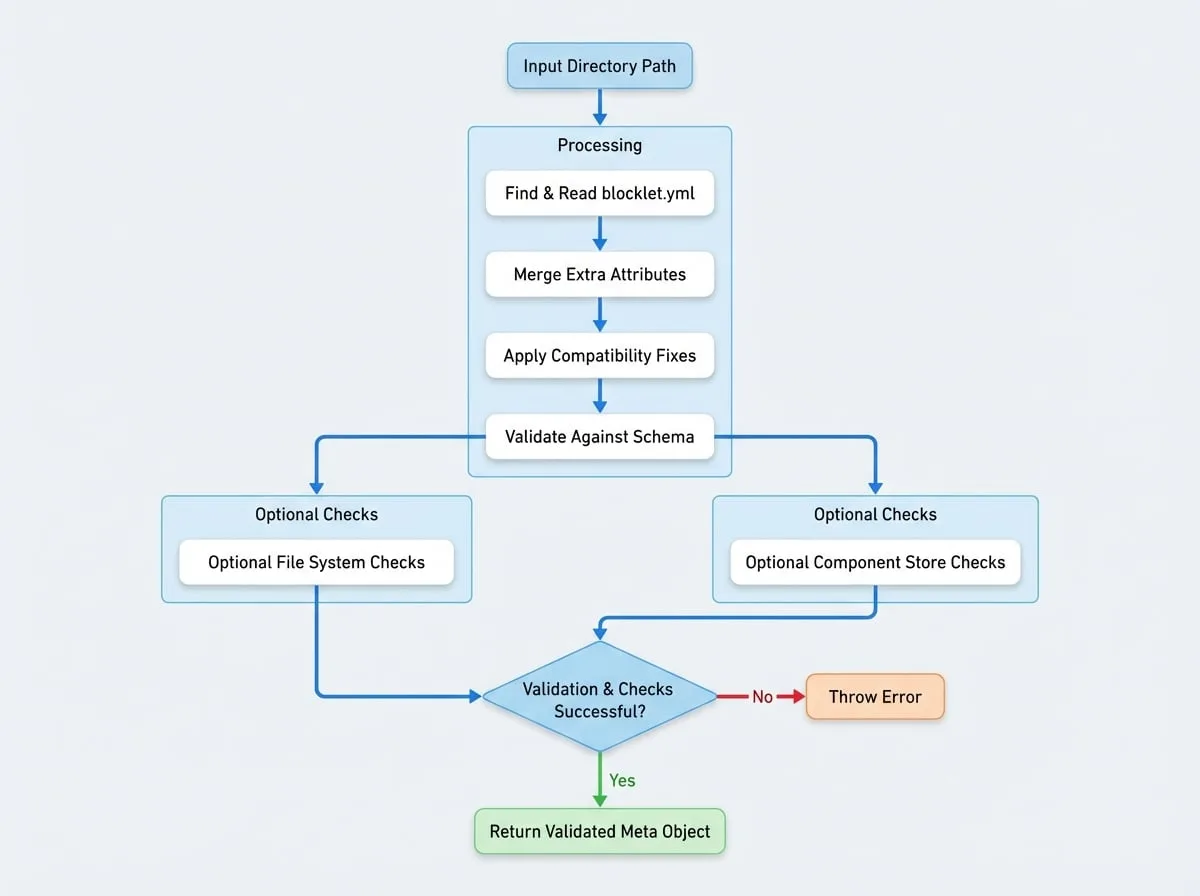
The parse function is the primary utility for reading a blocklet's metadata from the filesystem. It locates the blocklet.yml (or blocklet.yaml) file in a given directory, reads its content, applies a series of compatibility fixes, and validates the final object against the official schema.
Workflow
The parsing process follows several key steps to ensure a valid and consistent metadata object is produced. The following diagram illustrates this workflow:
Signature
function parse(
  dir: string,
  options?: {
    ensureFiles?: boolean;
    ensureDist?: boolean;
    ensureComponentStore?: boolean;
    extraRawAttrs?: any;
    schemaOptions?: any;
    defaultStoreUrl?: string | ((component: TComponent) => string);
    fix?: boolean;
  }
): TBlockletMeta;
Parameters
- dir
string(required) — The path to the blocklet directory containing the blocklet.yml file. - options
object— An optional configuration object.- ensureFiles
boolean(default:false) — If true, verifies that files listed in thelogoandfilesfields actually exist on the filesystem. - ensureDist
boolean(default:false) — If true, requires thedistfield to be present and valid in the metadata. - ensureComponentStore
boolean(default:true) — If true, ensures that any components sourced from a store have asource.storeURL defined. - extraRawAttrs
object— An object with extra attributes to be merged into the metadata before validation. Useful for augmenting metadata, for example in a registry. - schemaOptions
object— Additional options to pass to the underlying Joi schema validator. - defaultStoreUrl
string | function— A URL to be used as the default store for components that don't specify one. Can be a static string or a function that returns a string. - fix
boolean(default:true) — If true, applies automatic fixes to the metadata (e.g., forperson,repository,keywords).
- ensureFiles
Returns
Returns a validated TBlockletMeta object. If the blocklet.yml file is not found, is invalid YAML, or fails schema validation, the function will throw an Error with a descriptive message.
Example Usage
parse-example.js
import path from 'path';
import parse from '@blocklet/meta/lib/parse';

const blockletDir = path.join(__dirname, 'my-blocklet');

try {
  const meta = parse(blockletDir, {
    ensureFiles: true, // Make sure the logo exists
  });
  console.log('Successfully parsed blocklet:', meta.name, meta.version);
} catch (error) {
  console.error('Failed to parse blocklet.yml:', error.message);
}
validateMeta
Use validateMeta when you already have a blocklet metadata object (e.g., from a database or an API response) and need to validate it against the blocklet schema without reading from the filesystem.
Signature
function validateMeta(
  meta: any,
  options?: {
    ensureFiles?: boolean;
    ensureDist?: boolean;
    ensureComponentStore?: boolean;
    ensureName?: boolean;
    skipValidateDidName?: boolean;
    schemaOptions?: any;
  }
): TBlockletMeta;
Parameters
- meta
any(required) — The raw blocklet metadata object to validate. - options
object— An optional configuration object, similar to parse.- ensureFiles
boolean(default:false) — If true, verifies that files listed in thelogoandfilesfields actually exist on the filesystem. - ensureDist
boolean(default:false) — If true, requires thedistfield to be present and valid in the metadata. - ensureComponentStore
boolean(default:true) — If true, ensures that any components sourced from a store have asource.storeURL defined. - ensureName
boolean(default:false) — If true, requires thenamefield to be present. - skipValidateDidName
boolean(default:false) — If true, and the blocklet name is in a DID format, it will skip the DID type validation. - schemaOptions
object— Additional options to pass to the underlying Joi schema validator.
- ensureFiles
Returns
Returns the validated and cleaned TBlockletMeta object. It throws an Error if the metadata object fails validation.
Example Usage
validate-example.js
import validateMeta from '@blocklet/meta/lib/validate';

const rawMeta = {
  name: 'my-first-blocklet',
  version: '1.0.0',
  description: 'A simple blocklet.',
  did: 'z8iZpA529j4Jk1iA...',
  // ... other properties
};

try {
  const validatedMeta = validateMeta(rawMeta, { ensureName: true });
  console.log('Metadata is valid:', validatedMeta.title);
} catch (error) {
  console.error('Invalid blocklet meta:', error.message);
}
fixAndValidateService
This is a specialized helper function for validating the services configuration within each entry of the interfaces array in the metadata. The main parse and validateMeta functions call this internally, but it's exported for cases where you might need to process service configurations in isolation.
Signature
function fixAndValidateService(meta: TBlockletMeta): TBlockletMeta;Parameters
- meta
TBlockletMeta(required) — The blocklet metadata object containing the service configurations to validate.
Returns
Returns the input TBlockletMeta object with its service configurations validated and potentially modified with default values. It throws an Error if any service configuration is invalid.
Example Usage
service-validate-example.js
import { fixAndValidateService } from '@blocklet/meta/lib/validate';

const meta = {
  // ... other meta properties
  interfaces: [
    {
      type: 'web',
      name: 'publicUrl',
      path: '/',
      services: [
        {
          name: '@blocklet/service-auth',
          config: {
            // auth service config
          },
        },
      ],
    },
  ],
};

try {
  const metaWithValidatedServices = fixAndValidateService(meta);
  console.log('Service configuration is valid.');
} catch (error) {
  console.error('Invalid service config:', error.message);
}
validateBlockletEntry
This utility function validates a blocklet's entry point (main property) to ensure it's correctly configured for its group type (dapp or static). For dapps, it checks for the existence of required files or a valid engine configuration. For static blocklets, it ensures the main directory exists. This is a crucial check to perform after parsing to confirm a blocklet is executable.
Signature
function validateBlockletEntry(dir: string, meta: TBlockletMeta): void;Parameters
- dir
string(required) — The root directory of the blocklet bundle. - meta
TBlockletMeta(required) — The parsed and validated blocklet metadata object.
Returns
This function does not return a value. It will throw an Error if the entry point validation fails, with a message explaining the issue.
Example Usage
entry-validate-example.js
import path from 'path';
import parse from '@blocklet/meta/lib/parse';
import validateBlockletEntry from '@blocklet/meta/lib/entry';

const blockletDir = path.join(__dirname, 'my-dapp');

try {
  const meta = parse(blockletDir);
  validateBlockletEntry(blockletDir, meta);
  console.log('Blocklet entry point is valid.');
} catch (error) {
  console.error('Validation failed:', error.message);
}
Now that you understand how to parse and validate metadata, you may want to explore helpers for fetching metadata from remote sources. Proceed to the Metadata Helpers section to learn more.